
PotatoHotDog มี API สร้างภาพ AI ฟรีที่คุณสามารถเรียกใช้งานได้โดยตรงจาก Streamer.bot โดยไม่ต้องพึ่งพา middleware ของบุคคลที่สาม คู่มือนี้จะแสดงวิธีเพิ่มสคริปต์ C# แบบกำหนดเองขนาดเล็กลงใน Execute Code sub action ของ Streamer.bot ซึ่งจะสร้างภาพ AI จากข้อความ prompt และดาวน์โหลดลงดิสก์
สคริปต์นี้ต้องการกุญแจ API ของ PotatoHotDog ของคุณเท่านั้น และคำอธิบายภาพที่คุณต้องการให้สร้างขึ้น แล้วมันจะบันทึกรูปภาพที่ดาวน์โหลดลงในโฟลเดอร์เฉพาะภายในไดเรกทอรีติดตั้ง Streamer.bot ของคุณ.
เตรียมคีย์ API
หากคุณยังไม่มีคีย์ API ให้สร้างจากแดชบอร์ดของคุณแล้วเตรียมไว้ให้พร้อม คุณจะต้องใช้มันในขั้นตอนถัดไป.
ไปที่คีย์ API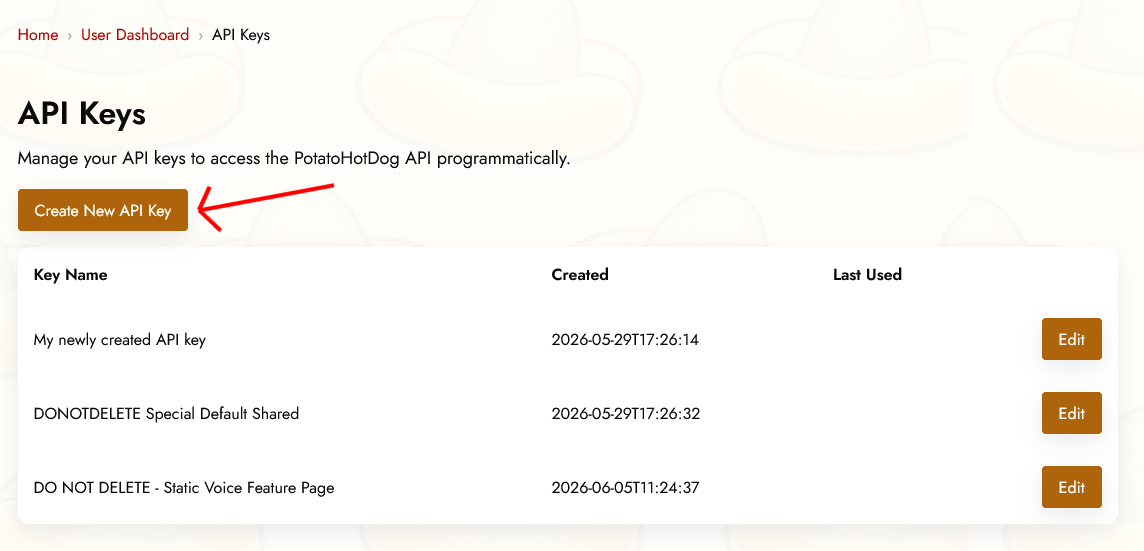
อาร์กิวเมนต์ที่จำเป็น
เพื่อสร้างภาพด้วย AI จำเป็นต้องระบุอาร์กิวเมนต์สองตัวใน Streamer.bot ก่อนที่การกระทำย่อย Execute Code จะทำงาน หรือพูดให้เข้าใจง่าย สองสิ่งนี้ต้องระบุไว้:
- คีย์ API.
- คำแนะนำ prompt ที่อธิบายภาพที่คุณต้องการสร้าง.
เหล่านี้สอดคล้องกับอาร์กิวเมนต์ของ Streamer.bot ดังต่อไปนี้:
- potatoKey
- potatoInstructions
คุณกำหนดอาร์กิวเมนต์ในแอ็กชันของคุณโดยคลิกขวาที่ Sub Actions แล้วเลือก Add, Core, Arguments และสุดท้าย Set Argument.
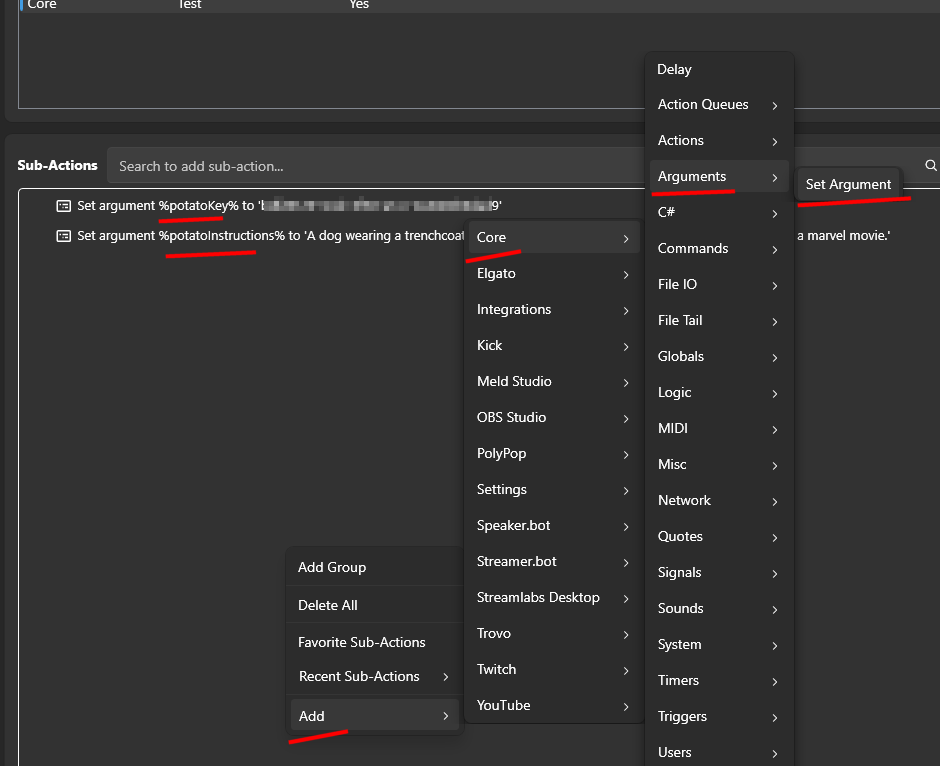
การเพิ่มคำสั่ง Execute Code ใน Streamer.bot
เปิด Streamer.bot แล้วไปที่แท็บ Actions. สร้างแอ็กชันใหม่ หรือเปิดแอ็กชันที่มีอยู่ และตั้งชื่อให้คุณจำได้ในภายหลัง เช่น "PotatoHotDog AI Image".
เมื่อคุณเลือกการกระทำของคุณ คลิก Add ใต้ Sub Actions จากนั้นเลือก Core ตามด้วย Execute C# Code เพื่อเพิ่ม sub action ที่คุณสามารถวางโค้ด C# ดิบลงไปได้ ซึ่ง Streamer.bot จะคอมไพล์และรันแบบเรียลไทม์.

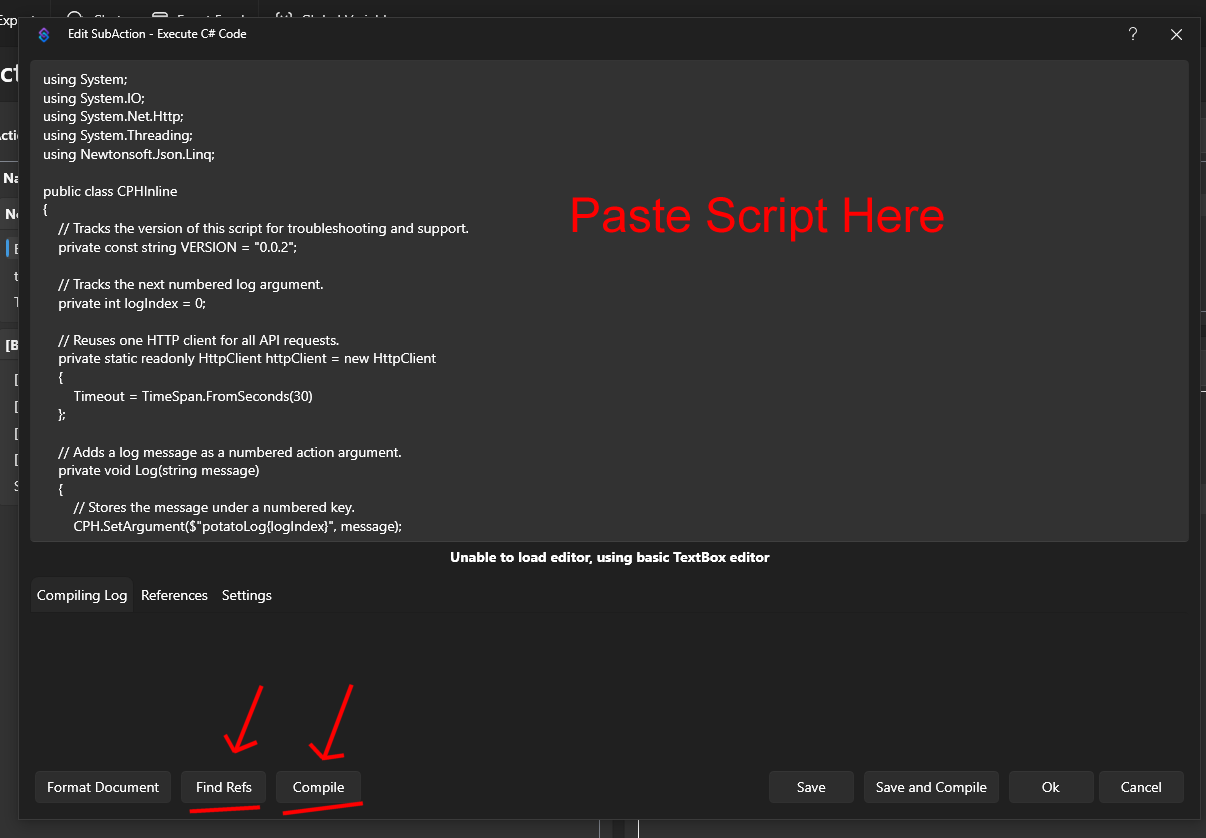
วางสคริปต์ด้านล่างลงในตัวแก้ไขโค้ด มันอ่านอาร์กิวเมนต์ potatoKey และ potatoInstructions. เรียกใช้งาน Generate AI Image API ของเราเพื่อสร้างภาพและดึง URL ของภาพนั้นกลับมา และจากนั้นจะดาวน์โหลดภาพที่ได้ลงในโฟลเดอร์ชื่อ temp_potatohotdog_images ภายในไดเรกทอรีติดตั้ง Streamer.bot ของคุณ.
using System;
using System.IO;
using System.Net.Http;
using Newtonsoft.Json.Linq;

public class CPHInline
{
    // Tracks the version of this script for troubleshooting and support.
    private const string VERSION = "1.0.0";

    // Base URL for the endpoint that generates an AI image.
    private const string BASE_URL_GENERATE = "https://api-generate-image-v1.potatohotdog.com/";

    // Tracks the next numbered log argument.
    private int logIndex = 0;

    // Reuses one HTTP client for all API requests.
    private static readonly HttpClient httpClient = new HttpClient
    {
        Timeout = TimeSpan.FromSeconds(30)
    };

    // Adds a log message as a numbered action argument.
    private void Log(string message)
    {
        // Stores the message under a numbered key.
        CPH.SetArgument($"potatoLog{logIndex}", message);

        // Advances the log index for the next message.
        logIndex++;

        // Keeps the total log count in sync.
        CPH.SetArgument("potatoLogCount", logIndex);
    }

    // Ensures a required action argument exists and is not empty.
    private bool RequireArgument(string name, out string value)
    {
        // Fails when the argument is missing or blank.
        if (!CPH.TryGetArg(name, out value) || string.IsNullOrWhiteSpace(value))
        {
            value = "";
            return false;
        }

        return true;
    }

    // URL-encodes a value so it can safely be used in a query string.
    private string EncodeUrlValue(string value)
    {
        // Escapes reserved characters for safe use in a URL.
        return Uri.EscapeDataString(value);
    }

    // Performs an HTTP GET request and returns the response body.
    private string HttpGet(string url)
    {
        try
        {
            Log($"GET {url}");

            // Sends the HTTP request synchronously.
            HttpResponseMessage response =
                httpClient.GetAsync(url).GetAwaiter().GetResult();

            // Reads the complete response body.
            string responseBody =
                response.Content.ReadAsStringAsync().GetAwaiter().GetResult();

            Log($"HTTP status: {(int)response.StatusCode} {response.ReasonPhrase}");

            // Stops when the server returns an unsuccessful status code.
            if (!response.IsSuccessStatusCode)
            {
                Log($"Error: HTTP request failed with status {(int)response.StatusCode} {response.ReasonPhrase}.");

                // Logs the server error response when available.
                if (!string.IsNullOrWhiteSpace(responseBody))
                {
                    Log($"Error response: {responseBody}");
                }

                return null;
            }

            Log($"Received {responseBody.Length} characters.");

            return responseBody;
        }
        catch (Exception exception)
        {
            // Logs network, timeout, and other HTTP-related exceptions.
            Log($"Error: HTTP request failed: {exception.Message}");
            return null;
        }
    }

    // Downloads a file from a URL and saves it to disk.
    private bool DownloadFile(string url, string destinationPath)
    {
        try
        {
            Log($"Downloading image from \"{url}\".");
            Log($"Saving image to \"{destinationPath}\".");

            // Sends the image download request.
            HttpResponseMessage response =
                httpClient.GetAsync(url).GetAwaiter().GetResult();

            Log($"Image download HTTP status: {(int)response.StatusCode} {response.ReasonPhrase}");

            // Reads the complete image response into memory.
            byte[] fileData = response.Content.ReadAsByteArrayAsync().GetAwaiter().GetResult();

            // Stops when the image server returns an unsuccessful status.
            if (!response.IsSuccessStatusCode)
            {
                Log($"Error: Image download failed with status {(int)response.StatusCode} {response.ReasonPhrase}.");

                return false;
            }

            // Rejects an empty image response.
            if (fileData == null || fileData.Length == 0)
            {
                Log("Error: The downloaded image file is empty.");
                return false;
            }

            // Writes the downloaded image bytes to the destination file.
            File.WriteAllBytes(destinationPath, fileData);

            Log($"Downloaded {fileData.Length} image bytes.");

            // Confirms that the image file now exists on disk.
            if (!File.Exists(destinationPath))
            {
                Log("Error: The image download completed, but the file does not exist on disk.");

                return false;
            }

            // Reports the final file size from disk.
            FileInfo fileInfo = new FileInfo(destinationPath);

            Log($"Image file saved successfully. File size: {fileInfo.Length} bytes.");

            return true;
        }
        catch (Exception exception)
        {
            // Logs download, filesystem, and permission errors.
            Log($"Error: Could not download the image file: {exception.Message}");

            return false;
        }
    }

    // Extracts a required string value from a JSON response.
    private bool TryGetJsonString(string json, string propertyName, out string value)
    {
        value = "";

        try
        {
            // Parses the response body as a JSON object.
            JObject jsonObject = JObject.Parse(json);

            // Retrieves the requested JSON property.
            JToken property = jsonObject[propertyName];

            if (property == null)
            {
                Log($"Error: JSON response does not contain \"{propertyName}\".");

                return false;
            }

            value = property.ToString();

            // Rejects empty JSON string values.
            if (string.IsNullOrWhiteSpace(value))
            {
                Log($"Error: JSON property \"{propertyName}\" is empty.");

                value = "";

                return false;
            }

            return true;
        }
        catch (Exception exception)
        {
            // Logs malformed JSON and property conversion errors.
            Log($"Error: Could not parse JSON property \"{propertyName}\": {exception.Message}");

            return false;
        }
    }

    // Creates and returns the dedicated PotatoImage folder.
    private string GetImageFolder()
    {
        // Uses Streamer.bot's application directory instead of the process working directory.
        string streamerBotFolder = AppDomain.CurrentDomain.BaseDirectory;

        // Places generated image files inside a dedicated subfolder.
        string imageFolder = Path.Combine(streamerBotFolder, "temp_potatohotdog_images");

        Log($"Streamer.bot folder: \"{streamerBotFolder}\".");
        Log($"Image folder: \"{imageFolder}\".");

        // Creates the image folder if it does not already exist.
        if (!Directory.Exists(imageFolder))
        {
            Log("Image folder does not exist. Creating it...");

            Directory.CreateDirectory(imageFolder);

            Log("Image folder created.");
        }
        else
        {
            Log("Image folder already exists.");
        }

        return imageFolder;
    }

    // Runs the main PotatoHotdog AI image action.
    public bool Execute()
    {
        // Resets log numbering for this execution.
        logIndex = 0;
        CPH.SetArgument("potatoLogCount", 0);

        Log("Starting script...");

        // Logs the script version so runs can be tracked over time.
        Log($"Version: {VERSION}");

        // Retrieves the PotatoHotdog API key.
        if (!RequireArgument("potatoKey", out string potatoKey))
        {
            Log("Error: potatoKey variable is missing. Please login to potatohotdog.com, generate an API key, create a set variable action and save the variable \"potatoKey\" with your key.");

            return false;
        }

        // Retrieves the prompt instructions describing the image to generate.
        if (!RequireArgument("potatoInstructions", out string potatoInstructions))
        {
            Log("Error: potatoInstructions variable is missing. Create a set variable action and save the variable \"potatoInstructions\" with a description of the image you want generated.");

            return false;
        }

        // Logs the non-secret input values.
        Log("potatoKey was provided.");
        Log($"potatoInstructions=\"{potatoInstructions}\"");

        // Builds the API URL used to generate the AI image.
        string generateUrl = BASE_URL_GENERATE + "?key=" + EncodeUrlValue(potatoKey) + "&instructions=" + EncodeUrlValue(potatoInstructions);

        // Requests generation of the AI image.
        string generateJson = HttpGet(generateUrl);

        if (generateJson == null)
        {
            Log("Error: Failed to generate the AI image.");
            return false;
        }

        Log($"Generate response: {generateJson}");

        // Extracts the generated item's ID, reused below as the local filename.
        if (!TryGetJsonString(generateJson, "itemID", out string itemID))
        {
            Log("Error: Could not retrieve itemID from the generate response.");

            return false;
        }

        Log($"itemID=\"{itemID}\"");

        // Logs the generation duration when present, purely for troubleshooting.
        if (TryGetJsonString(generateJson, "duration", out string duration))
        {
            Log($"duration={duration} second(s)");
        }

        // Extracts the generated image URL from the response.
        if (!TryGetJsonString(generateJson, "imageURL", out string imageURL))
        {
            Log("Error: Could not retrieve imageURL from the generate response.");

            return false;
        }

        Log($"imageURL=\"{imageURL}\"");

        string imageFolder;

        try
        {
            // Resolves and creates the dedicated PotatoImage directory.
            imageFolder = GetImageFolder();
        }
        catch (Exception exception)
        {
            Log($"Error: Could not create or access the image folder: {exception.Message}");

            return false;
        }

        // Reuses the item's own ID as the local filename instead of minting a new one.
        string imageFileName = $"{itemID}.png";

        // Combines the image folder and unique filename.
        string imageFilePath = Path.Combine(imageFolder, imageFileName);

        Log($"Generated image filename: \"{imageFileName}\".");
        Log($"Local image path: \"{imageFilePath}\".");

        // Downloads the generated image file to the PotatoImage folder.
        if (!DownloadFile(imageURL, imageFilePath))
        {
            Log("Error: Failed to download the generated AI image.");
            return false;
        }

        // Stores the remote image URL as a final action argument.
        CPH.SetArgument("potatoGeneratedImageURL", imageURL);

        // Stores the absolute local file path as a final action argument.
        CPH.SetArgument("potatoGeneratedImageFile", imageFilePath);

        Log($"potatoGeneratedImageURL=\"{imageURL}\"");
        Log($"potatoGeneratedImageFile=\"{imageFilePath}\"");

        Log("Finished.");

        return true;
    }
}
หลังจากวางสคริปต์ลงไปแล้ว ให้คลิก Find Refs และ Compile และตรวจสอบให้แน่ใจว่ามันคอมไพล์สำเร็จ บันทึกการดำเนินการ แล้วทดสอบโดยเรียกใช้งานด้วยตนเอง หรือผูกมันกับคำสั่งหรือรางวัลคะแนนช่องทาง เพื่อดูว่าภาพถูกสร้างขึ้นอย่างถูกต้อง
ตรวจสอบภาพที่ดาวน์โหลด
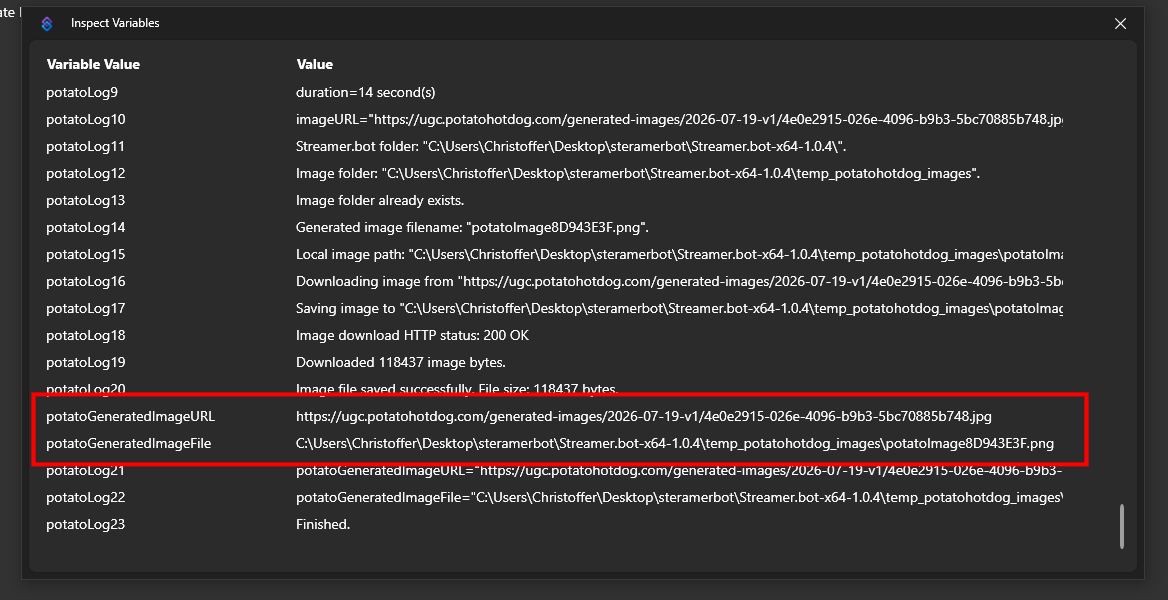
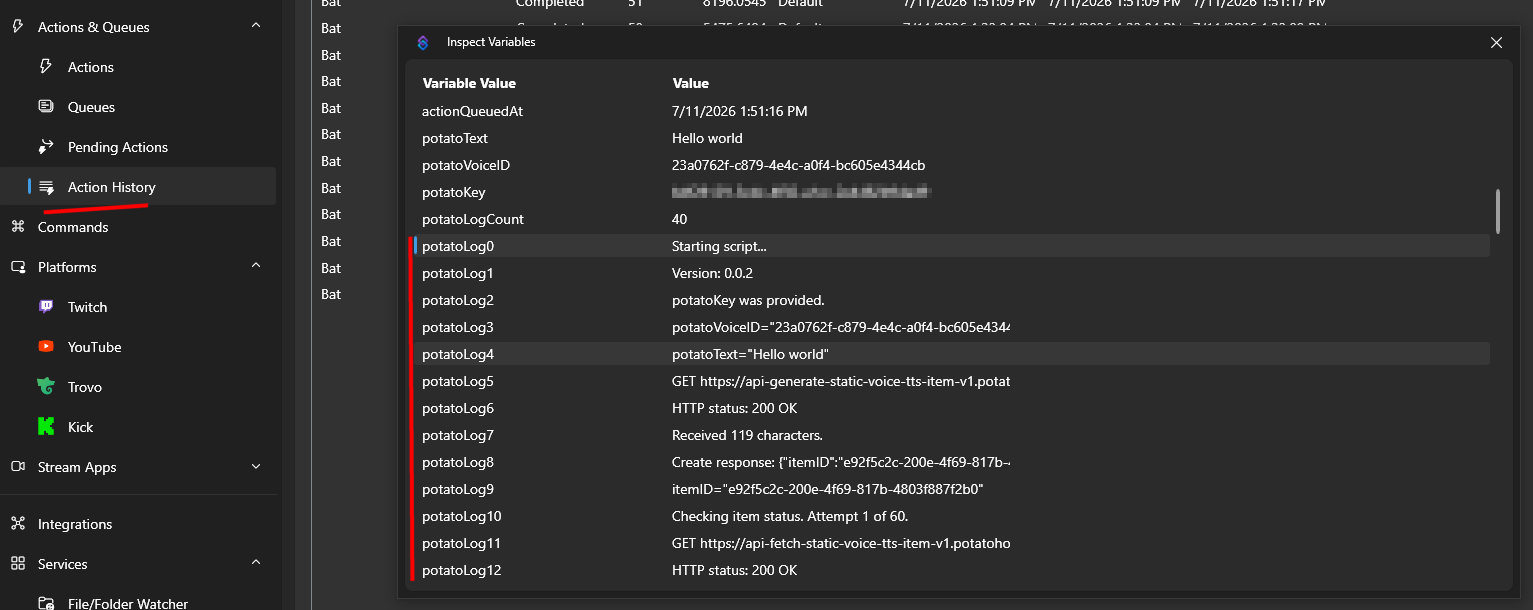
เมื่อการดำเนินการเสร็จสิ้นแล้ว คุณสามารถตรวจสอบตัวแปรของการดำเนินการผ่านประวัติการดำเนินการเพื่อยืนยันว่าทุกอย่างทำงานได้ตามที่คาดไว้。
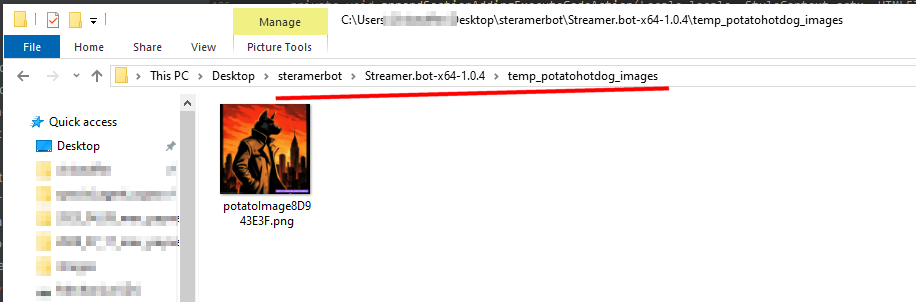
ที่นั่นคุณจะพบเส้นทางท้องถิ่นที่ภาพที่สร้างขึ้นถูกบันทึกลงบนดิสก์ ภายในโฟลเดอร์ temp_potatohotdog_images ในไดเรกทอรีติดตั้ง Streamer.bot ของคุณ
เปิดโฟลเดอร์นั้นเพื่อดูภาพที่ดาวน์โหลดไว้โดยตรง
การแก้ปัญหา
หากสคริปต์ทำงานไม่เป็นไปตามที่คาดไว้ วิธีที่ดีที่สุดในการแก้ปัญหาคือการตรวจสอบบันทึกกิจกรรม.
คุณสามารถทำสิ่งนี้ได้โดยการตรวจสอบตัวแปร Action ของคุณผ่านทาง Action History.
คู่มือฉบับนี้เผยแพร่ครั้งแรกเมื่อวันที่ 2026-07-19 และมีการแก้ไขล่าสุดเมื่อวันที่ 2026-07-19.
คู่มือที่คล้ายกันอื่นๆ
ต่อไปนี้คือคู่มือวิธีใช้งานอื่นๆ ที่คุณอาจพบว่ามีประโยชน์.

