
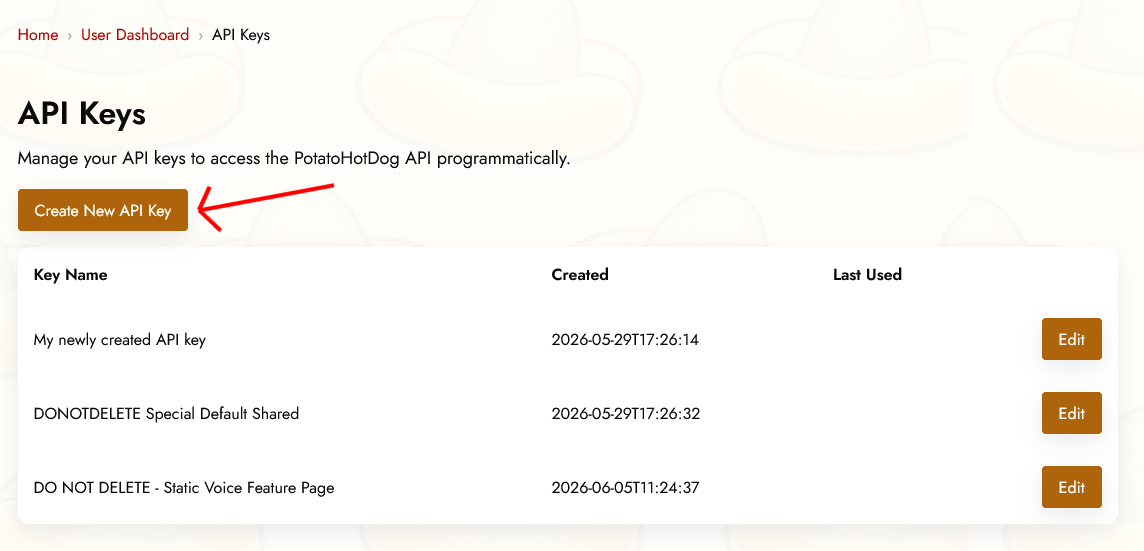
PotatoHotDog은 제3자 미들웨어가 필요 없이 Streamer.bot에서 바로 호출할 수 있는 무료 AI 이미지 생성 API를 제공합니다. 이 가이드는 텍스트 프롬프트를 기반으로 AI 이미지를 생성하고 디스크에 다운로드하는 작은 커스텀 C# 스크립트를 Streamer.bot의 Execute Code 하위 작업에 추가하는 방법을 보여줍니다.
이 스크립트는 PotatoHotDog API 키와 생성하려는 이미지에 대한 프롬프트만 필요로 하며, 다운로드된 이미지를 Streamer.bot 설치 디렉터리 내의 전용 폴더에 저장합니다.
필수 매개변수
AI 이미지를 생성하려면 Streamer.bot에서 Execute Code 하위 액션이 실행되기 전에 두 개의 인수를 지정해야 합니다. 다시 말해, 이 두 가지를 지정해야 한다는 뜻입니다:
- API 키입니다.
- 생성하려는 이미지를 설명하는 프롬프트 지시사항.
다음과 같은 Streamer.bot 매개변수에 해당합니다:
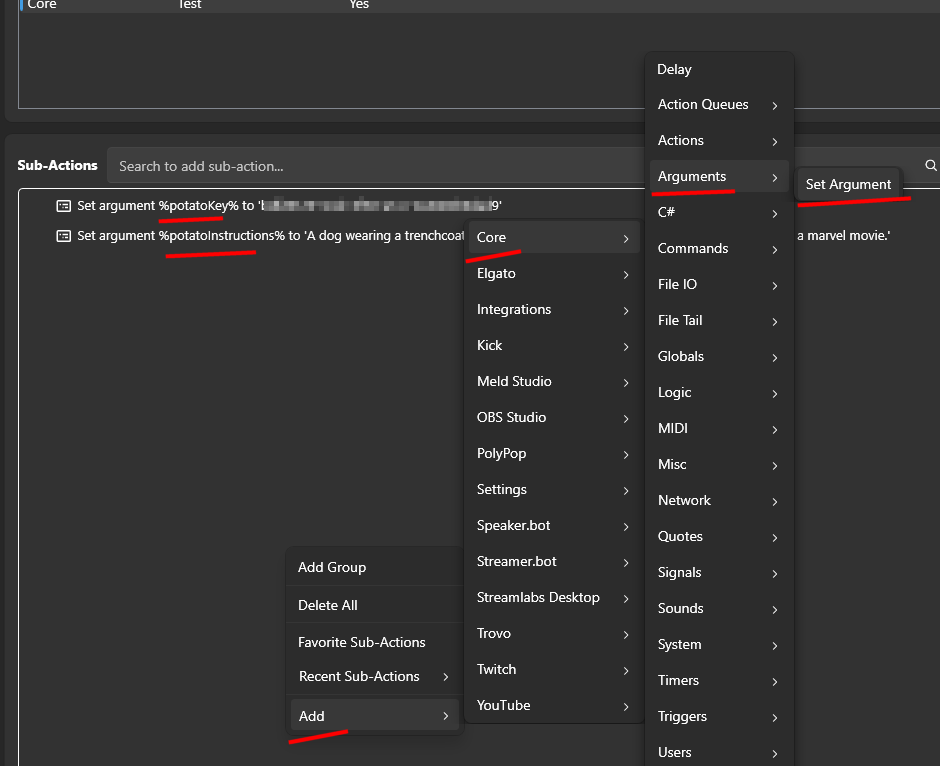
- potatoKey
- potatoInstructions
액션에서 인수를 지정하려면 Sub Actions에서 마우스 오른쪽 버튼을 클릭한 다음 Add, Core, Arguments를 차례로 선택하고 마지막으로 Set Argument를 선택합니다.
Streamer.bot에서 Execute Code 액션을 추가
Streamer.bot을 열고 Actions 탭으로 이동합니다. 새 액션을 만들거나 기존 액션을 열고, 나중에 알아볼 수 있는 이름을 지정합니다. 예를 들어 "PotatoHotDog AI Image"처럼.
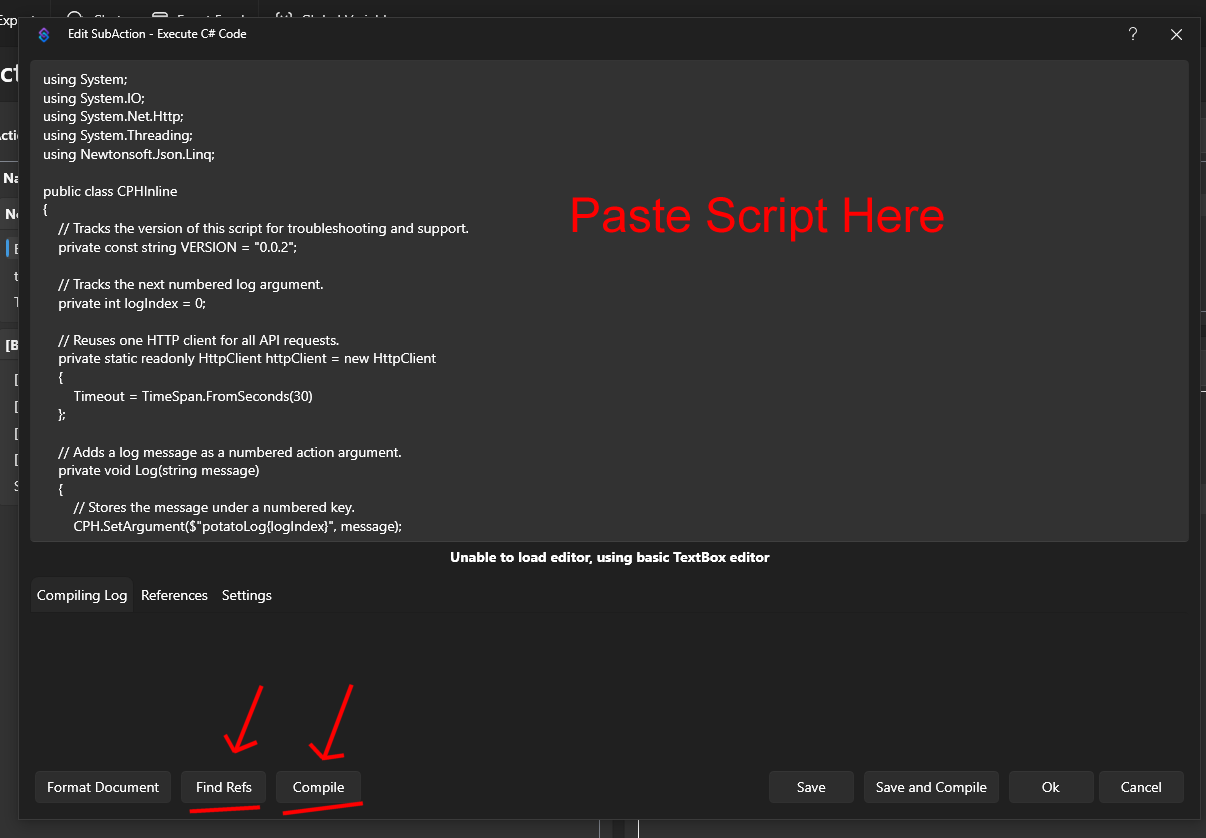
선택한 액션에서 Sub Actions 아래의 Add를 클릭한 다음 Core를 선택하고 이어서 Execute C# Code를 선택합니다. 이렇게 하면 Streamer.bot이 즉시 컴파일하고 실행하는 원시 C# 코드를 붙여넣을 수 있는 하위 동작이 추가됩니다.

아래 스크립트를 코드 편집기에 붙여넣으세요. 이 스크립트는 potatoKey와 potatoInstructions 인수를 읽고, 저희의 Generate AI Image API를 호출해 이미지를 생성하고 URL을 가져온 뒤, 그 결과 이미지를 Streamer.bot 설치 디렉터리 안의 temp_potatohotdog_images 폴더에 다운로드합니다.
using System;
using System.IO;
using System.Net.Http;
using Newtonsoft.Json.Linq;

public class CPHInline
{
    // Tracks the version of this script for troubleshooting and support.
    private const string VERSION = "1.0.0";

    // Base URL for the endpoint that generates an AI image.
    private const string BASE_URL_GENERATE = "https://api-generate-image-v1.potatohotdog.com/";

    // Tracks the next numbered log argument.
    private int logIndex = 0;

    // Reuses one HTTP client for all API requests.
    private static readonly HttpClient httpClient = new HttpClient
    {
        Timeout = TimeSpan.FromSeconds(30)
    };

    // Adds a log message as a numbered action argument.
    private void Log(string message)
    {
        // Stores the message under a numbered key.
        CPH.SetArgument($"potatoLog{logIndex}", message);

        // Advances the log index for the next message.
        logIndex++;

        // Keeps the total log count in sync.
        CPH.SetArgument("potatoLogCount", logIndex);
    }

    // Ensures a required action argument exists and is not empty.
    private bool RequireArgument(string name, out string value)
    {
        // Fails when the argument is missing or blank.
        if (!CPH.TryGetArg(name, out value) || string.IsNullOrWhiteSpace(value))
        {
            value = "";
            return false;
        }

        return true;
    }

    // URL-encodes a value so it can safely be used in a query string.
    private string EncodeUrlValue(string value)
    {
        // Escapes reserved characters for safe use in a URL.
        return Uri.EscapeDataString(value);
    }

    // Performs an HTTP GET request and returns the response body.
    private string HttpGet(string url)
    {
        try
        {
            Log($"GET {url}");

            // Sends the HTTP request synchronously.
            HttpResponseMessage response =
                httpClient.GetAsync(url).GetAwaiter().GetResult();

            // Reads the complete response body.
            string responseBody =
                response.Content.ReadAsStringAsync().GetAwaiter().GetResult();

            Log($"HTTP status: {(int)response.StatusCode} {response.ReasonPhrase}");

            // Stops when the server returns an unsuccessful status code.
            if (!response.IsSuccessStatusCode)
            {
                Log($"Error: HTTP request failed with status {(int)response.StatusCode} {response.ReasonPhrase}.");

                // Logs the server error response when available.
                if (!string.IsNullOrWhiteSpace(responseBody))
                {
                    Log($"Error response: {responseBody}");
                }

                return null;
            }

            Log($"Received {responseBody.Length} characters.");

            return responseBody;
        }
        catch (Exception exception)
        {
            // Logs network, timeout, and other HTTP-related exceptions.
            Log($"Error: HTTP request failed: {exception.Message}");
            return null;
        }
    }

    // Downloads a file from a URL and saves it to disk.
    private bool DownloadFile(string url, string destinationPath)
    {
        try
        {
            Log($"Downloading image from \"{url}\".");
            Log($"Saving image to \"{destinationPath}\".");

            // Sends the image download request.
            HttpResponseMessage response =
                httpClient.GetAsync(url).GetAwaiter().GetResult();

            Log($"Image download HTTP status: {(int)response.StatusCode} {response.ReasonPhrase}");

            // Reads the complete image response into memory.
            byte[] fileData = response.Content.ReadAsByteArrayAsync().GetAwaiter().GetResult();

            // Stops when the image server returns an unsuccessful status.
            if (!response.IsSuccessStatusCode)
            {
                Log($"Error: Image download failed with status {(int)response.StatusCode} {response.ReasonPhrase}.");

                return false;
            }

            // Rejects an empty image response.
            if (fileData == null || fileData.Length == 0)
            {
                Log("Error: The downloaded image file is empty.");
                return false;
            }

            // Writes the downloaded image bytes to the destination file.
            File.WriteAllBytes(destinationPath, fileData);

            Log($"Downloaded {fileData.Length} image bytes.");

            // Confirms that the image file now exists on disk.
            if (!File.Exists(destinationPath))
            {
                Log("Error: The image download completed, but the file does not exist on disk.");

                return false;
            }

            // Reports the final file size from disk.
            FileInfo fileInfo = new FileInfo(destinationPath);

            Log($"Image file saved successfully. File size: {fileInfo.Length} bytes.");

            return true;
        }
        catch (Exception exception)
        {
            // Logs download, filesystem, and permission errors.
            Log($"Error: Could not download the image file: {exception.Message}");

            return false;
        }
    }

    // Extracts a required string value from a JSON response.
    private bool TryGetJsonString(string json, string propertyName, out string value)
    {
        value = "";

        try
        {
            // Parses the response body as a JSON object.
            JObject jsonObject = JObject.Parse(json);

            // Retrieves the requested JSON property.
            JToken property = jsonObject[propertyName];

            if (property == null)
            {
                Log($"Error: JSON response does not contain \"{propertyName}\".");

                return false;
            }

            value = property.ToString();

            // Rejects empty JSON string values.
            if (string.IsNullOrWhiteSpace(value))
            {
                Log($"Error: JSON property \"{propertyName}\" is empty.");

                value = "";

                return false;
            }

            return true;
        }
        catch (Exception exception)
        {
            // Logs malformed JSON and property conversion errors.
            Log($"Error: Could not parse JSON property \"{propertyName}\": {exception.Message}");

            return false;
        }
    }

    // Creates and returns the dedicated PotatoImage folder.
    private string GetImageFolder()
    {
        // Uses Streamer.bot's application directory instead of the process working directory.
        string streamerBotFolder = AppDomain.CurrentDomain.BaseDirectory;

        // Places generated image files inside a dedicated subfolder.
        string imageFolder = Path.Combine(streamerBotFolder, "temp_potatohotdog_images");

        Log($"Streamer.bot folder: \"{streamerBotFolder}\".");
        Log($"Image folder: \"{imageFolder}\".");

        // Creates the image folder if it does not already exist.
        if (!Directory.Exists(imageFolder))
        {
            Log("Image folder does not exist. Creating it...");

            Directory.CreateDirectory(imageFolder);

            Log("Image folder created.");
        }
        else
        {
            Log("Image folder already exists.");
        }

        return imageFolder;
    }

    // Runs the main PotatoHotdog AI image action.
    public bool Execute()
    {
        // Resets log numbering for this execution.
        logIndex = 0;
        CPH.SetArgument("potatoLogCount", 0);

        Log("Starting script...");

        // Logs the script version so runs can be tracked over time.
        Log($"Version: {VERSION}");

        // Retrieves the PotatoHotdog API key.
        if (!RequireArgument("potatoKey", out string potatoKey))
        {
            Log("Error: potatoKey variable is missing. Please login to potatohotdog.com, generate an API key, create a set variable action and save the variable \"potatoKey\" with your key.");

            return false;
        }

        // Retrieves the prompt instructions describing the image to generate.
        if (!RequireArgument("potatoInstructions", out string potatoInstructions))
        {
            Log("Error: potatoInstructions variable is missing. Create a set variable action and save the variable \"potatoInstructions\" with a description of the image you want generated.");

            return false;
        }

        // Logs the non-secret input values.
        Log("potatoKey was provided.");
        Log($"potatoInstructions=\"{potatoInstructions}\"");

        // Builds the API URL used to generate the AI image.
        string generateUrl = BASE_URL_GENERATE + "?key=" + EncodeUrlValue(potatoKey) + "&instructions=" + EncodeUrlValue(potatoInstructions);

        // Requests generation of the AI image.
        string generateJson = HttpGet(generateUrl);

        if (generateJson == null)
        {
            Log("Error: Failed to generate the AI image.");
            return false;
        }

        Log($"Generate response: {generateJson}");

        // Extracts the generated item's ID, reused below as the local filename.
        if (!TryGetJsonString(generateJson, "itemID", out string itemID))
        {
            Log("Error: Could not retrieve itemID from the generate response.");

            return false;
        }

        Log($"itemID=\"{itemID}\"");

        // Logs the generation duration when present, purely for troubleshooting.
        if (TryGetJsonString(generateJson, "duration", out string duration))
        {
            Log($"duration={duration} second(s)");
        }

        // Extracts the generated image URL from the response.
        if (!TryGetJsonString(generateJson, "imageURL", out string imageURL))
        {
            Log("Error: Could not retrieve imageURL from the generate response.");

            return false;
        }

        Log($"imageURL=\"{imageURL}\"");

        string imageFolder;

        try
        {
            // Resolves and creates the dedicated PotatoImage directory.
            imageFolder = GetImageFolder();
        }
        catch (Exception exception)
        {
            Log($"Error: Could not create or access the image folder: {exception.Message}");

            return false;
        }

        // Reuses the item's own ID as the local filename instead of minting a new one.
        string imageFileName = $"{itemID}.png";

        // Combines the image folder and unique filename.
        string imageFilePath = Path.Combine(imageFolder, imageFileName);

        Log($"Generated image filename: \"{imageFileName}\".");
        Log($"Local image path: \"{imageFilePath}\".");

        // Downloads the generated image file to the PotatoImage folder.
        if (!DownloadFile(imageURL, imageFilePath))
        {
            Log("Error: Failed to download the generated AI image.");
            return false;
        }

        // Stores the remote image URL as a final action argument.
        CPH.SetArgument("potatoGeneratedImageURL", imageURL);

        // Stores the absolute local file path as a final action argument.
        CPH.SetArgument("potatoGeneratedImageFile", imageFilePath);

        Log($"potatoGeneratedImageURL=\"{imageURL}\"");
        Log($"potatoGeneratedImageFile=\"{imageFilePath}\"");

        Log("Finished.");

        return true;
    }
}
스크립트를 붙여넣은 뒤에는 Find Refs와 Compile를 클릭하고, 성공적으로 컴파일되는지 확인하세요. 그 액션을 저장한 뒤 수동으로 트리거하거나 명령어나 채널 포인트 보상에 바인딩해 이미지가 올바르게 생성되는지 테스트하세요.
다운로드한 이미지를 확인하세요
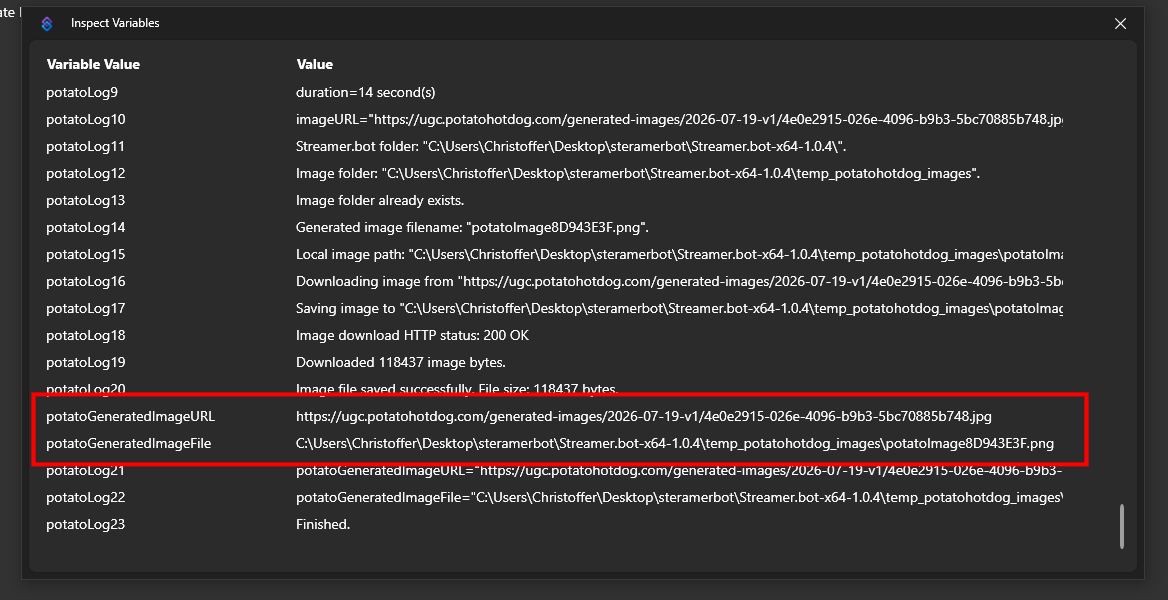
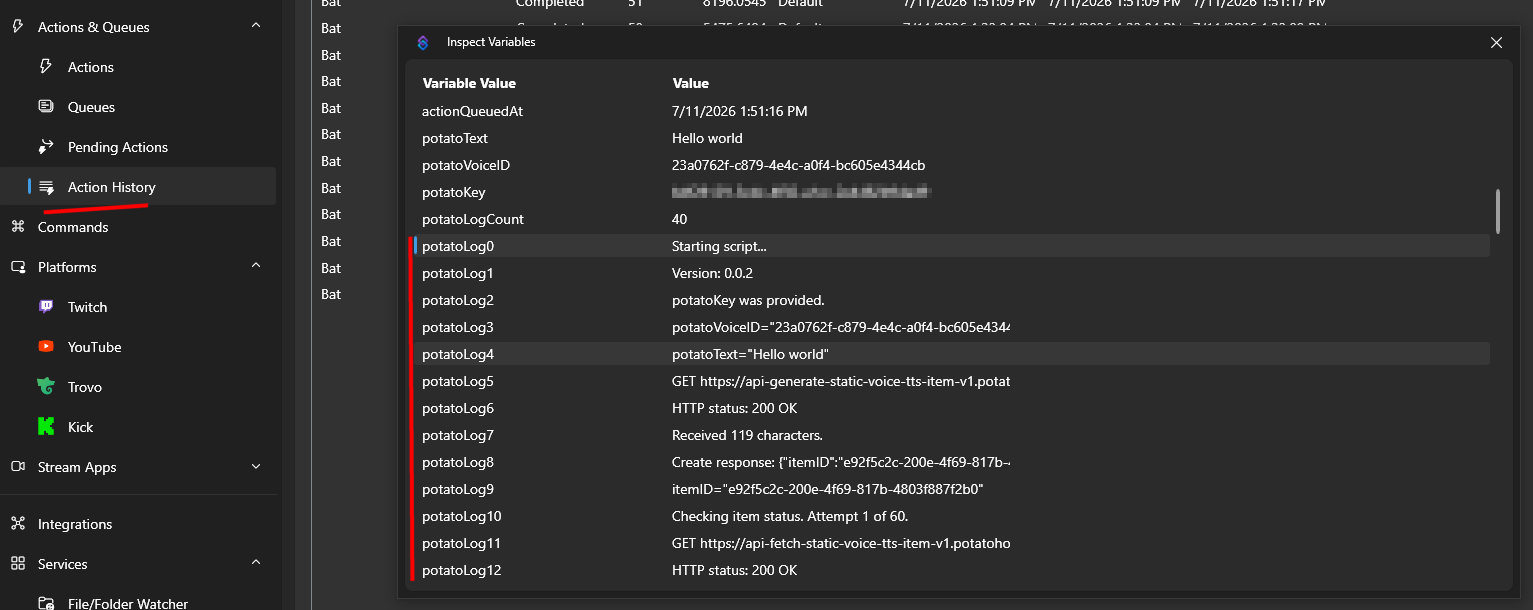
작업이 실행된 후, 모든 것이 예상대로 작동했는지 확인하기 위해 Action History를 통해 Action 변수들을 확인할 수 있습니다.
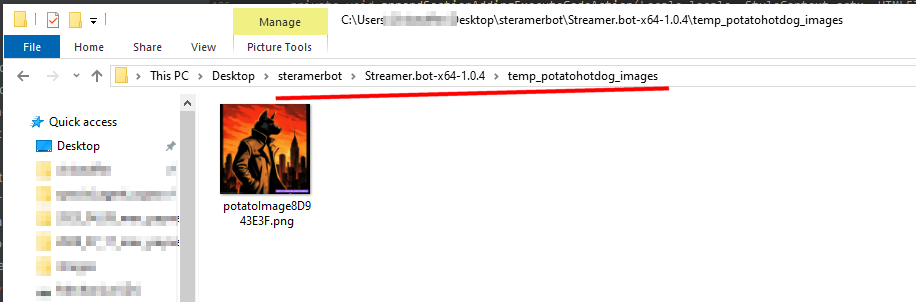
생성된 이미지가 디스크에 저장된 로컬 경로는 다음 위치에 있으며, Streamer.bot 설치 디렉토리의 temp_potatohotdog_images 폴더 안에 있습니다.
다운로드한 이미지를 바로 보려면 해당 폴더를 여세요.
문제 해결
스크립트가 기대대로 작동하지 않는 경우, 문제를 해결하는 가장 좋은 방법은 액션 로그를 확인하는 것입니다.
Action History에서 Action 변수들을 확인하면 이 작업을 수행할 수 있습니다.
이 가이드는 2026-07-19에 처음 게시되었으며, 마지막으로 수정된 날짜도 2026-07-19입니다.
다른 유사한 가이드들
다음은 여러분이 유용하게 보실 수 있는 다른 사용 방법 가이드들입니다.

