
PotatoHotDog ingyenes TTS (Text-to-Speech) API-t kínál, amelyet közvetlenül a Streamer.bot-ból hívhatsz meg, anélkül, hogy szükséged lenne Speaker.bot-ra vagy bármilyen más harmadik fél által nyújtott middleware-re. Ez az útmutató megmutatja, hogyan adhatsz hozzá egy kis egyedi C# szkriptet a Streamer.bot Execute Code al-műveletéhez, amely generálja a beszédet, letölti a hangfájlt, és automatikusan lejátsza azt.
Két kész szkriptet biztosítunk, amelyeket kimásolhatsz és beilleszthetsz: az egyik statikus Piper TTS hang lejátszására való, a másik pedig a saját klónozott hangod lejátszására szolgál. Mindkét szkript csak a PotatoHotDog API-kulcsodra, egy hangazonosítóra és a beszédre szánt szövegre van szükség.
Előfeltételek
Annak érdekében, hogy TTS-t generáljunk, három argumentumot kell megadni a Streamer.bot-ban, mielőtt a Execute Code al-akció lefut. Más szóval, ezeknek a három dolognak kell megadva lennie:
- Egy API-kulcs.
- A generálni kívánt hang azonosítója, legyen az statikus hang vagy klónozott hang.
- A szöveg.
Ezek a következő Streamer.bot paramétereknek felelnek meg:
- potatoKey
- potatoVoiceID
- potatoText
Az akciódban megadod az argumentumokat úgy, hogy a Sub Actions-nél jobb gombbal kattintasz, majd kiválasztod Add, Core, Arguments, és végül Set Argument.
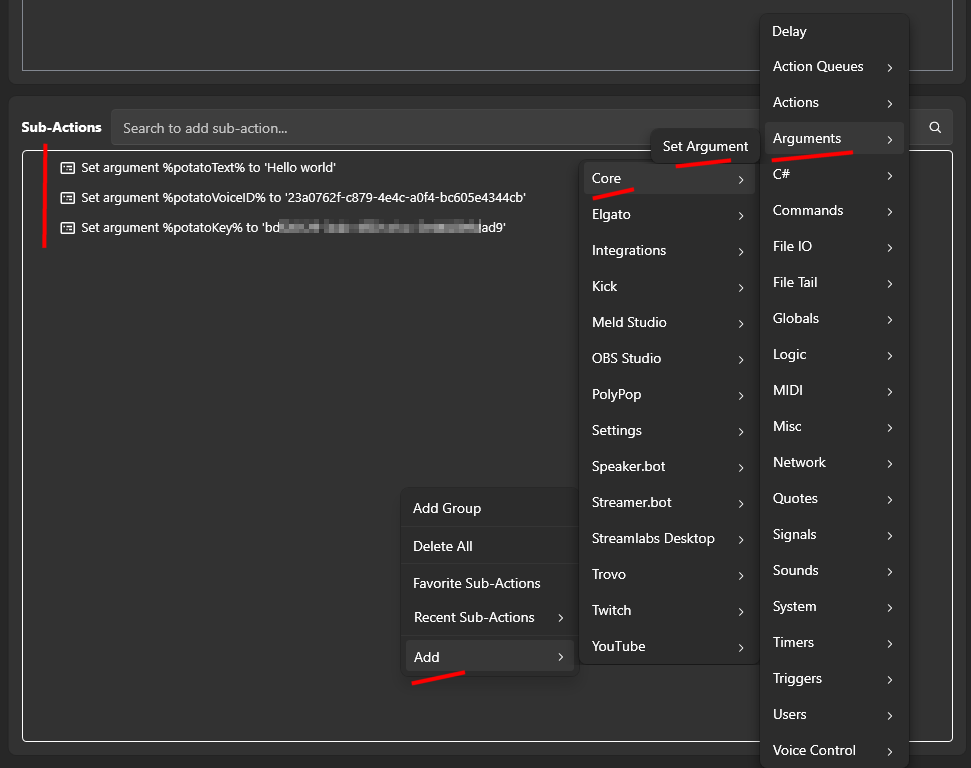
Kód végrehajtása művelet hozzáadása a Streamer.botban
Nyisd meg a Streamer.bot-ot, és menj a Műveletek fülre. Hozz létre egy új műveletet, vagy nyisd meg egy meglévőt, és adj neki olyan nevet, amit később könnyen felismerhetsz, például "PotatoHotDog TTS".
A kiválasztott művelettel kattints a Hozzáadásra az Alműveletek alatt, majd válaszd a Core-t, ezt követően a C# kód futtatása opciót. Ez egy alműveletet ad hozzá, amelybe beillesztheted a nyers C# kódot, amelyet a Streamer.bot valós időben lefordít és futtat.

Másold be az alábbiak közül az egyik szkriptet a kódszerkesztőbe, attól függően, hogy statikus hangot vagy klónozott hangot szeretnél lejátszani. Mindkét szkript néhány olyan argumentumot vár, amely már létezik a műveletben; lásd az alábbi Előfeltétel-argumentumok részt, hogyan állítsd be őket.
A szkript beillesztése után ne felejts el a Find Refs-re és a Compile-ra kattintani, és győződj meg róla, hogy a szkript sikeresen le lett fordítva.
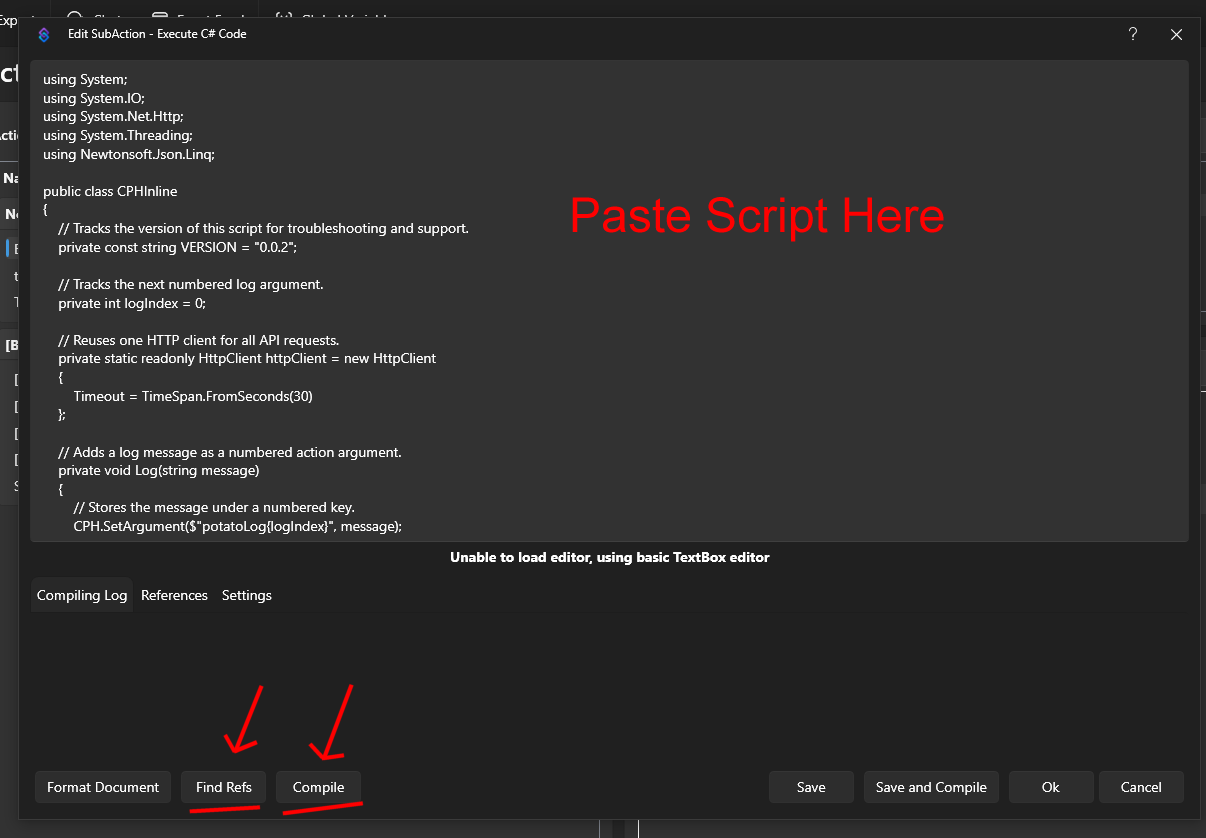
A PotatoHotDog API-kulcsodat a műszerfaladról generálhatod. Mentsd el a műveletet, majd indítsd el kézzel, vagy kötheted egy parancshoz vagy csatorna pont jutalomhoz, hogy a hang helyesen lejátsszon.
Statikus hang lejátszásához szkript
Ez a szkript egy statikus Piper TTS hangot játszik le. Létrehozza a beszédet, megvárja, amíg befejeződik a feldolgozás, letölti a keletkező hangfájlt, és lejátsza azt a Streamer.bot-ban. Az elérhető statikus hangazonosítók listáját a Statikus Hangok oldalunkon találja.
Statikus Hangok Böngészéseusing System;
using System.IO;
using System.Net.Http;
using System.Threading;
using Newtonsoft.Json.Linq;
public class CPHInline
{
// Tracks the version of this script for troubleshooting and support.
private const string VERSION = "2 (static)";
// Base URL for the endpoint that creates a new TTS item.
private const string BASE_URL_GENERATE = "https://api-generate-static-voice-tts-item-v1.potatohotdog.com/";
// Base URL for the endpoint that polls a TTS item's status.
private const string BASE_URL_STATUS = "https://api-fetch-static-voice-tts-item-v1.potatohotdog.com/";
// Tracks the next numbered log argument.
private int logIndex = 0;
// Reuses one HTTP client for all API requests.
private static readonly HttpClient httpClient = new HttpClient
{
Timeout = TimeSpan.FromSeconds(30)
};
// Adds a log message as a numbered action argument.
private void Log(string message)
{
// Stores the message under a numbered key.
CPH.SetArgument($"potatoLog{logIndex}", message);
// Advances the log index for the next message.
logIndex++;
// Keeps the total log count in sync.
CPH.SetArgument("potatoLogCount", logIndex);
}
// Ensures a required action argument exists and is not empty.
private bool RequireArgument(string name, out string value)
{
// Fails when the argument is missing or blank.
if (!CPH.TryGetArg(name, out value) || string.IsNullOrWhiteSpace(value))
{
value = "";
return false;
}
return true;
}
// URL-encodes a value so it can safely be used in a query string.
private string EncodeUrlValue(string value)
{
// Escapes reserved characters for safe use in a URL.
return Uri.EscapeDataString(value);
}
// Performs an HTTP GET request and returns the response body.
private string HttpGet(string url)
{
try
{
Log($"GET {url}");
// Sends the HTTP request synchronously.
HttpResponseMessage response =
httpClient.GetAsync(url).GetAwaiter().GetResult();
// Reads the complete response body.
string responseBody =
response.Content.ReadAsStringAsync().GetAwaiter().GetResult();
Log($"HTTP status: {(int)response.StatusCode} {response.ReasonPhrase}");
// Stops when the server returns an unsuccessful status code.
if (!response.IsSuccessStatusCode)
{
Log($"Error: HTTP request failed with status {(int)response.StatusCode} {response.ReasonPhrase}.");
// Logs the server error response when available.
if (!string.IsNullOrWhiteSpace(responseBody))
{
Log($"Error response: {responseBody}");
}
return null;
}
Log($"Received {responseBody.Length} characters.");
return responseBody;
}
catch (Exception exception)
{
// Logs network, timeout, and other HTTP-related exceptions.
Log($"Error: HTTP request failed: {exception.Message}");
return null;
}
}
// Downloads a file from a URL and saves it to disk.
private bool DownloadFile(string url, string destinationPath)
{
try
{
Log($"Downloading audio from \"{url}\".");
Log($"Saving audio to \"{destinationPath}\".");
// Sends the audio download request.
HttpResponseMessage response =
httpClient.GetAsync(url).GetAwaiter().GetResult();
Log($"Audio download HTTP status: {(int)response.StatusCode} {response.ReasonPhrase}");
// Reads the complete audio response into memory.
byte[] fileData =
response.Content.ReadAsByteArrayAsync().GetAwaiter().GetResult();
// Stops when the audio server returns an unsuccessful status.
if (!response.IsSuccessStatusCode)
{
Log($"Error: Audio download failed with status {(int)response.StatusCode} {response.ReasonPhrase}.");
return false;
}
// Rejects an empty audio response.
if (fileData == null || fileData.Length == 0)
{
Log("Error: The downloaded audio file is empty.");
return false;
}
// Writes the downloaded audio bytes to the destination file.
File.WriteAllBytes(destinationPath, fileData);
Log($"Downloaded {fileData.Length} audio bytes.");
// Confirms that the audio file now exists on disk.
if (!File.Exists(destinationPath))
{
Log("Error: The audio download completed, but the file does not exist on disk.");
return false;
}
// Reports the final file size from disk.
FileInfo fileInfo = new FileInfo(destinationPath);
Log($"Audio file saved successfully. File size: {fileInfo.Length} bytes.");
return true;
}
catch (Exception exception)
{
// Logs download, filesystem, and permission errors.
Log($"Error: Could not download the audio file: {exception.Message}");
return false;
}
}
// Extracts a required string value from a JSON response.
private bool TryGetJsonString(string json, string propertyName, out string value)
{
value = "";
try
{
// Parses the response body as a JSON object.
JObject jsonObject = JObject.Parse(json);
// Retrieves the requested JSON property.
JToken property = jsonObject[propertyName];
if (property == null)
{
Log($"Error: JSON response does not contain \"{propertyName}\".");
return false;
}
value = property.ToString();
// Rejects empty JSON string values.
if (string.IsNullOrWhiteSpace(value))
{
Log($"Error: JSON property \"{propertyName}\" is empty.");
value = "";
return false;
}
return true;
}
catch (Exception exception)
{
// Logs malformed JSON and property conversion errors.
Log($"Error: Could not parse JSON property \"{propertyName}\": {exception.Message}");
return false;
}
}
// Extracts a required integer value from a JSON response.
private bool TryGetJsonInteger(string json, string propertyName, out int value)
{
value = 0;
try
{
// Parses the response body as a JSON object.
JObject jsonObject = JObject.Parse(json);
// Retrieves the requested JSON property.
JToken property = jsonObject[propertyName];
if (property == null)
{
Log($"Error: JSON response does not contain \"{propertyName}\".");
return false;
}
// Converts the JSON property to an integer.
if (!int.TryParse(property.ToString(), out value))
{
Log($"Error: JSON property \"{propertyName}\" is not a valid integer.");
value = 0;
return false;
}
return true;
}
catch (Exception exception)
{
// Logs malformed JSON and property conversion errors.
Log($"Error: Could not parse JSON property \"{propertyName}\": {exception.Message}");
return false;
}
}
// Creates a unique PotatoHotdog WAV filename.
private string CreateAudioFileName()
{
// Uses eight GUID characters to avoid overwriting previous files.
string uniqueID = Guid.NewGuid().ToString("N").Substring(0, 8).ToUpperInvariant();
return $"potatoAudio{uniqueID}.wav";
}
// Creates and returns the dedicated PotatoAudio folder.
private string GetAudioFolder()
{
// Uses Streamer.bot's application directory instead of the process working directory.
string streamerBotFolder = AppDomain.CurrentDomain.BaseDirectory;
// Places generated audio files inside a dedicated subfolder.
string audioFolder = Path.Combine(streamerBotFolder, "temp_potatohotdog_audio");
Log($"Streamer.bot folder: \"{streamerBotFolder}\".");
Log($"Audio folder: \"{audioFolder}\".");
// Creates the audio folder if it does not already exist.
if (!Directory.Exists(audioFolder))
{
Log("Audio folder does not exist. Creating it...");
Directory.CreateDirectory(audioFolder);
Log("Audio folder created.");
}
else
{
Log("Audio folder already exists.");
}
return audioFolder;
}
// Runs the main PotatoHotdog TTS action.
public bool Execute()
{
// Resets log numbering for this execution.
logIndex = 0;
CPH.SetArgument("potatoLogCount", 0);
Log("Starting script...");
// Logs the script version so runs can be tracked over time.
Log($"Version: {VERSION}");
// Retrieves the PotatoHotdog API key.
if (!RequireArgument("potatoKey", out string potatoKey))
{
Log("Error: potatoKey variable is missing. Please login to potatohotdog.com, generate an API key, create a set variable action and save the variable \"potatoKey\" with your key.");
return false;
}
// Retrieves the requested voice ID.
if (!RequireArgument("potatoVoiceID", out string potatoVoiceID))
{
Log("Error: potatoVoiceID variable is missing. Please login to potatohotdog.com, copy a voice ID, create a set variable action and save the variable \"potatoVoiceID\" with your voice ID.");
return false;
}
// Retrieves the text that should be converted to speech.
if (!RequireArgument("potatoText", out string potatoText))
{
Log("Error: potatoText variable is missing. Create a set variable action and save the variable \"potatoText\" with the text you want the TTS to say.");
return false;
}
// Logs the non-secret input values.
Log("potatoKey was provided.");
Log($"potatoVoiceID=\"{potatoVoiceID}\"");
Log($"potatoText=\"{potatoText}\"");
// Builds the API URL used to create the TTS item.
string createUrl = BASE_URL_GENERATE + "?key=" + EncodeUrlValue(potatoKey) + "&voice=" + EncodeUrlValue(potatoVoiceID) + "&text=" + EncodeUrlValue(potatoText);
// Requests creation of the TTS item.
string createJson = HttpGet(createUrl);
if (createJson == null)
{
Log("Error: Failed to create the TTS item.");
return false;
}
Log($"Create response: {createJson}");
// Extracts the created item's ID from the API response.
if (!TryGetJsonString(createJson, "itemID", out string itemID))
{
Log("Error: Could not retrieve itemID from the create response.");
return false;
}
Log($"itemID=\"{itemID}\"");
// Builds the API URL used to poll the TTS item status.
string fetchUrl = BASE_URL_STATUS + "?key=" + EncodeUrlValue(potatoKey) + "&item=" + EncodeUrlValue(itemID);
// Tracks whether the TTS item finishes processing.
bool completed = false;
// Stores the final fetch response containing the audio URL.
string completedFetchJson = null;
// Polls the item status up to 60 times.
for (int attempt = 1; attempt <= 60; attempt++)
{
Log($"Checking item status. Attempt {attempt} of 60.");
// Fetches the latest TTS item status.
string fetchJson = HttpGet(fetchUrl);
if (fetchJson == null)
{
Log($"Error: Failed to fetch the TTS item on attempt {attempt}.");
return false;
}
Log($"Fetch response: {fetchJson}");
// Extracts the current processing status from the response.
if (!TryGetJsonInteger(fetchJson, "statusID", out int statusID))
{
Log("Error: Could not retrieve statusID from the fetch response.");
return false;
}
Log($"statusID={statusID}");
// Stops polling when the API reports that processing is complete.
if (statusID == 0)
{
completed = true;
completedFetchJson = fetchJson;
Log("statusID is 0. TTS processing is complete.");
break;
}
// Waits five seconds before the next polling request.
if (attempt < 60)
{
Log("TTS processing is not complete. Waiting five seconds...");
Thread.Sleep(5000);
}
}
// Fails when the item has not completed after all polling attempts.
if (!completed)
{
Log("Error: TTS processing did not complete after 60 attempts.");
return false;
}
// Extracts the generated audio URL from the completed item response.
if (!TryGetJsonString(completedFetchJson, "audioURL", out string audioURL))
{
Log("Error: Could not retrieve audioURL from the completed fetch response.");
return false;
}
Log($"audioURL=\"{audioURL}\"");
string audioFolder;
try
{
// Resolves and creates the dedicated PotatoAudio directory.
audioFolder = GetAudioFolder();
}
catch (Exception exception)
{
Log($"Error: Could not create or access the audio folder: {exception.Message}");
return false;
}
// Creates a unique local filename for the generated WAV file.
string audioFileName = CreateAudioFileName();
// Combines the audio folder and unique filename.
string audioFilePath = Path.Combine(audioFolder, audioFileName);
Log($"Generated audio filename: \"{audioFileName}\".");
Log($"Local audio path: \"{audioFilePath}\".");
// Downloads the generated audio file to the PotatoAudio folder.
if (!DownloadFile(audioURL, audioFilePath))
{
Log("Error: Failed to download the generated TTS audio.");
return false;
}
try
{
Log($"Starting playback of \"{audioFilePath}\".");
// Plays the WAV file and waits until playback has finished.
CPH.PlaySound(audioFilePath, 1.0f, true, audioFileName, true);
Log("Audio playback finished.");
}
catch (Exception exception)
{
// Logs Streamer.bot audio playback errors.
Log($"Error: Could not play the audio file: {exception.Message}");
return false;
}
Log("Finished.");
return true;
}
}
A klónozott hang lejátszásához használható szkript
Ez a szkript ugyanúgy működik, mint a fent lévő statikus hangszkript, de a saját klónozott hangjaid közül egyet használva generál beszédet. A klónozott hangjaid azonosítóit a Klónozott Hangok oldalán találod a PotatoHotDog irányítópultodon.
Nézd meg a klónozott hangjaidatusing System;
using System.IO;
using System.Net.Http;
using System.Threading;
using Newtonsoft.Json.Linq;
public class CPHInline
{
// Tracks the version of this script for troubleshooting and support.
private const string VERSION = "2 (cloned)";
// Base URL for the endpoint that creates a new TTS item.
private const string BASE_URL_GENERATE = "https://api-generate-cloned-voice-tts-item-v1.potatohotdog.com/";
// Base URL for the endpoint that polls a TTS item's status.
private const string BASE_URL_STATUS = "https://api-fetch-cloned-voice-tts-item-v1.potatohotdog.com/";
// Tracks the next numbered log argument.
private int logIndex = 0;
// Reuses one HTTP client for all API requests.
private static readonly HttpClient httpClient = new HttpClient
{
Timeout = TimeSpan.FromSeconds(30)
};
// Adds a log message as a numbered action argument.
private void Log(string message)
{
// Stores the message under a numbered key.
CPH.SetArgument($"potatoLog{logIndex}", message);
// Advances the log index for the next message.
logIndex++;
// Keeps the total log count in sync.
CPH.SetArgument("potatoLogCount", logIndex);
}
// Ensures a required action argument exists and is not empty.
private bool RequireArgument(string name, out string value)
{
// Fails when the argument is missing or blank.
if (!CPH.TryGetArg(name, out value) || string.IsNullOrWhiteSpace(value))
{
value = "";
return false;
}
return true;
}
// URL-encodes a value so it can safely be used in a query string.
private string EncodeUrlValue(string value)
{
// Escapes reserved characters for safe use in a URL.
return Uri.EscapeDataString(value);
}
// Performs an HTTP GET request and returns the response body.
private string HttpGet(string url)
{
try
{
Log($"GET {url}");
// Sends the HTTP request synchronously.
HttpResponseMessage response =
httpClient.GetAsync(url).GetAwaiter().GetResult();
// Reads the complete response body.
string responseBody =
response.Content.ReadAsStringAsync().GetAwaiter().GetResult();
Log($"HTTP status: {(int)response.StatusCode} {response.ReasonPhrase}");
// Stops when the server returns an unsuccessful status code.
if (!response.IsSuccessStatusCode)
{
Log($"Error: HTTP request failed with status {(int)response.StatusCode} {response.ReasonPhrase}.");
// Logs the server error response when available.
if (!string.IsNullOrWhiteSpace(responseBody))
{
Log($"Error response: {responseBody}");
}
return null;
}
Log($"Received {responseBody.Length} characters.");
return responseBody;
}
catch (Exception exception)
{
// Logs network, timeout, and other HTTP-related exceptions.
Log($"Error: HTTP request failed: {exception.Message}");
return null;
}
}
// Downloads a file from a URL and saves it to disk.
private bool DownloadFile(string url, string destinationPath)
{
try
{
Log($"Downloading audio from \"{url}\".");
Log($"Saving audio to \"{destinationPath}\".");
// Sends the audio download request.
HttpResponseMessage response =
httpClient.GetAsync(url).GetAwaiter().GetResult();
Log($"Audio download HTTP status: {(int)response.StatusCode} {response.ReasonPhrase}");
// Reads the complete audio response into memory.
byte[] fileData =
response.Content.ReadAsByteArrayAsync().GetAwaiter().GetResult();
// Stops when the audio server returns an unsuccessful status.
if (!response.IsSuccessStatusCode)
{
Log($"Error: Audio download failed with status {(int)response.StatusCode} {response.ReasonPhrase}.");
return false;
}
// Rejects an empty audio response.
if (fileData == null || fileData.Length == 0)
{
Log("Error: The downloaded audio file is empty.");
return false;
}
// Writes the downloaded audio bytes to the destination file.
File.WriteAllBytes(destinationPath, fileData);
Log($"Downloaded {fileData.Length} audio bytes.");
// Confirms that the audio file now exists on disk.
if (!File.Exists(destinationPath))
{
Log("Error: The audio download completed, but the file does not exist on disk.");
return false;
}
// Reports the final file size from disk.
FileInfo fileInfo = new FileInfo(destinationPath);
Log($"Audio file saved successfully. File size: {fileInfo.Length} bytes.");
return true;
}
catch (Exception exception)
{
// Logs download, filesystem, and permission errors.
Log($"Error: Could not download the audio file: {exception.Message}");
return false;
}
}
// Extracts a required string value from a JSON response.
private bool TryGetJsonString(string json, string propertyName, out string value)
{
value = "";
try
{
// Parses the response body as a JSON object.
JObject jsonObject = JObject.Parse(json);
// Retrieves the requested JSON property.
JToken property = jsonObject[propertyName];
if (property == null)
{
Log($"Error: JSON response does not contain \"{propertyName}\".");
return false;
}
value = property.ToString();
// Rejects empty JSON string values.
if (string.IsNullOrWhiteSpace(value))
{
Log($"Error: JSON property \"{propertyName}\" is empty.");
value = "";
return false;
}
return true;
}
catch (Exception exception)
{
// Logs malformed JSON and property conversion errors.
Log($"Error: Could not parse JSON property \"{propertyName}\": {exception.Message}");
return false;
}
}
// Extracts a required integer value from a JSON response.
private bool TryGetJsonInteger(string json, string propertyName, out int value)
{
value = 0;
try
{
// Parses the response body as a JSON object.
JObject jsonObject = JObject.Parse(json);
// Retrieves the requested JSON property.
JToken property = jsonObject[propertyName];
if (property == null)
{
Log($"Error: JSON response does not contain \"{propertyName}\".");
return false;
}
// Converts the JSON property to an integer.
if (!int.TryParse(property.ToString(), out value))
{
Log($"Error: JSON property \"{propertyName}\" is not a valid integer.");
value = 0;
return false;
}
return true;
}
catch (Exception exception)
{
// Logs malformed JSON and property conversion errors.
Log($"Error: Could not parse JSON property \"{propertyName}\": {exception.Message}");
return false;
}
}
// Creates a unique PotatoHotdog WAV filename.
private string CreateAudioFileName()
{
// Uses eight GUID characters to avoid overwriting previous files.
string uniqueID = Guid.NewGuid().ToString("N").Substring(0, 8).ToUpperInvariant();
return $"potatoAudio{uniqueID}.wav";
}
// Creates and returns the dedicated PotatoAudio folder.
private string GetAudioFolder()
{
// Uses Streamer.bot's application directory instead of the process working directory.
string streamerBotFolder = AppDomain.CurrentDomain.BaseDirectory;
// Places generated audio files inside a dedicated subfolder.
string audioFolder = Path.Combine(streamerBotFolder, "temp_potatohotdog_audio");
Log($"Streamer.bot folder: \"{streamerBotFolder}\".");
Log($"Audio folder: \"{audioFolder}\".");
// Creates the audio folder if it does not already exist.
if (!Directory.Exists(audioFolder))
{
Log("Audio folder does not exist. Creating it...");
Directory.CreateDirectory(audioFolder);
Log("Audio folder created.");
}
else
{
Log("Audio folder already exists.");
}
return audioFolder;
}
// Runs the main PotatoHotdog TTS action.
public bool Execute()
{
// Resets log numbering for this execution.
logIndex = 0;
CPH.SetArgument("potatoLogCount", 0);
Log("Starting script...");
// Logs the script version so runs can be tracked over time.
Log($"Version: {VERSION}");
// Retrieves the PotatoHotdog API key.
if (!RequireArgument("potatoKey", out string potatoKey))
{
Log("Error: potatoKey variable is missing. Please login to potatohotdog.com, generate an API key, create a set variable action and save the variable \"potatoKey\" with your key.");
return false;
}
// Retrieves the requested voice ID.
if (!RequireArgument("potatoVoiceID", out string potatoVoiceID))
{
Log("Error: potatoVoiceID variable is missing. Please login to potatohotdog.com, copy a voice ID, create a set variable action and save the variable \"potatoVoiceID\" with your voice ID.");
return false;
}
// Retrieves the text that should be converted to speech.
if (!RequireArgument("potatoText", out string potatoText))
{
Log("Error: potatoText variable is missing. Create a set variable action and save the variable \"potatoText\" with the text you want the TTS to say.");
return false;
}
// Logs the non-secret input values.
Log("potatoKey was provided.");
Log($"potatoVoiceID=\"{potatoVoiceID}\"");
Log($"potatoText=\"{potatoText}\"");
// Builds the API URL used to create the TTS item.
string createUrl = BASE_URL_GENERATE + "?key=" + EncodeUrlValue(potatoKey) + "&voice=" + EncodeUrlValue(potatoVoiceID) + "&text=" + EncodeUrlValue(potatoText);
// Requests creation of the TTS item.
string createJson = HttpGet(createUrl);
if (createJson == null)
{
Log("Error: Failed to create the TTS item.");
return false;
}
Log($"Create response: {createJson}");
// Extracts the created item's ID from the API response.
if (!TryGetJsonString(createJson, "itemID", out string itemID))
{
Log("Error: Could not retrieve itemID from the create response.");
return false;
}
Log($"itemID=\"{itemID}\"");
// Builds the API URL used to poll the TTS item status.
string fetchUrl = BASE_URL_STATUS + "?key=" + EncodeUrlValue(potatoKey) + "&item=" + EncodeUrlValue(itemID);
// Tracks whether the TTS item finishes processing.
bool completed = false;
// Stores the final fetch response containing the audio URL.
string completedFetchJson = null;
// Polls the item status up to 60 times.
for (int attempt = 1; attempt <= 60; attempt++)
{
Log($"Checking item status. Attempt {attempt} of 60.");
// Fetches the latest TTS item status.
string fetchJson = HttpGet(fetchUrl);
if (fetchJson == null)
{
Log($"Error: Failed to fetch the TTS item on attempt {attempt}.");
return false;
}
Log($"Fetch response: {fetchJson}");
// Extracts the current processing status from the response.
if (!TryGetJsonInteger(fetchJson, "statusID", out int statusID))
{
Log("Error: Could not retrieve statusID from the fetch response.");
return false;
}
Log($"statusID={statusID}");
// Stops polling when the API reports that processing is complete.
if (statusID == 0)
{
completed = true;
completedFetchJson = fetchJson;
Log("statusID is 0. TTS processing is complete.");
break;
}
// Waits five seconds before the next polling request.
if (attempt < 60)
{
Log("TTS processing is not complete. Waiting five seconds...");
Thread.Sleep(5000);
}
}
// Fails when the item has not completed after all polling attempts.
if (!completed)
{
Log("Error: TTS processing did not complete after 60 attempts.");
return false;
}
// Extracts the generated audio URL from the completed item response.
if (!TryGetJsonString(completedFetchJson, "audioURL", out string audioURL))
{
Log("Error: Could not retrieve audioURL from the completed fetch response.");
return false;
}
Log($"audioURL=\"{audioURL}\"");
string audioFolder;
try
{
// Resolves and creates the dedicated PotatoAudio directory.
audioFolder = GetAudioFolder();
}
catch (Exception exception)
{
Log($"Error: Could not create or access the audio folder: {exception.Message}");
return false;
}
// Creates a unique local filename for the generated WAV file.
string audioFileName = CreateAudioFileName();
// Combines the audio folder and unique filename.
string audioFilePath = Path.Combine(audioFolder, audioFileName);
Log($"Generated audio filename: \"{audioFileName}\".");
Log($"Local audio path: \"{audioFilePath}\".");
// Downloads the generated audio file to the PotatoAudio folder.
if (!DownloadFile(audioURL, audioFilePath))
{
Log("Error: Failed to download the generated TTS audio.");
return false;
}
try
{
Log($"Starting playback of \"{audioFilePath}\".");
// Plays the WAV file and waits until playback has finished.
CPH.PlaySound(audioFilePath, 1.0f, true, audioFileName, true);
Log("Audio playback finished.");
}
catch (Exception exception)
{
// Logs Streamer.bot audio playback errors.
Log($"Error: Could not play the audio file: {exception.Message}");
return false;
}
Log("Finished.");
return true;
}
}
Hibaelhárítás
Ha a szkript nem úgy működik, ahogy várható, a hibakeresés legjobb módja az, ha megnézed a műveleti naplókat.
Ezt úgy teheti meg, hogy az Action History-n keresztül megvizsgálja az Action változóit.
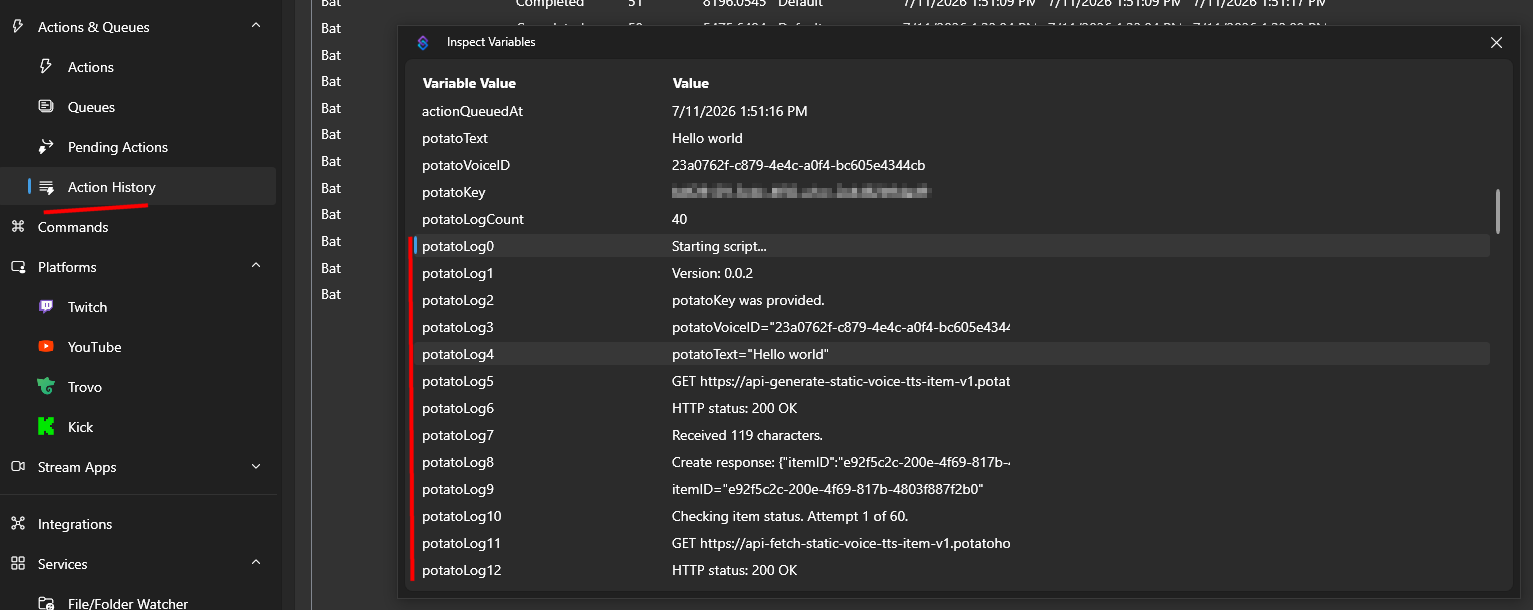
Ez az útmutató először 2026-07-11-én jelent meg, és utoljára 2026-07-11-én módosították.
Egyéb Hasonló Útmutatók
Íme néhány további útmutató, amelyeket hasznosnak találhat.


