
PotatoHotDog propose une API gratuite de génération d'images IA que vous pouvez appeler directement depuis Streamer.bot, sans avoir besoin d’un middleware tiers. Ce guide vous montre comment ajouter un petit script personnalisé en C# à une sous-action Execute Code de Streamer.bot qui génère une image IA à partir d'une invite de texte et la télécharge sur le disque.
Le script n'a besoin que de votre clé API PotatoHotDog et d'une requête décrivant l'image que vous souhaitez générer, et il enregistre l'image téléchargée dans un dossier dédié à l'intérieur du répertoire d'installation de Streamer.bot.
Préparez une clé API
Si vous n'en avez pas encore, générez une clé API depuis votre tableau de bord et gardez-la prête; vous en aurez besoin à l'étape suivante.
Aller aux clés API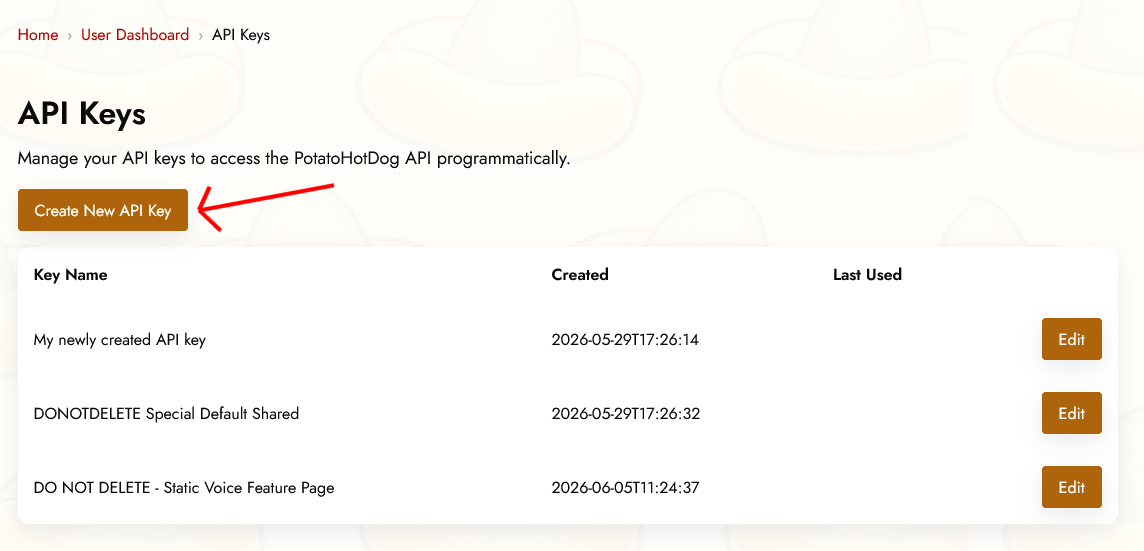
Arguments Prérequis
Pour générer une image IA, deux arguments doivent être spécifiés dans Streamer.bot avant que l'action secondaire Execute Code ne s'exécute. Ou, en d'autres termes, ces deux éléments doivent être spécifiés :
- Une clé API.
- Les instructions du prompt décrivant l'image que vous souhaitez générer.
Ceux-ci correspondent aux arguments suivants de Streamer.bot :
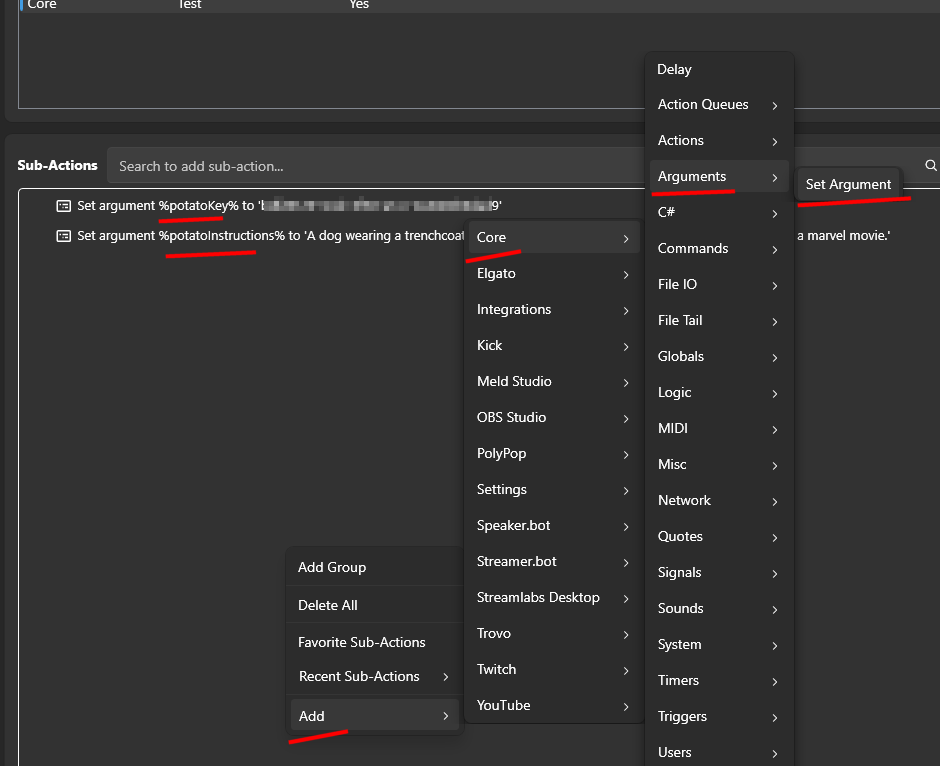
- potatoKey
- potatoInstructions
Vous spécifiez des arguments dans votre action en effectuant un clic droit sur Sous Actions, puis en sélectionnant Ajouter, Noyau, Arguments, et enfin Définir l'Argument.
Ajouter une action d'exécution du code dans Streamer.bot
Ouvrez Streamer.bot et allez dans l’onglet Actions. Créez une nouvelle action, ou ouvrez-en une existante, et donnez-lui un nom que vous reconnaîtrez plus tard, par exemple « PotatoHotDog AI Image ».
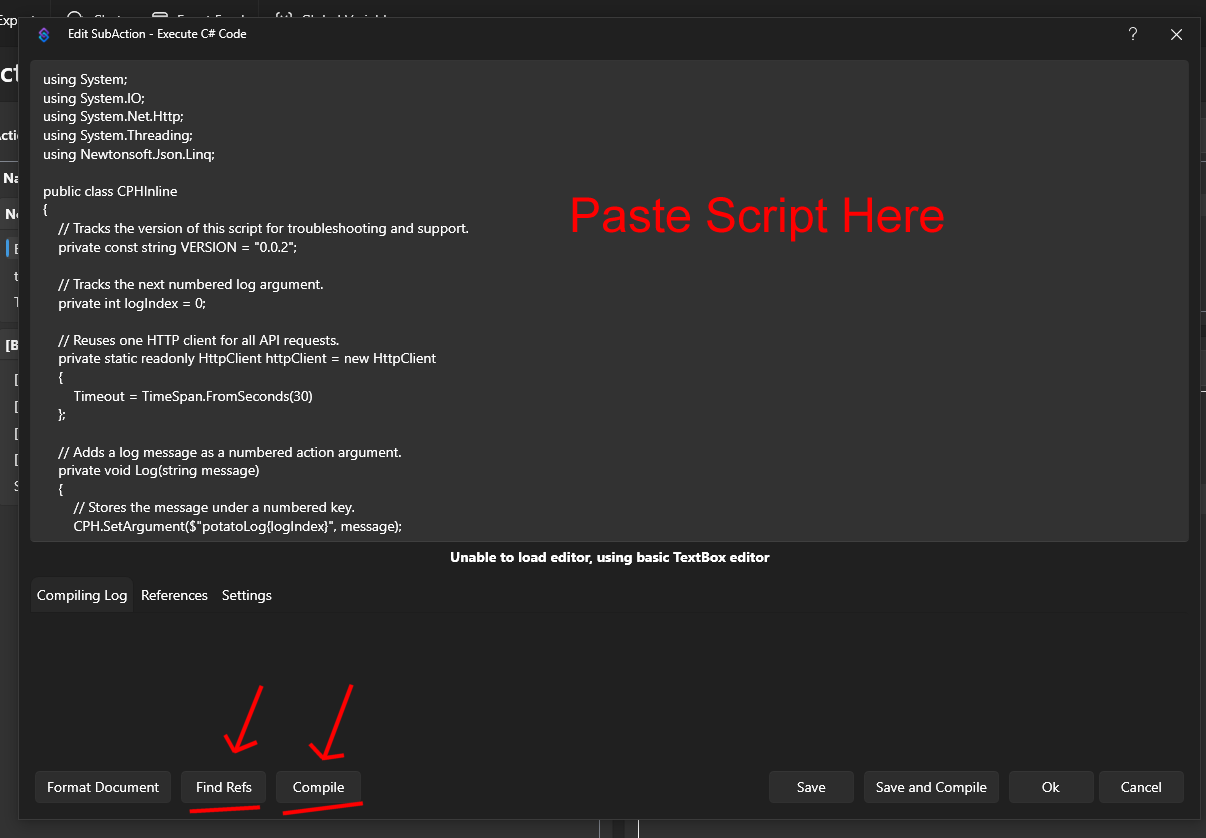
Avec l'action que vous avez sélectionnée, cliquez sur Ajouter sous Actions, puis choisissez Core, puis Exécuter C# Code. Cela ajoute une sous-action où vous pouvez coller du code C# brut que Streamer.bot compile et exécute à la volée.

Collez le script ci-dessous dans l'éditeur de code. Il lit les arguments potatoKey et potatoInstructions, appelle notre API de génération d'images par IA pour générer l'image et récupérer son URL, puis télécharge l'image résultante dans un dossier nommé temp_potatohotdog_images dans le répertoire d'installation de Streamer.bot.
using System;
using System.IO;
using System.Net.Http;
using Newtonsoft.Json.Linq;

public class CPHInline
{
    // Tracks the version of this script for troubleshooting and support.
    private const string VERSION = "1.0.0";

    // Base URL for the endpoint that generates an AI image.
    private const string BASE_URL_GENERATE = "https://api-generate-image-v1.potatohotdog.com/";

    // Tracks the next numbered log argument.
    private int logIndex = 0;

    // Reuses one HTTP client for all API requests.
    private static readonly HttpClient httpClient = new HttpClient
    {
        Timeout = TimeSpan.FromSeconds(30)
    };

    // Adds a log message as a numbered action argument.
    private void Log(string message)
    {
        // Stores the message under a numbered key.
        CPH.SetArgument($"potatoLog{logIndex}", message);

        // Advances the log index for the next message.
        logIndex++;

        // Keeps the total log count in sync.
        CPH.SetArgument("potatoLogCount", logIndex);
    }

    // Ensures a required action argument exists and is not empty.
    private bool RequireArgument(string name, out string value)
    {
        // Fails when the argument is missing or blank.
        if (!CPH.TryGetArg(name, out value) || string.IsNullOrWhiteSpace(value))
        {
            value = "";
            return false;
        }

        return true;
    }

    // URL-encodes a value so it can safely be used in a query string.
    private string EncodeUrlValue(string value)
    {
        // Escapes reserved characters for safe use in a URL.
        return Uri.EscapeDataString(value);
    }

    // Performs an HTTP GET request and returns the response body.
    private string HttpGet(string url)
    {
        try
        {
            Log($"GET {url}");

            // Sends the HTTP request synchronously.
            HttpResponseMessage response =
                httpClient.GetAsync(url).GetAwaiter().GetResult();

            // Reads the complete response body.
            string responseBody =
                response.Content.ReadAsStringAsync().GetAwaiter().GetResult();

            Log($"HTTP status: {(int)response.StatusCode} {response.ReasonPhrase}");

            // Stops when the server returns an unsuccessful status code.
            if (!response.IsSuccessStatusCode)
            {
                Log($"Error: HTTP request failed with status {(int)response.StatusCode} {response.ReasonPhrase}.");

                // Logs the server error response when available.
                if (!string.IsNullOrWhiteSpace(responseBody))
                {
                    Log($"Error response: {responseBody}");
                }

                return null;
            }

            Log($"Received {responseBody.Length} characters.");

            return responseBody;
        }
        catch (Exception exception)
        {
            // Logs network, timeout, and other HTTP-related exceptions.
            Log($"Error: HTTP request failed: {exception.Message}");
            return null;
        }
    }

    // Downloads a file from a URL and saves it to disk.
    private bool DownloadFile(string url, string destinationPath)
    {
        try
        {
            Log($"Downloading image from \"{url}\".");
            Log($"Saving image to \"{destinationPath}\".");

            // Sends the image download request.
            HttpResponseMessage response =
                httpClient.GetAsync(url).GetAwaiter().GetResult();

            Log($"Image download HTTP status: {(int)response.StatusCode} {response.ReasonPhrase}");

            // Reads the complete image response into memory.
            byte[] fileData = response.Content.ReadAsByteArrayAsync().GetAwaiter().GetResult();

            // Stops when the image server returns an unsuccessful status.
            if (!response.IsSuccessStatusCode)
            {
                Log($"Error: Image download failed with status {(int)response.StatusCode} {response.ReasonPhrase}.");

                return false;
            }

            // Rejects an empty image response.
            if (fileData == null || fileData.Length == 0)
            {
                Log("Error: The downloaded image file is empty.");
                return false;
            }

            // Writes the downloaded image bytes to the destination file.
            File.WriteAllBytes(destinationPath, fileData);

            Log($"Downloaded {fileData.Length} image bytes.");

            // Confirms that the image file now exists on disk.
            if (!File.Exists(destinationPath))
            {
                Log("Error: The image download completed, but the file does not exist on disk.");

                return false;
            }

            // Reports the final file size from disk.
            FileInfo fileInfo = new FileInfo(destinationPath);

            Log($"Image file saved successfully. File size: {fileInfo.Length} bytes.");

            return true;
        }
        catch (Exception exception)
        {
            // Logs download, filesystem, and permission errors.
            Log($"Error: Could not download the image file: {exception.Message}");

            return false;
        }
    }

    // Extracts a required string value from a JSON response.
    private bool TryGetJsonString(string json, string propertyName, out string value)
    {
        value = "";

        try
        {
            // Parses the response body as a JSON object.
            JObject jsonObject = JObject.Parse(json);

            // Retrieves the requested JSON property.
            JToken property = jsonObject[propertyName];

            if (property == null)
            {
                Log($"Error: JSON response does not contain \"{propertyName}\".");

                return false;
            }

            value = property.ToString();

            // Rejects empty JSON string values.
            if (string.IsNullOrWhiteSpace(value))
            {
                Log($"Error: JSON property \"{propertyName}\" is empty.");

                value = "";

                return false;
            }

            return true;
        }
        catch (Exception exception)
        {
            // Logs malformed JSON and property conversion errors.
            Log($"Error: Could not parse JSON property \"{propertyName}\": {exception.Message}");

            return false;
        }
    }

    // Creates and returns the dedicated PotatoImage folder.
    private string GetImageFolder()
    {
        // Uses Streamer.bot's application directory instead of the process working directory.
        string streamerBotFolder = AppDomain.CurrentDomain.BaseDirectory;

        // Places generated image files inside a dedicated subfolder.
        string imageFolder = Path.Combine(streamerBotFolder, "temp_potatohotdog_images");

        Log($"Streamer.bot folder: \"{streamerBotFolder}\".");
        Log($"Image folder: \"{imageFolder}\".");

        // Creates the image folder if it does not already exist.
        if (!Directory.Exists(imageFolder))
        {
            Log("Image folder does not exist. Creating it...");

            Directory.CreateDirectory(imageFolder);

            Log("Image folder created.");
        }
        else
        {
            Log("Image folder already exists.");
        }

        return imageFolder;
    }

    // Runs the main PotatoHotdog AI image action.
    public bool Execute()
    {
        // Resets log numbering for this execution.
        logIndex = 0;
        CPH.SetArgument("potatoLogCount", 0);

        Log("Starting script...");

        // Logs the script version so runs can be tracked over time.
        Log($"Version: {VERSION}");

        // Retrieves the PotatoHotdog API key.
        if (!RequireArgument("potatoKey", out string potatoKey))
        {
            Log("Error: potatoKey variable is missing. Please login to potatohotdog.com, generate an API key, create a set variable action and save the variable \"potatoKey\" with your key.");

            return false;
        }

        // Retrieves the prompt instructions describing the image to generate.
        if (!RequireArgument("potatoInstructions", out string potatoInstructions))
        {
            Log("Error: potatoInstructions variable is missing. Create a set variable action and save the variable \"potatoInstructions\" with a description of the image you want generated.");

            return false;
        }

        // Logs the non-secret input values.
        Log("potatoKey was provided.");
        Log($"potatoInstructions=\"{potatoInstructions}\"");

        // Builds the API URL used to generate the AI image.
        string generateUrl = BASE_URL_GENERATE + "?key=" + EncodeUrlValue(potatoKey) + "&instructions=" + EncodeUrlValue(potatoInstructions);

        // Requests generation of the AI image.
        string generateJson = HttpGet(generateUrl);

        if (generateJson == null)
        {
            Log("Error: Failed to generate the AI image.");
            return false;
        }

        Log($"Generate response: {generateJson}");

        // Extracts the generated item's ID, reused below as the local filename.
        if (!TryGetJsonString(generateJson, "itemID", out string itemID))
        {
            Log("Error: Could not retrieve itemID from the generate response.");

            return false;
        }

        Log($"itemID=\"{itemID}\"");

        // Logs the generation duration when present, purely for troubleshooting.
        if (TryGetJsonString(generateJson, "duration", out string duration))
        {
            Log($"duration={duration} second(s)");
        }

        // Extracts the generated image URL from the response.
        if (!TryGetJsonString(generateJson, "imageURL", out string imageURL))
        {
            Log("Error: Could not retrieve imageURL from the generate response.");

            return false;
        }

        Log($"imageURL=\"{imageURL}\"");

        string imageFolder;

        try
        {
            // Resolves and creates the dedicated PotatoImage directory.
            imageFolder = GetImageFolder();
        }
        catch (Exception exception)
        {
            Log($"Error: Could not create or access the image folder: {exception.Message}");

            return false;
        }

        // Reuses the item's own ID as the local filename instead of minting a new one.
        string imageFileName = $"{itemID}.png";

        // Combines the image folder and unique filename.
        string imageFilePath = Path.Combine(imageFolder, imageFileName);

        Log($"Generated image filename: \"{imageFileName}\".");
        Log($"Local image path: \"{imageFilePath}\".");

        // Downloads the generated image file to the PotatoImage folder.
        if (!DownloadFile(imageURL, imageFilePath))
        {
            Log("Error: Failed to download the generated AI image.");
            return false;
        }

        // Stores the remote image URL as a final action argument.
        CPH.SetArgument("potatoGeneratedImageURL", imageURL);

        // Stores the absolute local file path as a final action argument.
        CPH.SetArgument("potatoGeneratedImageFile", imageFilePath);

        Log($"potatoGeneratedImageURL=\"{imageURL}\"");
        Log($"potatoGeneratedImageFile=\"{imageFilePath}\"");

        Log("Finished.");

        return true;
    }
}
Après avoir collé le script, n'oubliez pas de cliquer sur Find Refs et Compile et de vous assurer qu'il se compile avec succès. Enregistrez l'action, puis déclenchez-la manuellement ou liez-la à une commande ou à une récompense de points de chaîne pour tester que l'image est générée correctement.
Inspectez l'image téléchargée
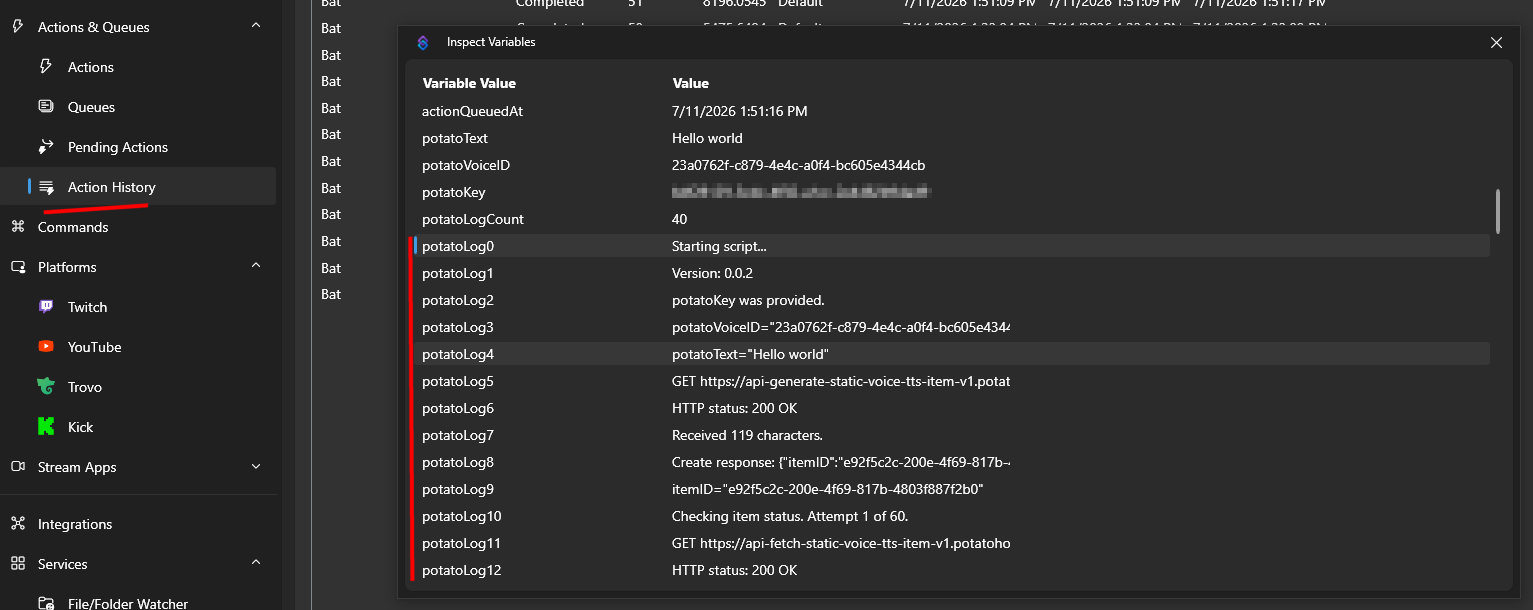
Une fois que l'action a été exécutée, vous pouvez consulter les variables Action via l'Action History pour confirmer que tout a fonctionné comme prévu.
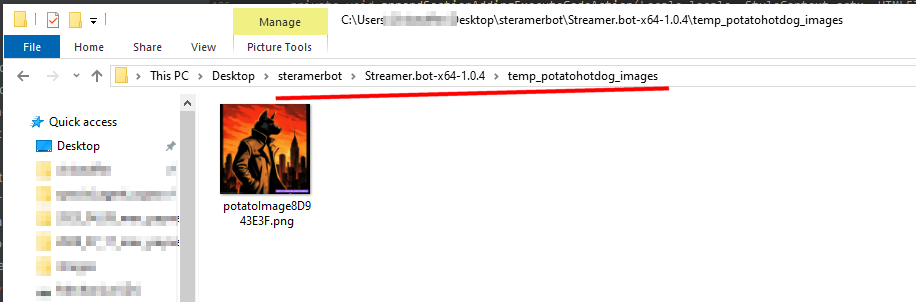
Là, vous trouverez le chemin local où l'image générée a été enregistrée sur le disque, dans le dossier temp_potatohotdog_images de votre répertoire d'installation de Streamer.bot.
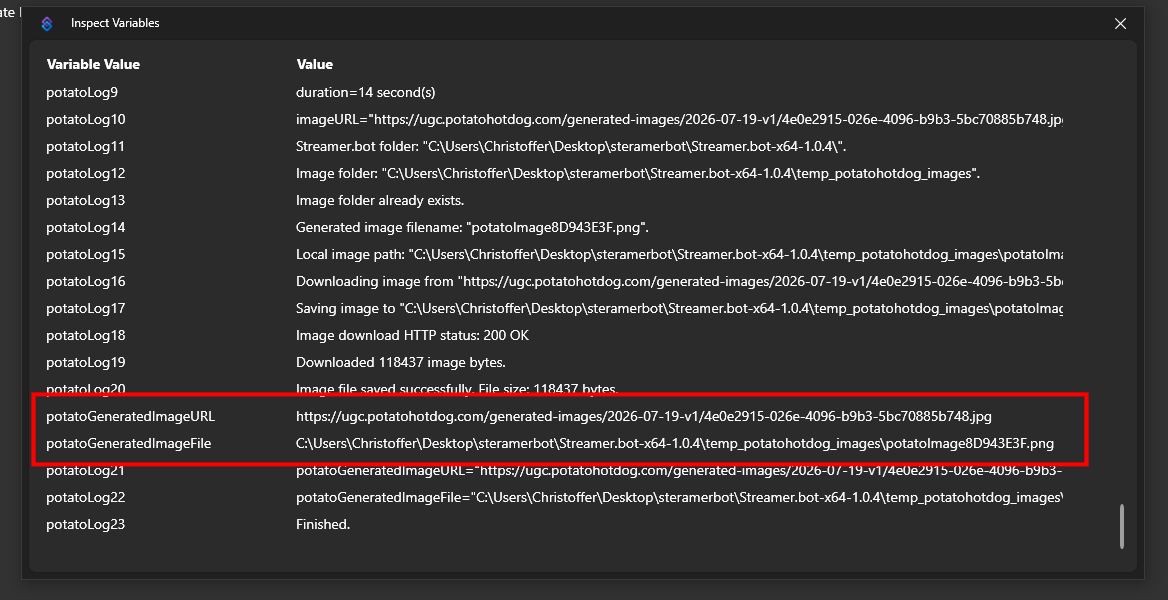
Ouvre ce dossier pour afficher directement l'image téléchargée.
Dépannage
Si le script ne se comporte pas comme prévu, le meilleur moyen de le dépanner consiste à vérifier les journaux d'exécution.
Vous pouvez le faire en inspectant vos variables Action via l'Historique des Actions.
Ce guide a été publié pour la première fois le 19 juillet 2026 et a été modifié pour la dernière fois le 19 juillet 2026.
Autres Guides Similaires
Voici d'autres guides pratiques qui pourraient vous être utiles.

