
PotatoHotDog tarjoaa ilmaisen AI-kuvien generointiin tarkoitetun API:n, jota voit kutsua suoraan Streamer.botista ilman tarvetta kolmannen osapuolen välikäsiä. Tämä opas näyttää, miten voit lisätä pienen mukautetun C#-skriptin Streamer.botin Suorita koodi -alitoimintoon, joka generoi AI-kuvan tekstikehotteesta ja lataa sen levylle.
Skriptin tarvitsee vain PotatoHotDog API -avaimesi sekä kehotteen, joka kuvaa haluamasi kuvan, ja se tallentaa ladatun kuvan omistetulle kansiolle Streamer.botin asennushakemistoon.
Valmistele API-avain
Jos sinulla ei ole vielä API-avainta, luo sellainen hallintapaneelista ja pidä se valmiina. Tarvitset sitä seuraavassa vaiheessa.
Siirry API-avaimiin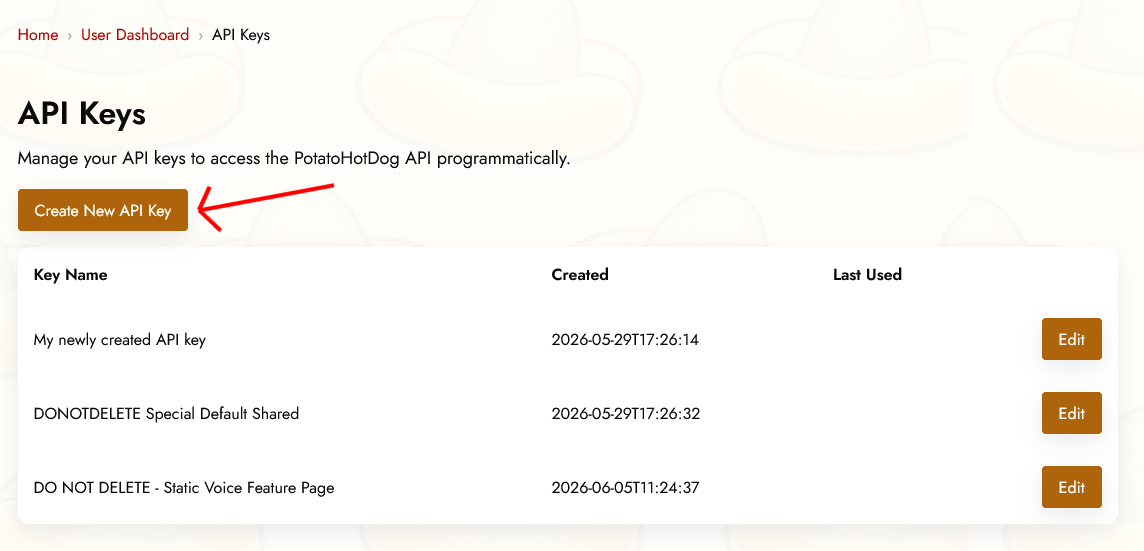
Edellytetyt argumentit
Jotta tekoälykuva voidaan luoda, Streamer.botissa on ennen Execute Code -alitoiminnon suorittamista määritettävä kaksi argumenttia. Toisin sanoen, nämä kaksi asiaa on määritettävä:
- API-avain.
- Kehotuksen ohjeet, jotka kuvaavat luotavan kuvan.
Nämä vastaavat seuraavia Streamer.botin argumentteja:
- potatoKey
- potatoInstructions
Voit määrittää toimintasi argumentit napsauttamalla hiiren oikealla Sub Actions -valikkoa, valitsemalla sitten Lisää, Ydin, Argumentit ja lopuksi Aseta Argumentti.
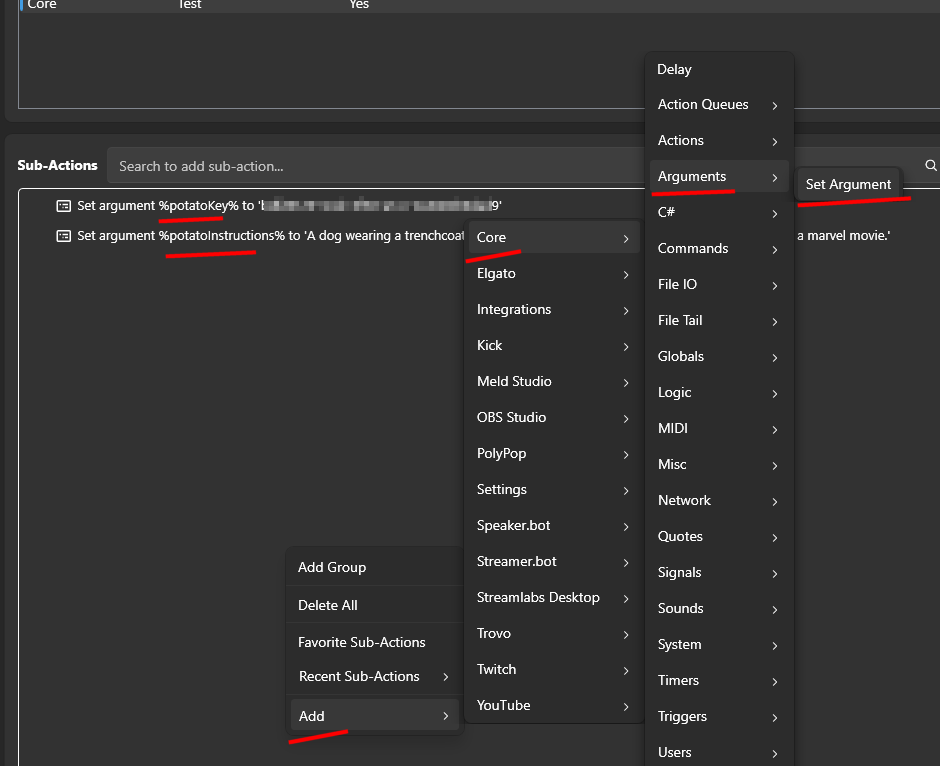
Lisää koodin suoritus -toiminto Streamer.botissa
Avaa Streamer.bot ja siirry Toiminnot-välilehdelle. Luo uusi toiminto tai avaa jokin jo olemassa oleva toiminto, ja anna sille nimeksi sellainen, jonka tunnistat myöhemmin, esimerkiksi "PotatoHotDog AI Image".
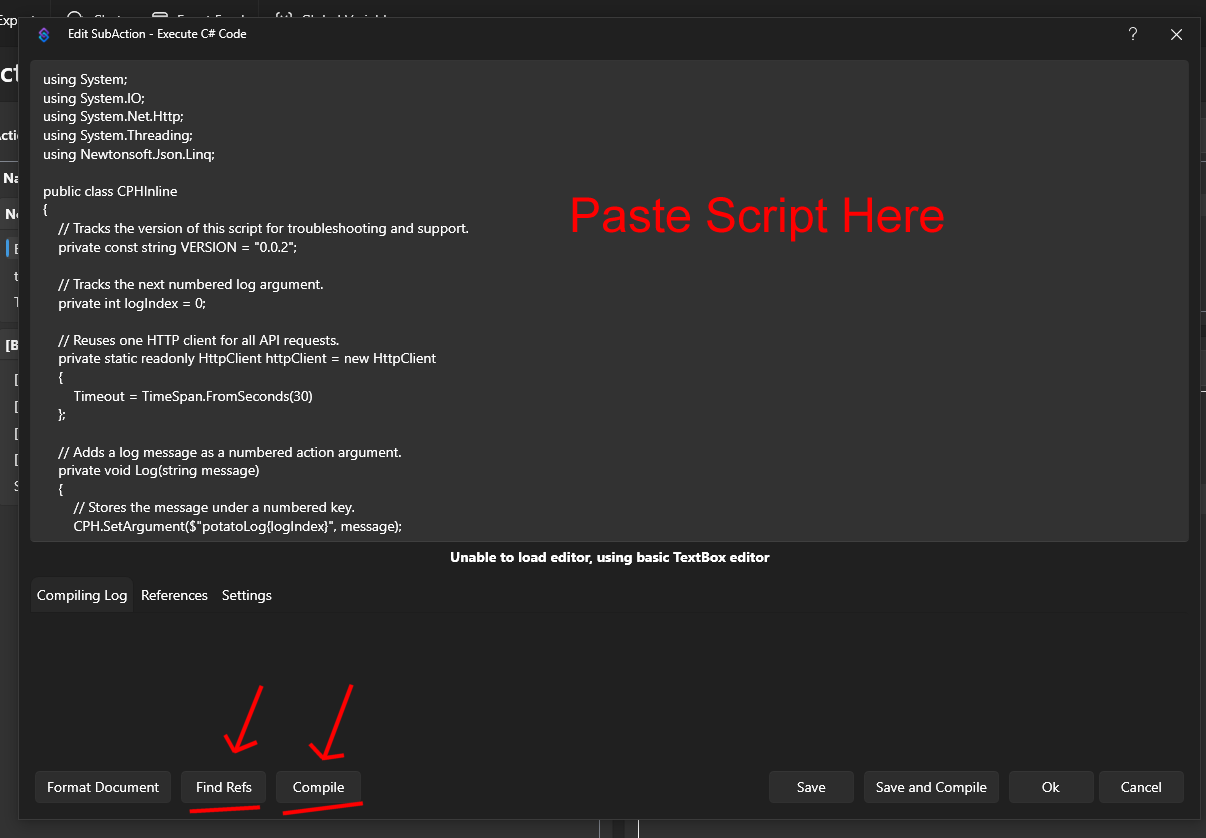
Kun toiminto on valittuna, napsauta Lisää alitoimintojen alta, sitten valitse Core ja sen jälkeen Execute C# Code. Tämä lisää alitoiminnon, jonne voit liittää raakaa C#-koodia, jonka Streamer.bot kääntää ja suorittaa lennossa.

Liitä alla oleva skripti koodieditoriin. Se lukee potatoKey- ja potatoInstructions-argumentit, kutsuu Generate AI Image API:amme kuvan luomiseksi ja sen URL-osoitteen hakemiseksi, ja lataa sitten lopullisen kuvan kansioon nimeltä temp_potatohotdog_images Streamer.botin asennuskansion sisälle.
using System;
using System.IO;
using System.Net.Http;
using Newtonsoft.Json.Linq;

public class CPHInline
{
    // Tracks the version of this script for troubleshooting and support.
    private const string VERSION = "1.0.0";

    // Base URL for the endpoint that generates an AI image.
    private const string BASE_URL_GENERATE = "https://api-generate-image-v1.potatohotdog.com/";

    // Tracks the next numbered log argument.
    private int logIndex = 0;

    // Reuses one HTTP client for all API requests.
    private static readonly HttpClient httpClient = new HttpClient
    {
        Timeout = TimeSpan.FromSeconds(30)
    };

    // Adds a log message as a numbered action argument.
    private void Log(string message)
    {
        // Stores the message under a numbered key.
        CPH.SetArgument($"potatoLog{logIndex}", message);

        // Advances the log index for the next message.
        logIndex++;

        // Keeps the total log count in sync.
        CPH.SetArgument("potatoLogCount", logIndex);
    }

    // Ensures a required action argument exists and is not empty.
    private bool RequireArgument(string name, out string value)
    {
        // Fails when the argument is missing or blank.
        if (!CPH.TryGetArg(name, out value) || string.IsNullOrWhiteSpace(value))
        {
            value = "";
            return false;
        }

        return true;
    }

    // URL-encodes a value so it can safely be used in a query string.
    private string EncodeUrlValue(string value)
    {
        // Escapes reserved characters for safe use in a URL.
        return Uri.EscapeDataString(value);
    }

    // Performs an HTTP GET request and returns the response body.
    private string HttpGet(string url)
    {
        try
        {
            Log($"GET {url}");

            // Sends the HTTP request synchronously.
            HttpResponseMessage response =
                httpClient.GetAsync(url).GetAwaiter().GetResult();

            // Reads the complete response body.
            string responseBody =
                response.Content.ReadAsStringAsync().GetAwaiter().GetResult();

            Log($"HTTP status: {(int)response.StatusCode} {response.ReasonPhrase}");

            // Stops when the server returns an unsuccessful status code.
            if (!response.IsSuccessStatusCode)
            {
                Log($"Error: HTTP request failed with status {(int)response.StatusCode} {response.ReasonPhrase}.");

                // Logs the server error response when available.
                if (!string.IsNullOrWhiteSpace(responseBody))
                {
                    Log($"Error response: {responseBody}");
                }

                return null;
            }

            Log($"Received {responseBody.Length} characters.");

            return responseBody;
        }
        catch (Exception exception)
        {
            // Logs network, timeout, and other HTTP-related exceptions.
            Log($"Error: HTTP request failed: {exception.Message}");
            return null;
        }
    }

    // Downloads a file from a URL and saves it to disk.
    private bool DownloadFile(string url, string destinationPath)
    {
        try
        {
            Log($"Downloading image from \"{url}\".");
            Log($"Saving image to \"{destinationPath}\".");

            // Sends the image download request.
            HttpResponseMessage response =
                httpClient.GetAsync(url).GetAwaiter().GetResult();

            Log($"Image download HTTP status: {(int)response.StatusCode} {response.ReasonPhrase}");

            // Reads the complete image response into memory.
            byte[] fileData = response.Content.ReadAsByteArrayAsync().GetAwaiter().GetResult();

            // Stops when the image server returns an unsuccessful status.
            if (!response.IsSuccessStatusCode)
            {
                Log($"Error: Image download failed with status {(int)response.StatusCode} {response.ReasonPhrase}.");

                return false;
            }

            // Rejects an empty image response.
            if (fileData == null || fileData.Length == 0)
            {
                Log("Error: The downloaded image file is empty.");
                return false;
            }

            // Writes the downloaded image bytes to the destination file.
            File.WriteAllBytes(destinationPath, fileData);

            Log($"Downloaded {fileData.Length} image bytes.");

            // Confirms that the image file now exists on disk.
            if (!File.Exists(destinationPath))
            {
                Log("Error: The image download completed, but the file does not exist on disk.");

                return false;
            }

            // Reports the final file size from disk.
            FileInfo fileInfo = new FileInfo(destinationPath);

            Log($"Image file saved successfully. File size: {fileInfo.Length} bytes.");

            return true;
        }
        catch (Exception exception)
        {
            // Logs download, filesystem, and permission errors.
            Log($"Error: Could not download the image file: {exception.Message}");

            return false;
        }
    }

    // Extracts a required string value from a JSON response.
    private bool TryGetJsonString(string json, string propertyName, out string value)
    {
        value = "";

        try
        {
            // Parses the response body as a JSON object.
            JObject jsonObject = JObject.Parse(json);

            // Retrieves the requested JSON property.
            JToken property = jsonObject[propertyName];

            if (property == null)
            {
                Log($"Error: JSON response does not contain \"{propertyName}\".");

                return false;
            }

            value = property.ToString();

            // Rejects empty JSON string values.
            if (string.IsNullOrWhiteSpace(value))
            {
                Log($"Error: JSON property \"{propertyName}\" is empty.");

                value = "";

                return false;
            }

            return true;
        }
        catch (Exception exception)
        {
            // Logs malformed JSON and property conversion errors.
            Log($"Error: Could not parse JSON property \"{propertyName}\": {exception.Message}");

            return false;
        }
    }

    // Creates and returns the dedicated PotatoImage folder.
    private string GetImageFolder()
    {
        // Uses Streamer.bot's application directory instead of the process working directory.
        string streamerBotFolder = AppDomain.CurrentDomain.BaseDirectory;

        // Places generated image files inside a dedicated subfolder.
        string imageFolder = Path.Combine(streamerBotFolder, "temp_potatohotdog_images");

        Log($"Streamer.bot folder: \"{streamerBotFolder}\".");
        Log($"Image folder: \"{imageFolder}\".");

        // Creates the image folder if it does not already exist.
        if (!Directory.Exists(imageFolder))
        {
            Log("Image folder does not exist. Creating it...");

            Directory.CreateDirectory(imageFolder);

            Log("Image folder created.");
        }
        else
        {
            Log("Image folder already exists.");
        }

        return imageFolder;
    }

    // Runs the main PotatoHotdog AI image action.
    public bool Execute()
    {
        // Resets log numbering for this execution.
        logIndex = 0;
        CPH.SetArgument("potatoLogCount", 0);

        Log("Starting script...");

        // Logs the script version so runs can be tracked over time.
        Log($"Version: {VERSION}");

        // Retrieves the PotatoHotdog API key.
        if (!RequireArgument("potatoKey", out string potatoKey))
        {
            Log("Error: potatoKey variable is missing. Please login to potatohotdog.com, generate an API key, create a set variable action and save the variable \"potatoKey\" with your key.");

            return false;
        }

        // Retrieves the prompt instructions describing the image to generate.
        if (!RequireArgument("potatoInstructions", out string potatoInstructions))
        {
            Log("Error: potatoInstructions variable is missing. Create a set variable action and save the variable \"potatoInstructions\" with a description of the image you want generated.");

            return false;
        }

        // Logs the non-secret input values.
        Log("potatoKey was provided.");
        Log($"potatoInstructions=\"{potatoInstructions}\"");

        // Builds the API URL used to generate the AI image.
        string generateUrl = BASE_URL_GENERATE + "?key=" + EncodeUrlValue(potatoKey) + "&instructions=" + EncodeUrlValue(potatoInstructions);

        // Requests generation of the AI image.
        string generateJson = HttpGet(generateUrl);

        if (generateJson == null)
        {
            Log("Error: Failed to generate the AI image.");
            return false;
        }

        Log($"Generate response: {generateJson}");

        // Extracts the generated item's ID, reused below as the local filename.
        if (!TryGetJsonString(generateJson, "itemID", out string itemID))
        {
            Log("Error: Could not retrieve itemID from the generate response.");

            return false;
        }

        Log($"itemID=\"{itemID}\"");

        // Logs the generation duration when present, purely for troubleshooting.
        if (TryGetJsonString(generateJson, "duration", out string duration))
        {
            Log($"duration={duration} second(s)");
        }

        // Extracts the generated image URL from the response.
        if (!TryGetJsonString(generateJson, "imageURL", out string imageURL))
        {
            Log("Error: Could not retrieve imageURL from the generate response.");

            return false;
        }

        Log($"imageURL=\"{imageURL}\"");

        string imageFolder;

        try
        {
            // Resolves and creates the dedicated PotatoImage directory.
            imageFolder = GetImageFolder();
        }
        catch (Exception exception)
        {
            Log($"Error: Could not create or access the image folder: {exception.Message}");

            return false;
        }

        // Reuses the item's own ID as the local filename instead of minting a new one.
        string imageFileName = $"{itemID}.png";

        // Combines the image folder and unique filename.
        string imageFilePath = Path.Combine(imageFolder, imageFileName);

        Log($"Generated image filename: \"{imageFileName}\".");
        Log($"Local image path: \"{imageFilePath}\".");

        // Downloads the generated image file to the PotatoImage folder.
        if (!DownloadFile(imageURL, imageFilePath))
        {
            Log("Error: Failed to download the generated AI image.");
            return false;
        }

        // Stores the remote image URL as a final action argument.
        CPH.SetArgument("potatoGeneratedImageURL", imageURL);

        // Stores the absolute local file path as a final action argument.
        CPH.SetArgument("potatoGeneratedImageFile", imageFilePath);

        Log($"potatoGeneratedImageURL=\"{imageURL}\"");
        Log($"potatoGeneratedImageFile=\"{imageFilePath}\"");

        Log("Finished.");

        return true;
    }
}
Skriptin liittäminen jälkeen muista klikata Find Refs ja Compile ja varmistaa, että se kääntyy onnistuneesti. Tallenna toimenpide, ja sen jälkeen voit käynnistää sen manuaalisesti tai sitoa sen komentoon tai kanavapistepalkintoon testataksesi, että kuva on generoitu oikein.
Tarkista ladattu kuva
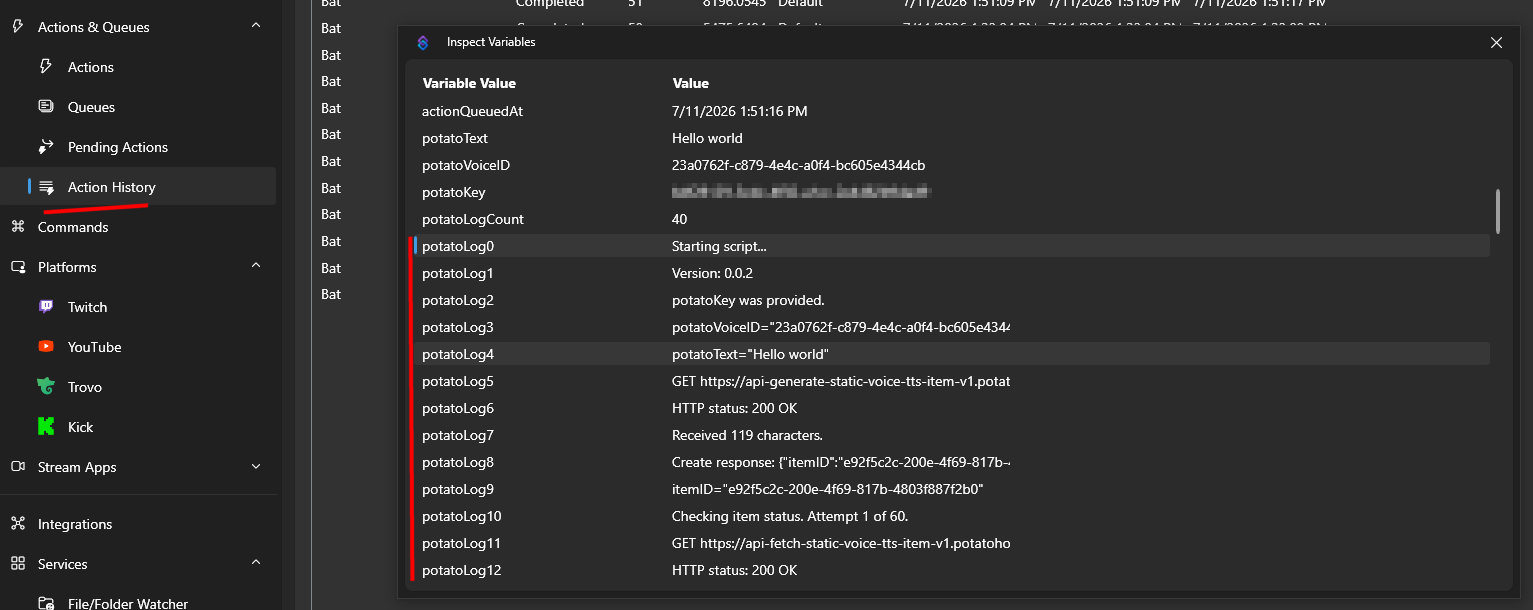
Kun toiminto on suoritettu, voit tarkastella Action variables -muuttujia Action Historyn kautta varmistaaksesi, että kaikki toimi odotetusti.
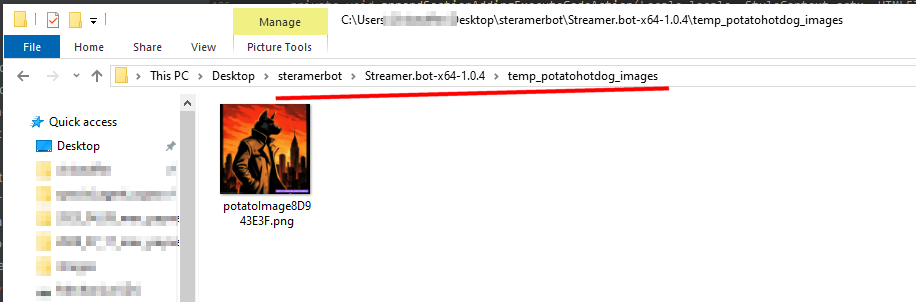
Siellä löydät sen paikallisen polun, johon luotu kuva on tallennettu kiintolevylle, temp_potatohotdog_images-kansion sisällä Streamer.botin asennuskansiossa.
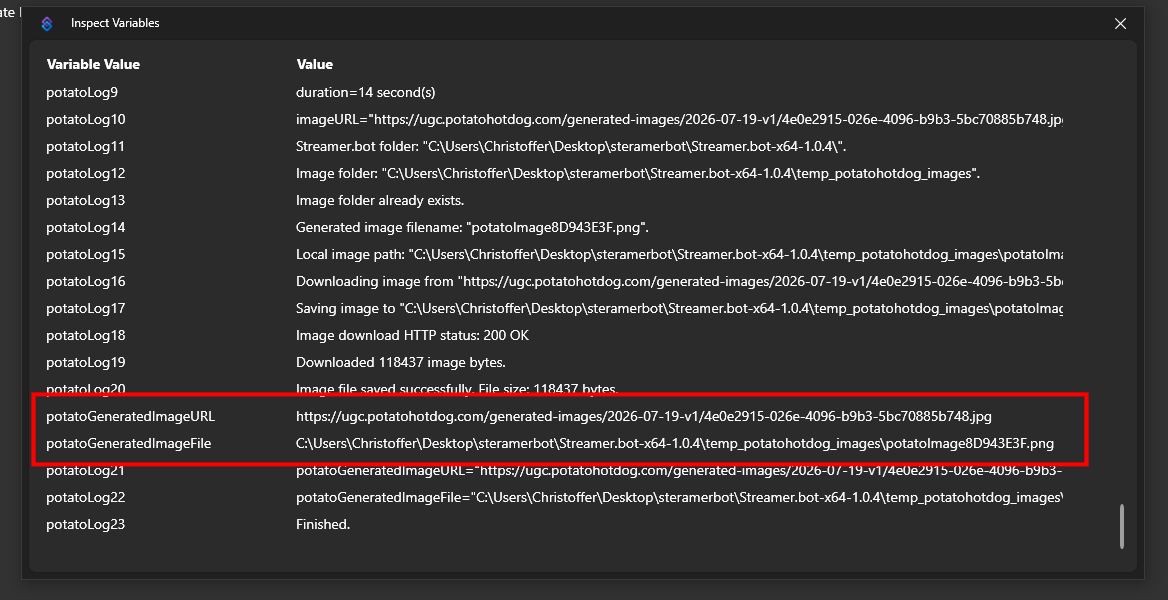
Avaa tuo kansio nähdäksesi ladatun kuvan suoraan.
Ongelmanratkaisu
Jos skripti ei käyttäydy odotetulla tavalla, paras tapa vianmääritykseen on tarkistaa toimintalokit.
Voit tehdä tämän tarkastelemalla Action-muuttujiasi Action Historyn kautta.
Tämä opas julkaistiin ensimmäisen kerran 2026-07-19 ja se viimeksi päivitettiin 2026-07-19.
Muita samankaltaisia oppaita
Tässä on vielä joitakin muita ohjeoppaita, joita saatat pitää hyödyllisinä.

