
PotatoHotDog предлага безплатен TTS (Text-to-Speech) API, който може да се извика директно от Streamer.bot, без нужда от Speaker.bot или какъвто и да е друг посредник от трета страна. Това ръководство ви показва как да добавите малък персонализиран C# скрипт към поддействието Execute Code на Streamer.bot, който генерира речта, изтегля аудиото и го възпроизвежда автоматично.
Ние предоставяме два готови скрипта, които можете да копирате и поставите: единият за възпроизвеждане на статичен Piper TTS глас, а другият за възпроизвеждане на ваш собствен клониран глас. И двата скрипта се нуждаят само от вашия PotatoHotDog API ключ, идентификатор на глас и текста, който искате да бъде прочетен.
Необходими Аргументи
За да се генерира TTS, три аргумента трябва да бъдат посочени в Streamer.bot преди да стартира поддействието Execute Code. Или с други думи, тези три неща трябва да бъдат посочени:
- API ключ.
- Идентификаторът на гласа, който искате да генерирате, може да бъде статичен глас или клониран глас.
- Текстът.
Тези съответстват на следните аргументи на Streamer.bot:
- potatoKey
- potatoVoiceID
- potatoText
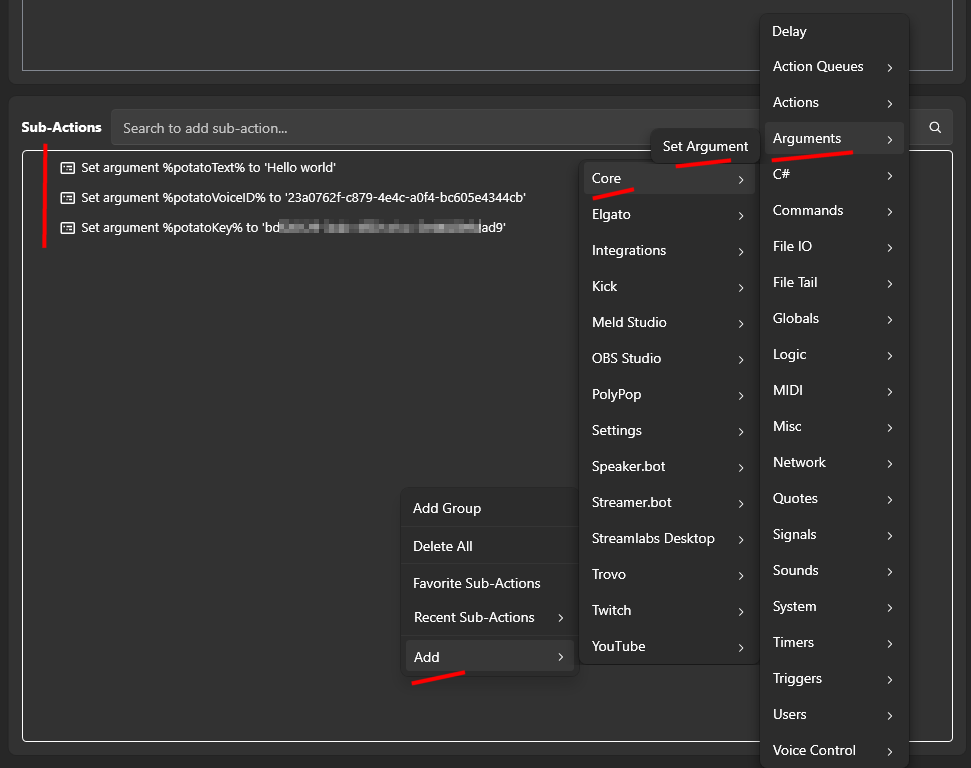
Укажете аргументите в действието си чрез десен клик върху Под Действия, след което изберете Добави, Ядро, Аргументи и накрая Задай Аргумент.
Добавяне на действие Execute Code в Streamer.bot
Отвори Streamer.bot и иди до таба „Действия“. Създай ново действие или отвори съществуващо и му дай име, което ще разпознаеш по-късно, например „PotatoHotDog TTS“.
Когато действието ви е избрано, кликнете върху Добави в раздела Поддействия, след което изберете Core, последвано от Изпълни C# код. Това добавя поддействие, в което можете да поставите суров C# код, който Streamer.bot компилира и изпълнява мигновено.

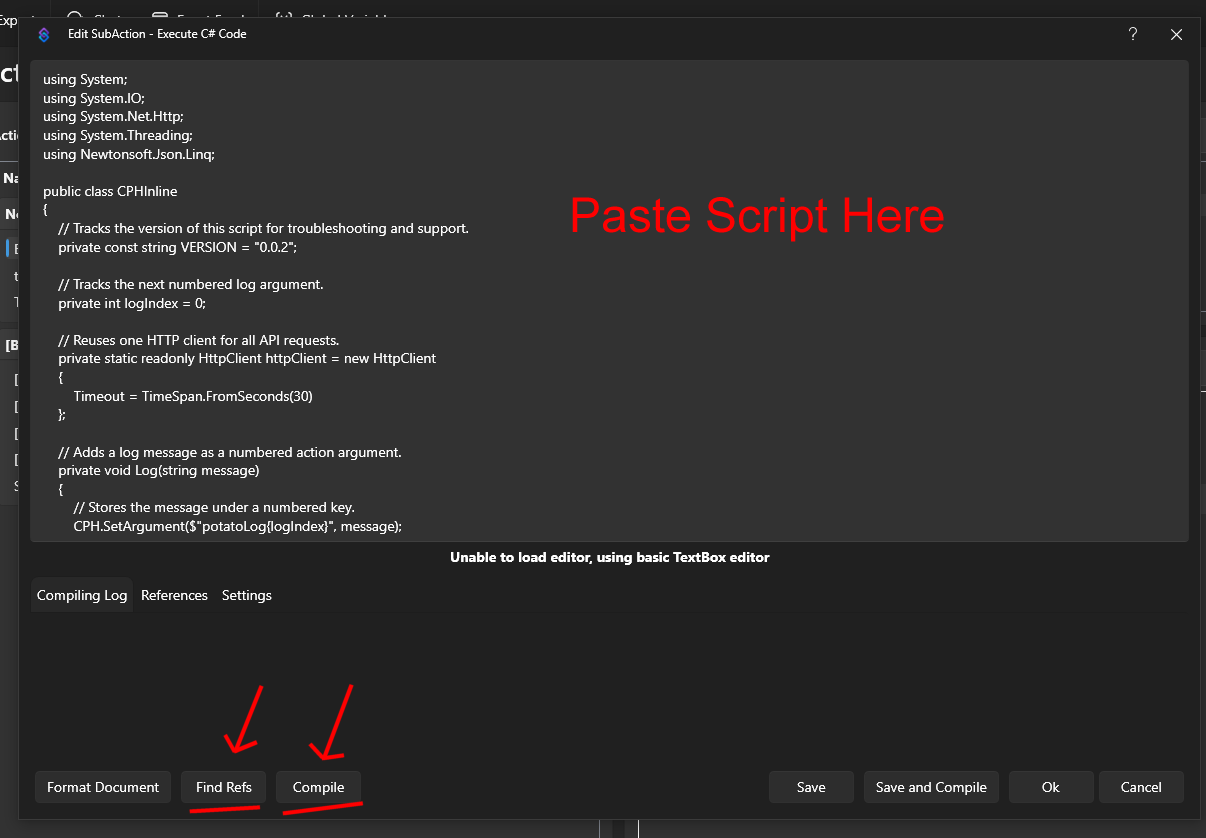
Поставете един от скриптовете по-долу в кодовия редактор, в зависимост от това дали искате да възпроизведете статичен глас или клониран глас. И двата скрипта очакват да съществуват вече няколко аргумента за действието; вижте по-долу предварителните аргументи за това как да ги настроите.
След поставяне на скрипта, също така помнете да кликнете върху Find Refs и Compile и да се уверите, че скриптът е компилиран успешно.
Вашият API ключ за PotatoHotDog може да бъде генериран от вашето табло за управление. Запазете действието, след това го задействайте ръчно или го свържете с команда или награда за точки в чата, за да проверите дали аудиото се възпроизвежда правилно.
Скрипт за възпроизвеждане на статичен глас
Този скрипт възпроизвежда статичен Piper TTS глас. Той генерира речта, изчаква да завърши обработката, сваля получения аудиофайл и го възпроизвежда в Streamer.bot. Можете да намерите списък с наличните статични ID-та за гласове на нашата страница Static Voices.
Разгледайте Статичните Гласовеusing System;
using System.IO;
using System.Net.Http;
using System.Threading;
using Newtonsoft.Json.Linq;
public class CPHInline
{
// Tracks the version of this script for troubleshooting and support.
private const string VERSION = "2 (static)";
// Base URL for the endpoint that creates a new TTS item.
private const string BASE_URL_GENERATE = "https://api-generate-static-voice-tts-item-v1.potatohotdog.com/";
// Base URL for the endpoint that polls a TTS item's status.
private const string BASE_URL_STATUS = "https://api-fetch-static-voice-tts-item-v1.potatohotdog.com/";
// Tracks the next numbered log argument.
private int logIndex = 0;
// Reuses one HTTP client for all API requests.
private static readonly HttpClient httpClient = new HttpClient
{
Timeout = TimeSpan.FromSeconds(30)
};
// Adds a log message as a numbered action argument.
private void Log(string message)
{
// Stores the message under a numbered key.
CPH.SetArgument($"potatoLog{logIndex}", message);
// Advances the log index for the next message.
logIndex++;
// Keeps the total log count in sync.
CPH.SetArgument("potatoLogCount", logIndex);
}
// Ensures a required action argument exists and is not empty.
private bool RequireArgument(string name, out string value)
{
// Fails when the argument is missing or blank.
if (!CPH.TryGetArg(name, out value) || string.IsNullOrWhiteSpace(value))
{
value = "";
return false;
}
return true;
}
// URL-encodes a value so it can safely be used in a query string.
private string EncodeUrlValue(string value)
{
// Escapes reserved characters for safe use in a URL.
return Uri.EscapeDataString(value);
}
// Performs an HTTP GET request and returns the response body.
private string HttpGet(string url)
{
try
{
Log($"GET {url}");
// Sends the HTTP request synchronously.
HttpResponseMessage response =
httpClient.GetAsync(url).GetAwaiter().GetResult();
// Reads the complete response body.
string responseBody =
response.Content.ReadAsStringAsync().GetAwaiter().GetResult();
Log($"HTTP status: {(int)response.StatusCode} {response.ReasonPhrase}");
// Stops when the server returns an unsuccessful status code.
if (!response.IsSuccessStatusCode)
{
Log($"Error: HTTP request failed with status {(int)response.StatusCode} {response.ReasonPhrase}.");
// Logs the server error response when available.
if (!string.IsNullOrWhiteSpace(responseBody))
{
Log($"Error response: {responseBody}");
}
return null;
}
Log($"Received {responseBody.Length} characters.");
return responseBody;
}
catch (Exception exception)
{
// Logs network, timeout, and other HTTP-related exceptions.
Log($"Error: HTTP request failed: {exception.Message}");
return null;
}
}
// Downloads a file from a URL and saves it to disk.
private bool DownloadFile(string url, string destinationPath)
{
try
{
Log($"Downloading audio from \"{url}\".");
Log($"Saving audio to \"{destinationPath}\".");
// Sends the audio download request.
HttpResponseMessage response =
httpClient.GetAsync(url).GetAwaiter().GetResult();
Log($"Audio download HTTP status: {(int)response.StatusCode} {response.ReasonPhrase}");
// Reads the complete audio response into memory.
byte[] fileData =
response.Content.ReadAsByteArrayAsync().GetAwaiter().GetResult();
// Stops when the audio server returns an unsuccessful status.
if (!response.IsSuccessStatusCode)
{
Log($"Error: Audio download failed with status {(int)response.StatusCode} {response.ReasonPhrase}.");
return false;
}
// Rejects an empty audio response.
if (fileData == null || fileData.Length == 0)
{
Log("Error: The downloaded audio file is empty.");
return false;
}
// Writes the downloaded audio bytes to the destination file.
File.WriteAllBytes(destinationPath, fileData);
Log($"Downloaded {fileData.Length} audio bytes.");
// Confirms that the audio file now exists on disk.
if (!File.Exists(destinationPath))
{
Log("Error: The audio download completed, but the file does not exist on disk.");
return false;
}
// Reports the final file size from disk.
FileInfo fileInfo = new FileInfo(destinationPath);
Log($"Audio file saved successfully. File size: {fileInfo.Length} bytes.");
return true;
}
catch (Exception exception)
{
// Logs download, filesystem, and permission errors.
Log($"Error: Could not download the audio file: {exception.Message}");
return false;
}
}
// Extracts a required string value from a JSON response.
private bool TryGetJsonString(string json, string propertyName, out string value)
{
value = "";
try
{
// Parses the response body as a JSON object.
JObject jsonObject = JObject.Parse(json);
// Retrieves the requested JSON property.
JToken property = jsonObject[propertyName];
if (property == null)
{
Log($"Error: JSON response does not contain \"{propertyName}\".");
return false;
}
value = property.ToString();
// Rejects empty JSON string values.
if (string.IsNullOrWhiteSpace(value))
{
Log($"Error: JSON property \"{propertyName}\" is empty.");
value = "";
return false;
}
return true;
}
catch (Exception exception)
{
// Logs malformed JSON and property conversion errors.
Log($"Error: Could not parse JSON property \"{propertyName}\": {exception.Message}");
return false;
}
}
// Extracts a required integer value from a JSON response.
private bool TryGetJsonInteger(string json, string propertyName, out int value)
{
value = 0;
try
{
// Parses the response body as a JSON object.
JObject jsonObject = JObject.Parse(json);
// Retrieves the requested JSON property.
JToken property = jsonObject[propertyName];
if (property == null)
{
Log($"Error: JSON response does not contain \"{propertyName}\".");
return false;
}
// Converts the JSON property to an integer.
if (!int.TryParse(property.ToString(), out value))
{
Log($"Error: JSON property \"{propertyName}\" is not a valid integer.");
value = 0;
return false;
}
return true;
}
catch (Exception exception)
{
// Logs malformed JSON and property conversion errors.
Log($"Error: Could not parse JSON property \"{propertyName}\": {exception.Message}");
return false;
}
}
// Creates a unique PotatoHotdog WAV filename.
private string CreateAudioFileName()
{
// Uses eight GUID characters to avoid overwriting previous files.
string uniqueID = Guid.NewGuid().ToString("N").Substring(0, 8).ToUpperInvariant();
return $"potatoAudio{uniqueID}.wav";
}
// Creates and returns the dedicated PotatoAudio folder.
private string GetAudioFolder()
{
// Uses Streamer.bot's application directory instead of the process working directory.
string streamerBotFolder = AppDomain.CurrentDomain.BaseDirectory;
// Places generated audio files inside a dedicated subfolder.
string audioFolder = Path.Combine(streamerBotFolder, "temp_potatohotdog_audio");
Log($"Streamer.bot folder: \"{streamerBotFolder}\".");
Log($"Audio folder: \"{audioFolder}\".");
// Creates the audio folder if it does not already exist.
if (!Directory.Exists(audioFolder))
{
Log("Audio folder does not exist. Creating it...");
Directory.CreateDirectory(audioFolder);
Log("Audio folder created.");
}
else
{
Log("Audio folder already exists.");
}
return audioFolder;
}
// Runs the main PotatoHotdog TTS action.
public bool Execute()
{
// Resets log numbering for this execution.
logIndex = 0;
CPH.SetArgument("potatoLogCount", 0);
Log("Starting script...");
// Logs the script version so runs can be tracked over time.
Log($"Version: {VERSION}");
// Retrieves the PotatoHotdog API key.
if (!RequireArgument("potatoKey", out string potatoKey))
{
Log("Error: potatoKey variable is missing. Please login to potatohotdog.com, generate an API key, create a set variable action and save the variable \"potatoKey\" with your key.");
return false;
}
// Retrieves the requested voice ID.
if (!RequireArgument("potatoVoiceID", out string potatoVoiceID))
{
Log("Error: potatoVoiceID variable is missing. Please login to potatohotdog.com, copy a voice ID, create a set variable action and save the variable \"potatoVoiceID\" with your voice ID.");
return false;
}
// Retrieves the text that should be converted to speech.
if (!RequireArgument("potatoText", out string potatoText))
{
Log("Error: potatoText variable is missing. Create a set variable action and save the variable \"potatoText\" with the text you want the TTS to say.");
return false;
}
// Logs the non-secret input values.
Log("potatoKey was provided.");
Log($"potatoVoiceID=\"{potatoVoiceID}\"");
Log($"potatoText=\"{potatoText}\"");
// Builds the API URL used to create the TTS item.
string createUrl = BASE_URL_GENERATE + "?key=" + EncodeUrlValue(potatoKey) + "&voice=" + EncodeUrlValue(potatoVoiceID) + "&text=" + EncodeUrlValue(potatoText);
// Requests creation of the TTS item.
string createJson = HttpGet(createUrl);
if (createJson == null)
{
Log("Error: Failed to create the TTS item.");
return false;
}
Log($"Create response: {createJson}");
// Extracts the created item's ID from the API response.
if (!TryGetJsonString(createJson, "itemID", out string itemID))
{
Log("Error: Could not retrieve itemID from the create response.");
return false;
}
Log($"itemID=\"{itemID}\"");
// Builds the API URL used to poll the TTS item status.
string fetchUrl = BASE_URL_STATUS + "?key=" + EncodeUrlValue(potatoKey) + "&item=" + EncodeUrlValue(itemID);
// Tracks whether the TTS item finishes processing.
bool completed = false;
// Stores the final fetch response containing the audio URL.
string completedFetchJson = null;
// Polls the item status up to 60 times.
for (int attempt = 1; attempt <= 60; attempt++)
{
Log($"Checking item status. Attempt {attempt} of 60.");
// Fetches the latest TTS item status.
string fetchJson = HttpGet(fetchUrl);
if (fetchJson == null)
{
Log($"Error: Failed to fetch the TTS item on attempt {attempt}.");
return false;
}
Log($"Fetch response: {fetchJson}");
// Extracts the current processing status from the response.
if (!TryGetJsonInteger(fetchJson, "statusID", out int statusID))
{
Log("Error: Could not retrieve statusID from the fetch response.");
return false;
}
Log($"statusID={statusID}");
// Stops polling when the API reports that processing is complete.
if (statusID == 0)
{
completed = true;
completedFetchJson = fetchJson;
Log("statusID is 0. TTS processing is complete.");
break;
}
// Waits five seconds before the next polling request.
if (attempt < 60)
{
Log("TTS processing is not complete. Waiting five seconds...");
Thread.Sleep(5000);
}
}
// Fails when the item has not completed after all polling attempts.
if (!completed)
{
Log("Error: TTS processing did not complete after 60 attempts.");
return false;
}
// Extracts the generated audio URL from the completed item response.
if (!TryGetJsonString(completedFetchJson, "audioURL", out string audioURL))
{
Log("Error: Could not retrieve audioURL from the completed fetch response.");
return false;
}
Log($"audioURL=\"{audioURL}\"");
string audioFolder;
try
{
// Resolves and creates the dedicated PotatoAudio directory.
audioFolder = GetAudioFolder();
}
catch (Exception exception)
{
Log($"Error: Could not create or access the audio folder: {exception.Message}");
return false;
}
// Creates a unique local filename for the generated WAV file.
string audioFileName = CreateAudioFileName();
// Combines the audio folder and unique filename.
string audioFilePath = Path.Combine(audioFolder, audioFileName);
Log($"Generated audio filename: \"{audioFileName}\".");
Log($"Local audio path: \"{audioFilePath}\".");
// Downloads the generated audio file to the PotatoAudio folder.
if (!DownloadFile(audioURL, audioFilePath))
{
Log("Error: Failed to download the generated TTS audio.");
return false;
}
try
{
Log($"Starting playback of \"{audioFilePath}\".");
// Plays the WAV file and waits until playback has finished.
CPH.PlaySound(audioFilePath, 1.0f, true, audioFileName, true);
Log("Audio playback finished.");
}
catch (Exception exception)
{
// Logs Streamer.bot audio playback errors.
Log($"Error: Could not play the audio file: {exception.Message}");
return false;
}
Log("Finished.");
return true;
}
}
Скрипт за възпроизвеждане на клониран глас
Този скрипт работи по същия начин като горния статичен скрипт за глас, но генерира реч, използвайки един от вашите собствени клонирани гласове. Можете да намерите идентификаторите на клонираните ви гласове на страницата „Клонирани гласове“ във вашето табло за управление в PotatoHotDog.
Вижте вашите клонирани гласовеusing System;
using System.IO;
using System.Net.Http;
using System.Threading;
using Newtonsoft.Json.Linq;
public class CPHInline
{
// Tracks the version of this script for troubleshooting and support.
private const string VERSION = "2 (cloned)";
// Base URL for the endpoint that creates a new TTS item.
private const string BASE_URL_GENERATE = "https://api-generate-cloned-voice-tts-item-v1.potatohotdog.com/";
// Base URL for the endpoint that polls a TTS item's status.
private const string BASE_URL_STATUS = "https://api-fetch-cloned-voice-tts-item-v1.potatohotdog.com/";
// Tracks the next numbered log argument.
private int logIndex = 0;
// Reuses one HTTP client for all API requests.
private static readonly HttpClient httpClient = new HttpClient
{
Timeout = TimeSpan.FromSeconds(30)
};
// Adds a log message as a numbered action argument.
private void Log(string message)
{
// Stores the message under a numbered key.
CPH.SetArgument($"potatoLog{logIndex}", message);
// Advances the log index for the next message.
logIndex++;
// Keeps the total log count in sync.
CPH.SetArgument("potatoLogCount", logIndex);
}
// Ensures a required action argument exists and is not empty.
private bool RequireArgument(string name, out string value)
{
// Fails when the argument is missing or blank.
if (!CPH.TryGetArg(name, out value) || string.IsNullOrWhiteSpace(value))
{
value = "";
return false;
}
return true;
}
// URL-encodes a value so it can safely be used in a query string.
private string EncodeUrlValue(string value)
{
// Escapes reserved characters for safe use in a URL.
return Uri.EscapeDataString(value);
}
// Performs an HTTP GET request and returns the response body.
private string HttpGet(string url)
{
try
{
Log($"GET {url}");
// Sends the HTTP request synchronously.
HttpResponseMessage response =
httpClient.GetAsync(url).GetAwaiter().GetResult();
// Reads the complete response body.
string responseBody =
response.Content.ReadAsStringAsync().GetAwaiter().GetResult();
Log($"HTTP status: {(int)response.StatusCode} {response.ReasonPhrase}");
// Stops when the server returns an unsuccessful status code.
if (!response.IsSuccessStatusCode)
{
Log($"Error: HTTP request failed with status {(int)response.StatusCode} {response.ReasonPhrase}.");
// Logs the server error response when available.
if (!string.IsNullOrWhiteSpace(responseBody))
{
Log($"Error response: {responseBody}");
}
return null;
}
Log($"Received {responseBody.Length} characters.");
return responseBody;
}
catch (Exception exception)
{
// Logs network, timeout, and other HTTP-related exceptions.
Log($"Error: HTTP request failed: {exception.Message}");
return null;
}
}
// Downloads a file from a URL and saves it to disk.
private bool DownloadFile(string url, string destinationPath)
{
try
{
Log($"Downloading audio from \"{url}\".");
Log($"Saving audio to \"{destinationPath}\".");
// Sends the audio download request.
HttpResponseMessage response =
httpClient.GetAsync(url).GetAwaiter().GetResult();
Log($"Audio download HTTP status: {(int)response.StatusCode} {response.ReasonPhrase}");
// Reads the complete audio response into memory.
byte[] fileData =
response.Content.ReadAsByteArrayAsync().GetAwaiter().GetResult();
// Stops when the audio server returns an unsuccessful status.
if (!response.IsSuccessStatusCode)
{
Log($"Error: Audio download failed with status {(int)response.StatusCode} {response.ReasonPhrase}.");
return false;
}
// Rejects an empty audio response.
if (fileData == null || fileData.Length == 0)
{
Log("Error: The downloaded audio file is empty.");
return false;
}
// Writes the downloaded audio bytes to the destination file.
File.WriteAllBytes(destinationPath, fileData);
Log($"Downloaded {fileData.Length} audio bytes.");
// Confirms that the audio file now exists on disk.
if (!File.Exists(destinationPath))
{
Log("Error: The audio download completed, but the file does not exist on disk.");
return false;
}
// Reports the final file size from disk.
FileInfo fileInfo = new FileInfo(destinationPath);
Log($"Audio file saved successfully. File size: {fileInfo.Length} bytes.");
return true;
}
catch (Exception exception)
{
// Logs download, filesystem, and permission errors.
Log($"Error: Could not download the audio file: {exception.Message}");
return false;
}
}
// Extracts a required string value from a JSON response.
private bool TryGetJsonString(string json, string propertyName, out string value)
{
value = "";
try
{
// Parses the response body as a JSON object.
JObject jsonObject = JObject.Parse(json);
// Retrieves the requested JSON property.
JToken property = jsonObject[propertyName];
if (property == null)
{
Log($"Error: JSON response does not contain \"{propertyName}\".");
return false;
}
value = property.ToString();
// Rejects empty JSON string values.
if (string.IsNullOrWhiteSpace(value))
{
Log($"Error: JSON property \"{propertyName}\" is empty.");
value = "";
return false;
}
return true;
}
catch (Exception exception)
{
// Logs malformed JSON and property conversion errors.
Log($"Error: Could not parse JSON property \"{propertyName}\": {exception.Message}");
return false;
}
}
// Extracts a required integer value from a JSON response.
private bool TryGetJsonInteger(string json, string propertyName, out int value)
{
value = 0;
try
{
// Parses the response body as a JSON object.
JObject jsonObject = JObject.Parse(json);
// Retrieves the requested JSON property.
JToken property = jsonObject[propertyName];
if (property == null)
{
Log($"Error: JSON response does not contain \"{propertyName}\".");
return false;
}
// Converts the JSON property to an integer.
if (!int.TryParse(property.ToString(), out value))
{
Log($"Error: JSON property \"{propertyName}\" is not a valid integer.");
value = 0;
return false;
}
return true;
}
catch (Exception exception)
{
// Logs malformed JSON and property conversion errors.
Log($"Error: Could not parse JSON property \"{propertyName}\": {exception.Message}");
return false;
}
}
// Creates a unique PotatoHotdog WAV filename.
private string CreateAudioFileName()
{
// Uses eight GUID characters to avoid overwriting previous files.
string uniqueID = Guid.NewGuid().ToString("N").Substring(0, 8).ToUpperInvariant();
return $"potatoAudio{uniqueID}.wav";
}
// Creates and returns the dedicated PotatoAudio folder.
private string GetAudioFolder()
{
// Uses Streamer.bot's application directory instead of the process working directory.
string streamerBotFolder = AppDomain.CurrentDomain.BaseDirectory;
// Places generated audio files inside a dedicated subfolder.
string audioFolder = Path.Combine(streamerBotFolder, "temp_potatohotdog_audio");
Log($"Streamer.bot folder: \"{streamerBotFolder}\".");
Log($"Audio folder: \"{audioFolder}\".");
// Creates the audio folder if it does not already exist.
if (!Directory.Exists(audioFolder))
{
Log("Audio folder does not exist. Creating it...");
Directory.CreateDirectory(audioFolder);
Log("Audio folder created.");
}
else
{
Log("Audio folder already exists.");
}
return audioFolder;
}
// Runs the main PotatoHotdog TTS action.
public bool Execute()
{
// Resets log numbering for this execution.
logIndex = 0;
CPH.SetArgument("potatoLogCount", 0);
Log("Starting script...");
// Logs the script version so runs can be tracked over time.
Log($"Version: {VERSION}");
// Retrieves the PotatoHotdog API key.
if (!RequireArgument("potatoKey", out string potatoKey))
{
Log("Error: potatoKey variable is missing. Please login to potatohotdog.com, generate an API key, create a set variable action and save the variable \"potatoKey\" with your key.");
return false;
}
// Retrieves the requested voice ID.
if (!RequireArgument("potatoVoiceID", out string potatoVoiceID))
{
Log("Error: potatoVoiceID variable is missing. Please login to potatohotdog.com, copy a voice ID, create a set variable action and save the variable \"potatoVoiceID\" with your voice ID.");
return false;
}
// Retrieves the text that should be converted to speech.
if (!RequireArgument("potatoText", out string potatoText))
{
Log("Error: potatoText variable is missing. Create a set variable action and save the variable \"potatoText\" with the text you want the TTS to say.");
return false;
}
// Logs the non-secret input values.
Log("potatoKey was provided.");
Log($"potatoVoiceID=\"{potatoVoiceID}\"");
Log($"potatoText=\"{potatoText}\"");
// Builds the API URL used to create the TTS item.
string createUrl = BASE_URL_GENERATE + "?key=" + EncodeUrlValue(potatoKey) + "&voice=" + EncodeUrlValue(potatoVoiceID) + "&text=" + EncodeUrlValue(potatoText);
// Requests creation of the TTS item.
string createJson = HttpGet(createUrl);
if (createJson == null)
{
Log("Error: Failed to create the TTS item.");
return false;
}
Log($"Create response: {createJson}");
// Extracts the created item's ID from the API response.
if (!TryGetJsonString(createJson, "itemID", out string itemID))
{
Log("Error: Could not retrieve itemID from the create response.");
return false;
}
Log($"itemID=\"{itemID}\"");
// Builds the API URL used to poll the TTS item status.
string fetchUrl = BASE_URL_STATUS + "?key=" + EncodeUrlValue(potatoKey) + "&item=" + EncodeUrlValue(itemID);
// Tracks whether the TTS item finishes processing.
bool completed = false;
// Stores the final fetch response containing the audio URL.
string completedFetchJson = null;
// Polls the item status up to 60 times.
for (int attempt = 1; attempt <= 60; attempt++)
{
Log($"Checking item status. Attempt {attempt} of 60.");
// Fetches the latest TTS item status.
string fetchJson = HttpGet(fetchUrl);
if (fetchJson == null)
{
Log($"Error: Failed to fetch the TTS item on attempt {attempt}.");
return false;
}
Log($"Fetch response: {fetchJson}");
// Extracts the current processing status from the response.
if (!TryGetJsonInteger(fetchJson, "statusID", out int statusID))
{
Log("Error: Could not retrieve statusID from the fetch response.");
return false;
}
Log($"statusID={statusID}");
// Stops polling when the API reports that processing is complete.
if (statusID == 0)
{
completed = true;
completedFetchJson = fetchJson;
Log("statusID is 0. TTS processing is complete.");
break;
}
// Waits five seconds before the next polling request.
if (attempt < 60)
{
Log("TTS processing is not complete. Waiting five seconds...");
Thread.Sleep(5000);
}
}
// Fails when the item has not completed after all polling attempts.
if (!completed)
{
Log("Error: TTS processing did not complete after 60 attempts.");
return false;
}
// Extracts the generated audio URL from the completed item response.
if (!TryGetJsonString(completedFetchJson, "audioURL", out string audioURL))
{
Log("Error: Could not retrieve audioURL from the completed fetch response.");
return false;
}
Log($"audioURL=\"{audioURL}\"");
string audioFolder;
try
{
// Resolves and creates the dedicated PotatoAudio directory.
audioFolder = GetAudioFolder();
}
catch (Exception exception)
{
Log($"Error: Could not create or access the audio folder: {exception.Message}");
return false;
}
// Creates a unique local filename for the generated WAV file.
string audioFileName = CreateAudioFileName();
// Combines the audio folder and unique filename.
string audioFilePath = Path.Combine(audioFolder, audioFileName);
Log($"Generated audio filename: \"{audioFileName}\".");
Log($"Local audio path: \"{audioFilePath}\".");
// Downloads the generated audio file to the PotatoAudio folder.
if (!DownloadFile(audioURL, audioFilePath))
{
Log("Error: Failed to download the generated TTS audio.");
return false;
}
try
{
Log($"Starting playback of \"{audioFilePath}\".");
// Plays the WAV file and waits until playback has finished.
CPH.PlaySound(audioFilePath, 1.0f, true, audioFileName, true);
Log("Audio playback finished.");
}
catch (Exception exception)
{
// Logs Streamer.bot audio playback errors.
Log($"Error: Could not play the audio file: {exception.Message}");
return false;
}
Log("Finished.");
return true;
}
}
Отстраняване на неизправности
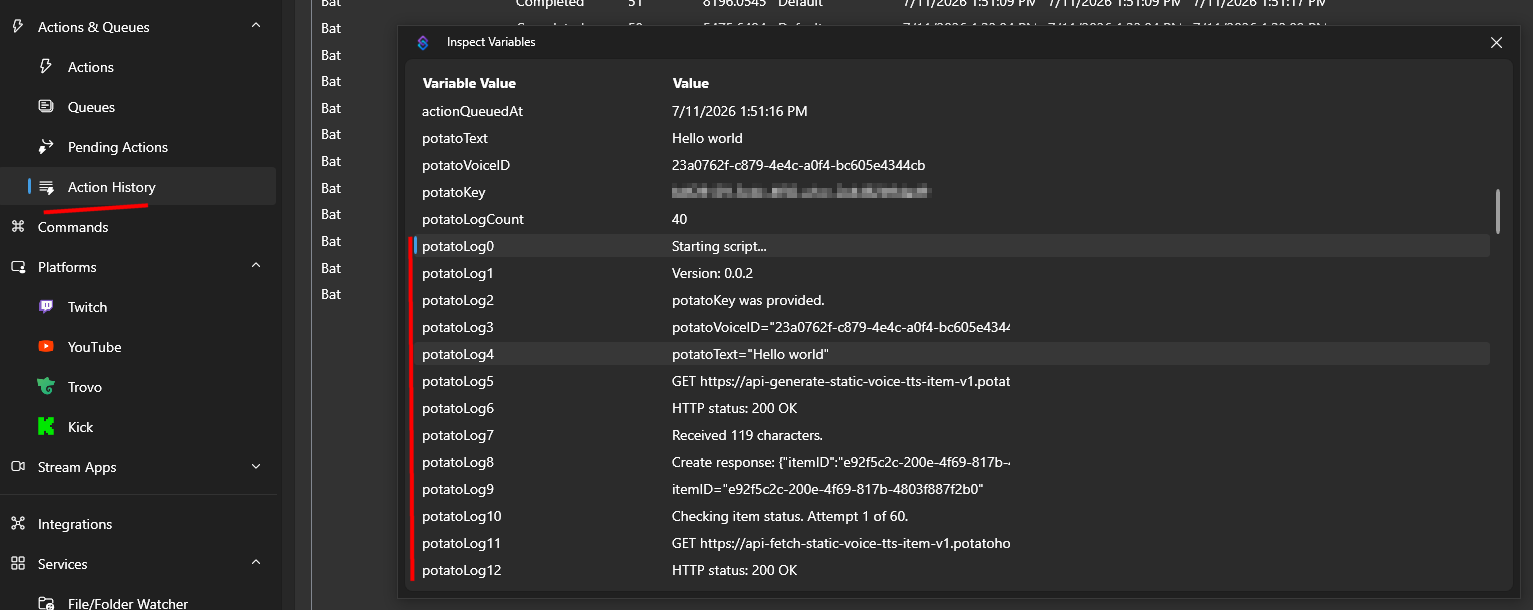
Ако скриптът не работи както се очаква, най-добрият начин да отстраните проблема е да проверите логовете за действия.
Можете да го направите, като прегледате вашите променливи за действието чрез Историята на действията.
Това ръководство беше публикувано за първи път на 2026-07-11 и беше последно променено на 2026-07-11.
Други подобни ръководства
Ето още няколко практични ръководства, които може да ви бъдат полезни.


