
PotatoHotDog пропонує безкоштовний API для генерації зображень за допомогою штучного інтелекту, який можна викликати безпосередньо з Streamer.bot, без потреби у сторонньому проміжному програмному забезпеченні. Цей посібник показує, як додати невеликий користувацький C#-скрипт до піддії Execute Code у Streamer.bot, який генерує зображення ШІ за текстовим запитом та зберігає його на диск.
Скрипт потребує лише вашого API-ключа PotatoHotDog та запиту, який описує зображення, яке ви хочете згенерувати, і завантажене зображення зберігається у спеціальній папці всередині каталогу встановлення Streamer.bot.
Підготуйте API-ключ
Якщо у вас його ще немає, згенеруйте API-ключ із вашої панелі керування та тримайте його готовим — він знадобиться вам на наступному кроці.
Перейти до API-ключів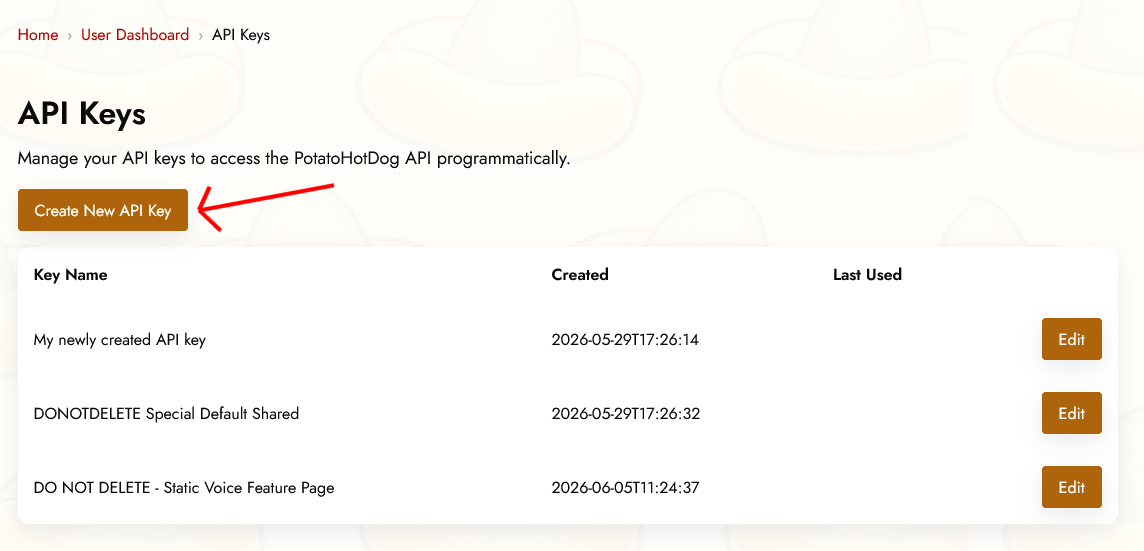
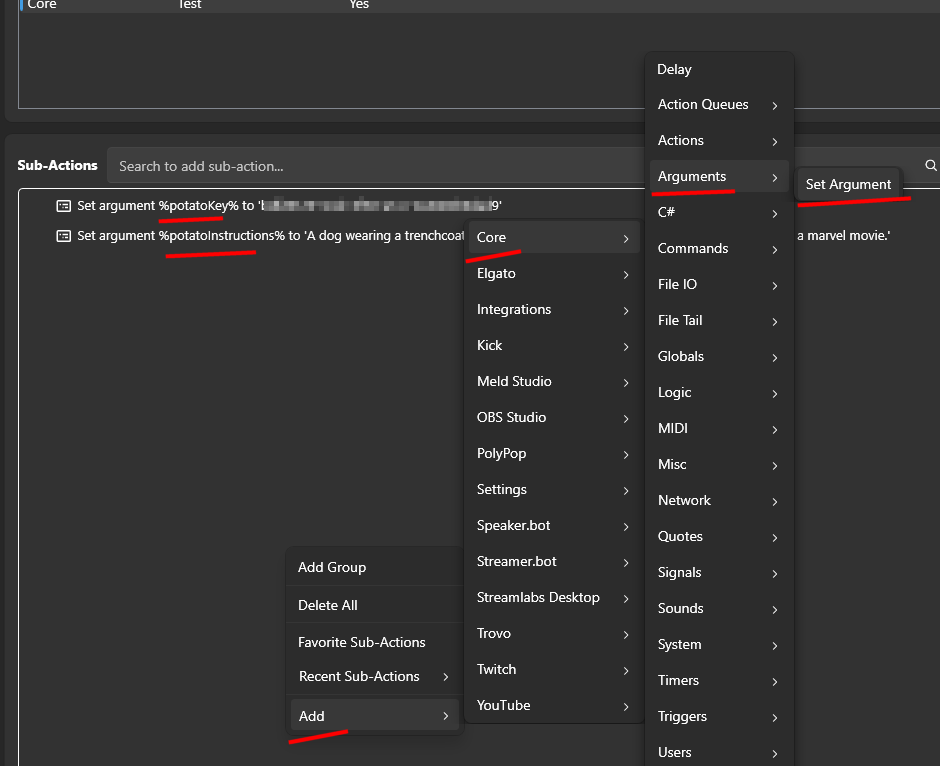
Передумовні Аргументи
Щоб згенерувати AI-зображення, потрібно вказати два аргументи в Streamer.bot перед тим, як запуститься піддія Execute Code. Іншими словами, ці дві речі потрібно вказати:
- API-ключ.
- Інструкції до запиту, які описують зображення, яке ви хочете згенерувати.
Вони відповідають наступним аргументам Streamer.bot:
- potatoKey
- potatoInstructions
Ви задаєте аргументи для вашої дії, клацнувши правою кнопкою миші на Sub Actions, потім вибравши Add, Core, Arguments, та нарешті Set Argument.
Додавання дії «Виконати код» у Streamer.bot
Відкрийте Streamer.bot і перейдіть на вкладку Дії. Створіть нову дію або відкрийте існуючу, і дайте їй назву, яку знатимете пізніше, наприклад "PotatoHotDog AI Image".
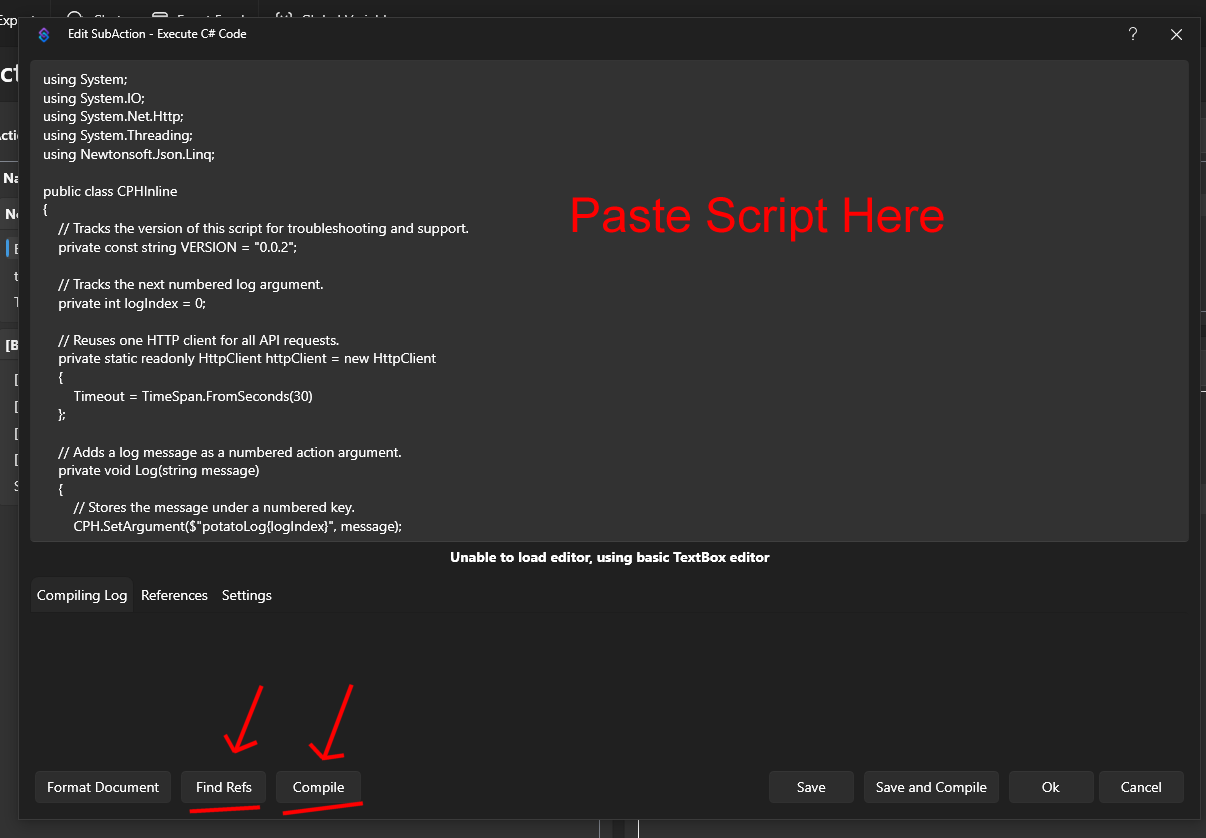
З обраною дією натисніть Додати під розділом «Піддії», потім оберіть Core, а далі — Execute C# Code. Це додає піддію, куди ви можете вставити сирий C# код, який Streamer.bot компілює та виконує на льоту.

Вставте нижче наведений скрипт у редактор коду. Він зчитує аргументи potatoKey та potatoInstructions, викликає наш Generate AI Image API для створення зображення та отримання його URL, а потім завантажує отримане зображення у папку з назвою temp_potatohotdog_images у каталозі встановлення Streamer.bot.
using System;
using System.IO;
using System.Net.Http;
using Newtonsoft.Json.Linq;

public class CPHInline
{
    // Tracks the version of this script for troubleshooting and support.
    private const string VERSION = "1.0.0";

    // Base URL for the endpoint that generates an AI image.
    private const string BASE_URL_GENERATE = "https://api-generate-image-v1.potatohotdog.com/";

    // Tracks the next numbered log argument.
    private int logIndex = 0;

    // Reuses one HTTP client for all API requests.
    private static readonly HttpClient httpClient = new HttpClient
    {
        Timeout = TimeSpan.FromSeconds(30)
    };

    // Adds a log message as a numbered action argument.
    private void Log(string message)
    {
        // Stores the message under a numbered key.
        CPH.SetArgument($"potatoLog{logIndex}", message);

        // Advances the log index for the next message.
        logIndex++;

        // Keeps the total log count in sync.
        CPH.SetArgument("potatoLogCount", logIndex);
    }

    // Ensures a required action argument exists and is not empty.
    private bool RequireArgument(string name, out string value)
    {
        // Fails when the argument is missing or blank.
        if (!CPH.TryGetArg(name, out value) || string.IsNullOrWhiteSpace(value))
        {
            value = "";
            return false;
        }

        return true;
    }

    // URL-encodes a value so it can safely be used in a query string.
    private string EncodeUrlValue(string value)
    {
        // Escapes reserved characters for safe use in a URL.
        return Uri.EscapeDataString(value);
    }

    // Performs an HTTP GET request and returns the response body.
    private string HttpGet(string url)
    {
        try
        {
            Log($"GET {url}");

            // Sends the HTTP request synchronously.
            HttpResponseMessage response =
                httpClient.GetAsync(url).GetAwaiter().GetResult();

            // Reads the complete response body.
            string responseBody =
                response.Content.ReadAsStringAsync().GetAwaiter().GetResult();

            Log($"HTTP status: {(int)response.StatusCode} {response.ReasonPhrase}");

            // Stops when the server returns an unsuccessful status code.
            if (!response.IsSuccessStatusCode)
            {
                Log($"Error: HTTP request failed with status {(int)response.StatusCode} {response.ReasonPhrase}.");

                // Logs the server error response when available.
                if (!string.IsNullOrWhiteSpace(responseBody))
                {
                    Log($"Error response: {responseBody}");
                }

                return null;
            }

            Log($"Received {responseBody.Length} characters.");

            return responseBody;
        }
        catch (Exception exception)
        {
            // Logs network, timeout, and other HTTP-related exceptions.
            Log($"Error: HTTP request failed: {exception.Message}");
            return null;
        }
    }

    // Downloads a file from a URL and saves it to disk.
    private bool DownloadFile(string url, string destinationPath)
    {
        try
        {
            Log($"Downloading image from \"{url}\".");
            Log($"Saving image to \"{destinationPath}\".");

            // Sends the image download request.
            HttpResponseMessage response =
                httpClient.GetAsync(url).GetAwaiter().GetResult();

            Log($"Image download HTTP status: {(int)response.StatusCode} {response.ReasonPhrase}");

            // Reads the complete image response into memory.
            byte[] fileData = response.Content.ReadAsByteArrayAsync().GetAwaiter().GetResult();

            // Stops when the image server returns an unsuccessful status.
            if (!response.IsSuccessStatusCode)
            {
                Log($"Error: Image download failed with status {(int)response.StatusCode} {response.ReasonPhrase}.");

                return false;
            }

            // Rejects an empty image response.
            if (fileData == null || fileData.Length == 0)
            {
                Log("Error: The downloaded image file is empty.");
                return false;
            }

            // Writes the downloaded image bytes to the destination file.
            File.WriteAllBytes(destinationPath, fileData);

            Log($"Downloaded {fileData.Length} image bytes.");

            // Confirms that the image file now exists on disk.
            if (!File.Exists(destinationPath))
            {
                Log("Error: The image download completed, but the file does not exist on disk.");

                return false;
            }

            // Reports the final file size from disk.
            FileInfo fileInfo = new FileInfo(destinationPath);

            Log($"Image file saved successfully. File size: {fileInfo.Length} bytes.");

            return true;
        }
        catch (Exception exception)
        {
            // Logs download, filesystem, and permission errors.
            Log($"Error: Could not download the image file: {exception.Message}");

            return false;
        }
    }

    // Extracts a required string value from a JSON response.
    private bool TryGetJsonString(string json, string propertyName, out string value)
    {
        value = "";

        try
        {
            // Parses the response body as a JSON object.
            JObject jsonObject = JObject.Parse(json);

            // Retrieves the requested JSON property.
            JToken property = jsonObject[propertyName];

            if (property == null)
            {
                Log($"Error: JSON response does not contain \"{propertyName}\".");

                return false;
            }

            value = property.ToString();

            // Rejects empty JSON string values.
            if (string.IsNullOrWhiteSpace(value))
            {
                Log($"Error: JSON property \"{propertyName}\" is empty.");

                value = "";

                return false;
            }

            return true;
        }
        catch (Exception exception)
        {
            // Logs malformed JSON and property conversion errors.
            Log($"Error: Could not parse JSON property \"{propertyName}\": {exception.Message}");

            return false;
        }
    }

    // Creates and returns the dedicated PotatoImage folder.
    private string GetImageFolder()
    {
        // Uses Streamer.bot's application directory instead of the process working directory.
        string streamerBotFolder = AppDomain.CurrentDomain.BaseDirectory;

        // Places generated image files inside a dedicated subfolder.
        string imageFolder = Path.Combine(streamerBotFolder, "temp_potatohotdog_images");

        Log($"Streamer.bot folder: \"{streamerBotFolder}\".");
        Log($"Image folder: \"{imageFolder}\".");

        // Creates the image folder if it does not already exist.
        if (!Directory.Exists(imageFolder))
        {
            Log("Image folder does not exist. Creating it...");

            Directory.CreateDirectory(imageFolder);

            Log("Image folder created.");
        }
        else
        {
            Log("Image folder already exists.");
        }

        return imageFolder;
    }

    // Runs the main PotatoHotdog AI image action.
    public bool Execute()
    {
        // Resets log numbering for this execution.
        logIndex = 0;
        CPH.SetArgument("potatoLogCount", 0);

        Log("Starting script...");

        // Logs the script version so runs can be tracked over time.
        Log($"Version: {VERSION}");

        // Retrieves the PotatoHotdog API key.
        if (!RequireArgument("potatoKey", out string potatoKey))
        {
            Log("Error: potatoKey variable is missing. Please login to potatohotdog.com, generate an API key, create a set variable action and save the variable \"potatoKey\" with your key.");

            return false;
        }

        // Retrieves the prompt instructions describing the image to generate.
        if (!RequireArgument("potatoInstructions", out string potatoInstructions))
        {
            Log("Error: potatoInstructions variable is missing. Create a set variable action and save the variable \"potatoInstructions\" with a description of the image you want generated.");

            return false;
        }

        // Logs the non-secret input values.
        Log("potatoKey was provided.");
        Log($"potatoInstructions=\"{potatoInstructions}\"");

        // Builds the API URL used to generate the AI image.
        string generateUrl = BASE_URL_GENERATE + "?key=" + EncodeUrlValue(potatoKey) + "&instructions=" + EncodeUrlValue(potatoInstructions);

        // Requests generation of the AI image.
        string generateJson = HttpGet(generateUrl);

        if (generateJson == null)
        {
            Log("Error: Failed to generate the AI image.");
            return false;
        }

        Log($"Generate response: {generateJson}");

        // Extracts the generated item's ID, reused below as the local filename.
        if (!TryGetJsonString(generateJson, "itemID", out string itemID))
        {
            Log("Error: Could not retrieve itemID from the generate response.");

            return false;
        }

        Log($"itemID=\"{itemID}\"");

        // Logs the generation duration when present, purely for troubleshooting.
        if (TryGetJsonString(generateJson, "duration", out string duration))
        {
            Log($"duration={duration} second(s)");
        }

        // Extracts the generated image URL from the response.
        if (!TryGetJsonString(generateJson, "imageURL", out string imageURL))
        {
            Log("Error: Could not retrieve imageURL from the generate response.");

            return false;
        }

        Log($"imageURL=\"{imageURL}\"");

        string imageFolder;

        try
        {
            // Resolves and creates the dedicated PotatoImage directory.
            imageFolder = GetImageFolder();
        }
        catch (Exception exception)
        {
            Log($"Error: Could not create or access the image folder: {exception.Message}");

            return false;
        }

        // Reuses the item's own ID as the local filename instead of minting a new one.
        string imageFileName = $"{itemID}.png";

        // Combines the image folder and unique filename.
        string imageFilePath = Path.Combine(imageFolder, imageFileName);

        Log($"Generated image filename: \"{imageFileName}\".");
        Log($"Local image path: \"{imageFilePath}\".");

        // Downloads the generated image file to the PotatoImage folder.
        if (!DownloadFile(imageURL, imageFilePath))
        {
            Log("Error: Failed to download the generated AI image.");
            return false;
        }

        // Stores the remote image URL as a final action argument.
        CPH.SetArgument("potatoGeneratedImageURL", imageURL);

        // Stores the absolute local file path as a final action argument.
        CPH.SetArgument("potatoGeneratedImageFile", imageFilePath);

        Log($"potatoGeneratedImageURL=\"{imageURL}\"");
        Log($"potatoGeneratedImageFile=\"{imageFilePath}\"");

        Log("Finished.");

        return true;
    }
}
Після вставлення скрипта не забудьте натиснути Find Refs і Compile та переконайтесь, що він успішно компілюється. Збережіть дію, потім запустіть її вручну або прив'яжіть її до команди або до винагороди за очки каналу, щоб перевірити, що згенероване зображення.
Переглянути завантажене зображення
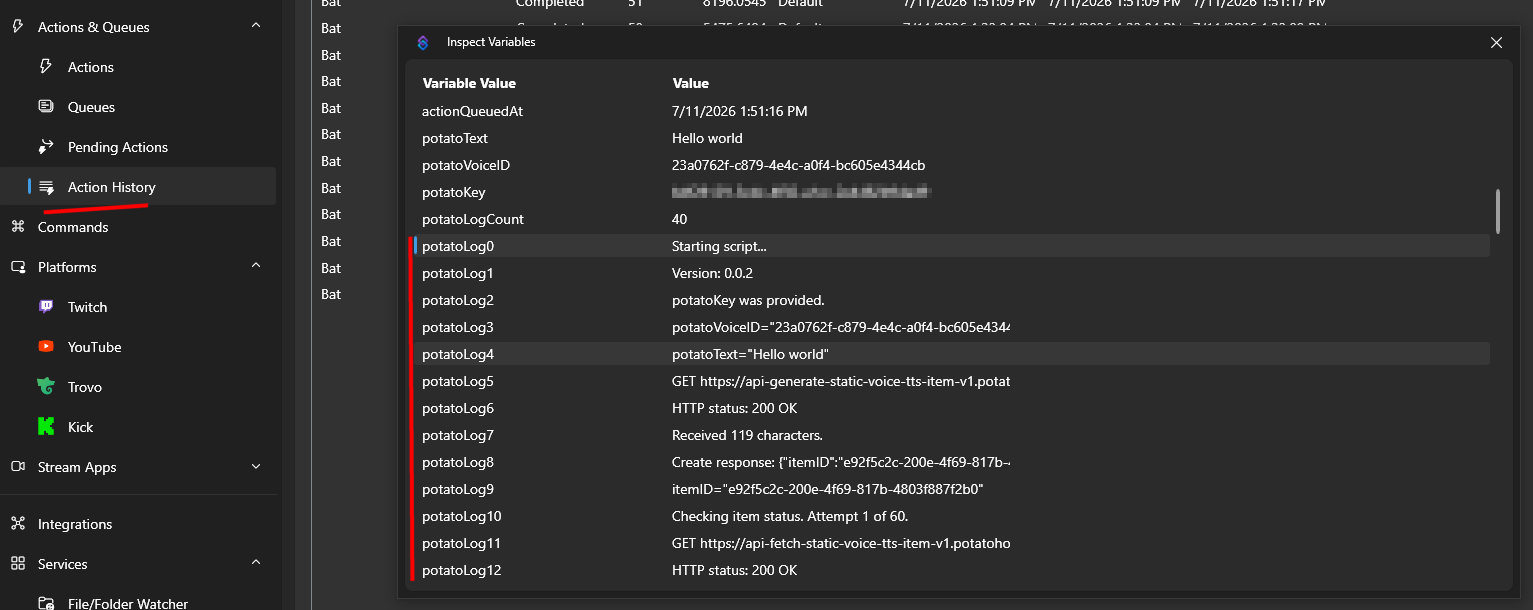
Після того, як дія виконається, ви зможете переглянути змінні Action через Action History, щоб підтвердити, що все спрацювало як очікувалося.
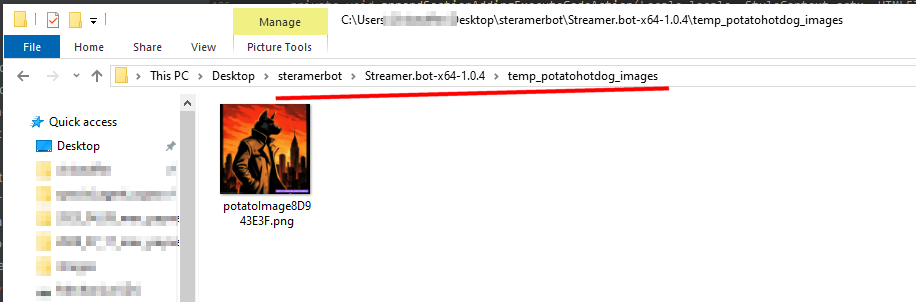
Там ви знайдете локальний шлях, де збережено згенероване зображення на диску, у папці temp_potatohotdog_images у каталозі встановлення Streamer.bot.
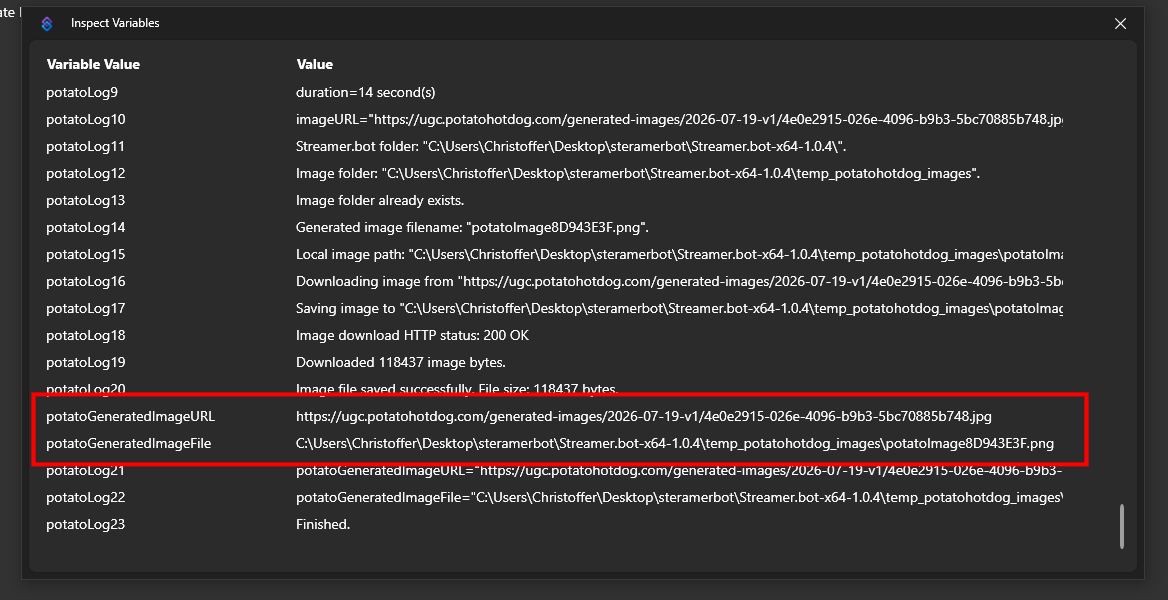
Відкрийте ту папку, щоб переглянути завантажене зображення безпосередньо.
Усунення несправностей
Якщо сценарій працює не так, як очікувалося, найкращий спосіб усунути проблему — перевірити журнали дій.
Ви можете зробити це, переглядаючи свої змінні дій через Історію дій.
Цей посібник вперше опублікований 2026-07-19, а востаннє змінено 2026-07-19.
Інші Подібні Керівництва
Ось ще кілька інших покрокових посібників, які можуть бути вам корисними.

