
PotatoHotDog ponuja brezplačen API Generate AI Images, ki ga lahko pokličete neposredno iz Streamer.bot, brez potrebe po kakršnem koli posredniku tretje osebe. Ta vodič vam pokaže, kako dodate majhno prilagojeno C# skripto v Streamer.bot Execute Code podakcijo, ki iz tekstovnega poziva generira AI sliko in jo shrani na disk.
Skript potrebuje le vaš PotatoHotDog API ključ in navodilo, ki opisuje sliko, ki jo želite ustvariti, ter shrani preneseno sliko v namensko mapo znotraj imenika za namestitev Streamer.bot.
Pripravi API ključ
Če ga še nimate, na nadzorni plošči ustvarite API ključ in ga imejte pri roki; v naslednjem koraku ga boste potrebovali.
Pojdi na API ključe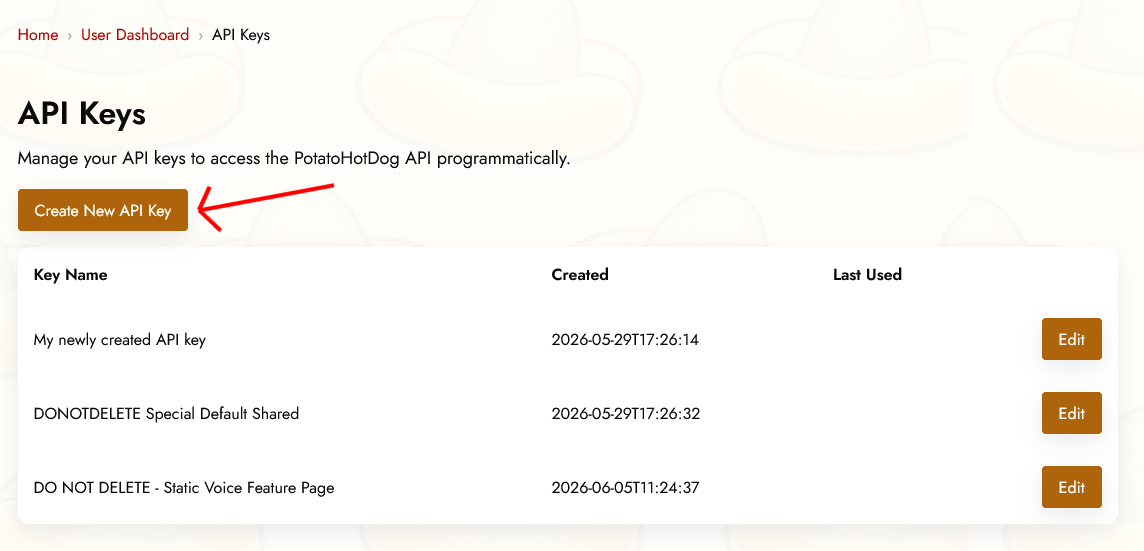
Predpogojni Argumenti
Da bi generirali AI sliko, je treba pred izvedbo podakcije Execute Code v Streamer.bot določiti dva argumenta. Oziroma, drugače povedano, je treba določiti te dve stvari:
- API ključ.
- Navodila v promptu, ki opisujejo sliko, ki jo želite ustvariti.
Ti se nanašajo na naslednje argumente Streamer.bot:
- potatoKey
- potatoInstructions
Določite argumente v vaši akciji z desnim klikom na Podakcije, nato izberite Dodaj, Jedro, Argumenti in na koncu Nastavi argument.
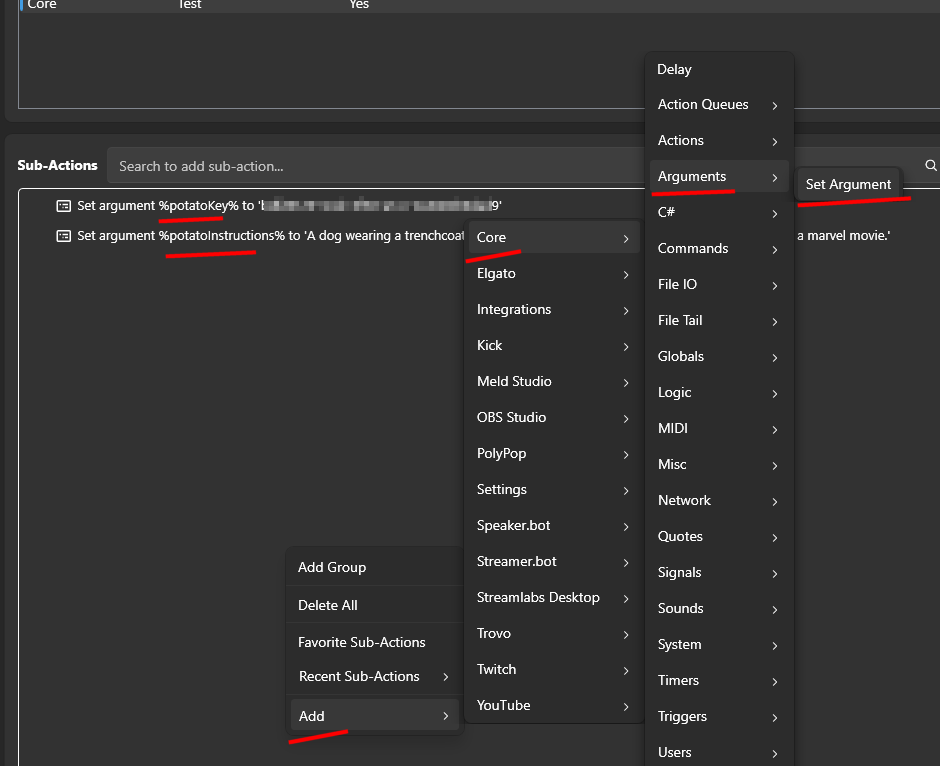
Dodajanje akcije Izvedi kodo v Streamer.bot
Odprite Streamer.bot in pojdite na zavihek Akcije. Ustvarite novo akcijo ali odprite obstoječo in ji dodelite ime, ki ga boste pozneje prepoznali, na primer "PotatoHotDog AI Image".
Ko imate izbrano dejanje, kliknite Dodaj pod Podakcije, nato izberite Core, nato Execute C# Code. To doda poddejanje, v katerem lahko prilepite surovo kodo C#, ki jo Streamer.bot prevede in zažene takoj.

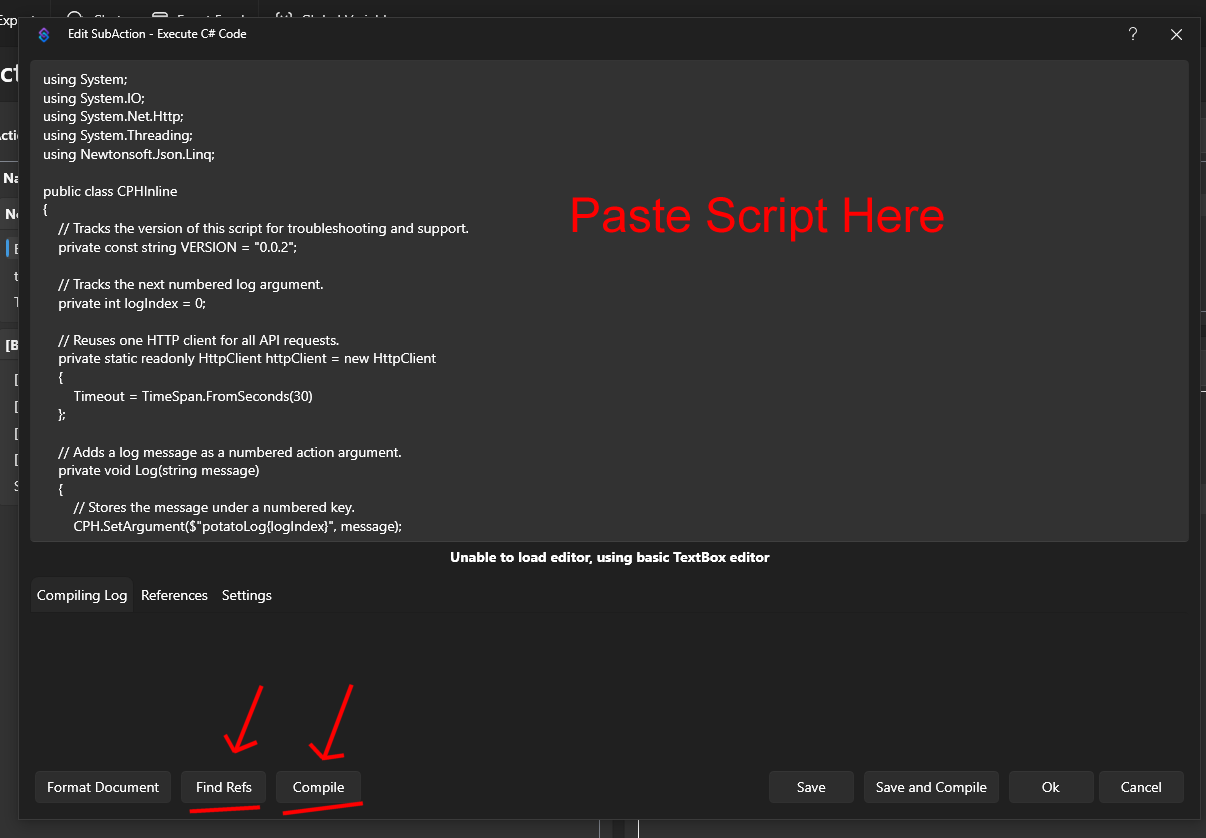
Prilepite spodnjo skripto v urejevalnik kode. Prebere argumenta potatoKey in potatoInstructions, pokliče naš Generate AI Image API, da ustvari sliko in pridobi njen URL, nato prenese dobljeno sliko v mapo z imenom temp_potatohotdog_images znotraj vašega namestitvenega direktorija Streamer.bot.
using System;
using System.IO;
using System.Net.Http;
using Newtonsoft.Json.Linq;

public class CPHInline
{
    // Tracks the version of this script for troubleshooting and support.
    private const string VERSION = "1.0.0";

    // Base URL for the endpoint that generates an AI image.
    private const string BASE_URL_GENERATE = "https://api-generate-image-v1.potatohotdog.com/";

    // Tracks the next numbered log argument.
    private int logIndex = 0;

    // Reuses one HTTP client for all API requests.
    private static readonly HttpClient httpClient = new HttpClient
    {
        Timeout = TimeSpan.FromSeconds(30)
    };

    // Adds a log message as a numbered action argument.
    private void Log(string message)
    {
        // Stores the message under a numbered key.
        CPH.SetArgument($"potatoLog{logIndex}", message);

        // Advances the log index for the next message.
        logIndex++;

        // Keeps the total log count in sync.
        CPH.SetArgument("potatoLogCount", logIndex);
    }

    // Ensures a required action argument exists and is not empty.
    private bool RequireArgument(string name, out string value)
    {
        // Fails when the argument is missing or blank.
        if (!CPH.TryGetArg(name, out value) || string.IsNullOrWhiteSpace(value))
        {
            value = "";
            return false;
        }

        return true;
    }

    // URL-encodes a value so it can safely be used in a query string.
    private string EncodeUrlValue(string value)
    {
        // Escapes reserved characters for safe use in a URL.
        return Uri.EscapeDataString(value);
    }

    // Performs an HTTP GET request and returns the response body.
    private string HttpGet(string url)
    {
        try
        {
            Log($"GET {url}");

            // Sends the HTTP request synchronously.
            HttpResponseMessage response =
                httpClient.GetAsync(url).GetAwaiter().GetResult();

            // Reads the complete response body.
            string responseBody =
                response.Content.ReadAsStringAsync().GetAwaiter().GetResult();

            Log($"HTTP status: {(int)response.StatusCode} {response.ReasonPhrase}");

            // Stops when the server returns an unsuccessful status code.
            if (!response.IsSuccessStatusCode)
            {
                Log($"Error: HTTP request failed with status {(int)response.StatusCode} {response.ReasonPhrase}.");

                // Logs the server error response when available.
                if (!string.IsNullOrWhiteSpace(responseBody))
                {
                    Log($"Error response: {responseBody}");
                }

                return null;
            }

            Log($"Received {responseBody.Length} characters.");

            return responseBody;
        }
        catch (Exception exception)
        {
            // Logs network, timeout, and other HTTP-related exceptions.
            Log($"Error: HTTP request failed: {exception.Message}");
            return null;
        }
    }

    // Downloads a file from a URL and saves it to disk.
    private bool DownloadFile(string url, string destinationPath)
    {
        try
        {
            Log($"Downloading image from \"{url}\".");
            Log($"Saving image to \"{destinationPath}\".");

            // Sends the image download request.
            HttpResponseMessage response =
                httpClient.GetAsync(url).GetAwaiter().GetResult();

            Log($"Image download HTTP status: {(int)response.StatusCode} {response.ReasonPhrase}");

            // Reads the complete image response into memory.
            byte[] fileData = response.Content.ReadAsByteArrayAsync().GetAwaiter().GetResult();

            // Stops when the image server returns an unsuccessful status.
            if (!response.IsSuccessStatusCode)
            {
                Log($"Error: Image download failed with status {(int)response.StatusCode} {response.ReasonPhrase}.");

                return false;
            }

            // Rejects an empty image response.
            if (fileData == null || fileData.Length == 0)
            {
                Log("Error: The downloaded image file is empty.");
                return false;
            }

            // Writes the downloaded image bytes to the destination file.
            File.WriteAllBytes(destinationPath, fileData);

            Log($"Downloaded {fileData.Length} image bytes.");

            // Confirms that the image file now exists on disk.
            if (!File.Exists(destinationPath))
            {
                Log("Error: The image download completed, but the file does not exist on disk.");

                return false;
            }

            // Reports the final file size from disk.
            FileInfo fileInfo = new FileInfo(destinationPath);

            Log($"Image file saved successfully. File size: {fileInfo.Length} bytes.");

            return true;
        }
        catch (Exception exception)
        {
            // Logs download, filesystem, and permission errors.
            Log($"Error: Could not download the image file: {exception.Message}");

            return false;
        }
    }

    // Extracts a required string value from a JSON response.
    private bool TryGetJsonString(string json, string propertyName, out string value)
    {
        value = "";

        try
        {
            // Parses the response body as a JSON object.
            JObject jsonObject = JObject.Parse(json);

            // Retrieves the requested JSON property.
            JToken property = jsonObject[propertyName];

            if (property == null)
            {
                Log($"Error: JSON response does not contain \"{propertyName}\".");

                return false;
            }

            value = property.ToString();

            // Rejects empty JSON string values.
            if (string.IsNullOrWhiteSpace(value))
            {
                Log($"Error: JSON property \"{propertyName}\" is empty.");

                value = "";

                return false;
            }

            return true;
        }
        catch (Exception exception)
        {
            // Logs malformed JSON and property conversion errors.
            Log($"Error: Could not parse JSON property \"{propertyName}\": {exception.Message}");

            return false;
        }
    }

    // Creates and returns the dedicated PotatoImage folder.
    private string GetImageFolder()
    {
        // Uses Streamer.bot's application directory instead of the process working directory.
        string streamerBotFolder = AppDomain.CurrentDomain.BaseDirectory;

        // Places generated image files inside a dedicated subfolder.
        string imageFolder = Path.Combine(streamerBotFolder, "temp_potatohotdog_images");

        Log($"Streamer.bot folder: \"{streamerBotFolder}\".");
        Log($"Image folder: \"{imageFolder}\".");

        // Creates the image folder if it does not already exist.
        if (!Directory.Exists(imageFolder))
        {
            Log("Image folder does not exist. Creating it...");

            Directory.CreateDirectory(imageFolder);

            Log("Image folder created.");
        }
        else
        {
            Log("Image folder already exists.");
        }

        return imageFolder;
    }

    // Runs the main PotatoHotdog AI image action.
    public bool Execute()
    {
        // Resets log numbering for this execution.
        logIndex = 0;
        CPH.SetArgument("potatoLogCount", 0);

        Log("Starting script...");

        // Logs the script version so runs can be tracked over time.
        Log($"Version: {VERSION}");

        // Retrieves the PotatoHotdog API key.
        if (!RequireArgument("potatoKey", out string potatoKey))
        {
            Log("Error: potatoKey variable is missing. Please login to potatohotdog.com, generate an API key, create a set variable action and save the variable \"potatoKey\" with your key.");

            return false;
        }

        // Retrieves the prompt instructions describing the image to generate.
        if (!RequireArgument("potatoInstructions", out string potatoInstructions))
        {
            Log("Error: potatoInstructions variable is missing. Create a set variable action and save the variable \"potatoInstructions\" with a description of the image you want generated.");

            return false;
        }

        // Logs the non-secret input values.
        Log("potatoKey was provided.");
        Log($"potatoInstructions=\"{potatoInstructions}\"");

        // Builds the API URL used to generate the AI image.
        string generateUrl = BASE_URL_GENERATE + "?key=" + EncodeUrlValue(potatoKey) + "&instructions=" + EncodeUrlValue(potatoInstructions);

        // Requests generation of the AI image.
        string generateJson = HttpGet(generateUrl);

        if (generateJson == null)
        {
            Log("Error: Failed to generate the AI image.");
            return false;
        }

        Log($"Generate response: {generateJson}");

        // Extracts the generated item's ID, reused below as the local filename.
        if (!TryGetJsonString(generateJson, "itemID", out string itemID))
        {
            Log("Error: Could not retrieve itemID from the generate response.");

            return false;
        }

        Log($"itemID=\"{itemID}\"");

        // Logs the generation duration when present, purely for troubleshooting.
        if (TryGetJsonString(generateJson, "duration", out string duration))
        {
            Log($"duration={duration} second(s)");
        }

        // Extracts the generated image URL from the response.
        if (!TryGetJsonString(generateJson, "imageURL", out string imageURL))
        {
            Log("Error: Could not retrieve imageURL from the generate response.");

            return false;
        }

        Log($"imageURL=\"{imageURL}\"");

        string imageFolder;

        try
        {
            // Resolves and creates the dedicated PotatoImage directory.
            imageFolder = GetImageFolder();
        }
        catch (Exception exception)
        {
            Log($"Error: Could not create or access the image folder: {exception.Message}");

            return false;
        }

        // Reuses the item's own ID as the local filename instead of minting a new one.
        string imageFileName = $"{itemID}.png";

        // Combines the image folder and unique filename.
        string imageFilePath = Path.Combine(imageFolder, imageFileName);

        Log($"Generated image filename: \"{imageFileName}\".");
        Log($"Local image path: \"{imageFilePath}\".");

        // Downloads the generated image file to the PotatoImage folder.
        if (!DownloadFile(imageURL, imageFilePath))
        {
            Log("Error: Failed to download the generated AI image.");
            return false;
        }

        // Stores the remote image URL as a final action argument.
        CPH.SetArgument("potatoGeneratedImageURL", imageURL);

        // Stores the absolute local file path as a final action argument.
        CPH.SetArgument("potatoGeneratedImageFile", imageFilePath);

        Log($"potatoGeneratedImageURL=\"{imageURL}\"");
        Log($"potatoGeneratedImageFile=\"{imageFilePath}\"");

        Log("Finished.");

        return true;
    }
}
Po prilepljanju skripte se prepričajte, da kliknete Find Refs in Compile in da se uspešno kompilira. Shrani dejanje, nato ga sprožite ročno ali ga povežite z ukazom ali nagrado kanalnih točk, da preverite, ali je slika pravilno generirana.
Preveri preneseno sliko
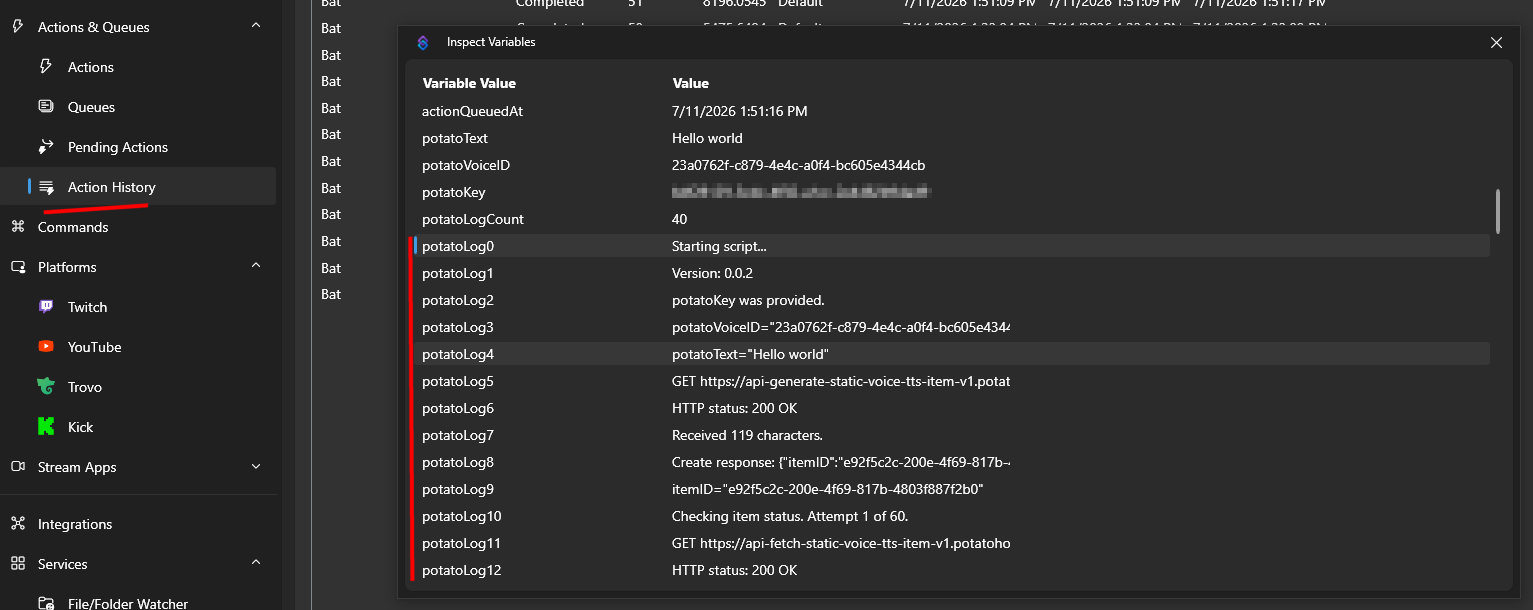
Ko se akcija izvede, lahko preko Zgodovine akcij preverite akcijske spremenljivke, da potrdite, da je vse delovalo, kot je bilo pričakovano.
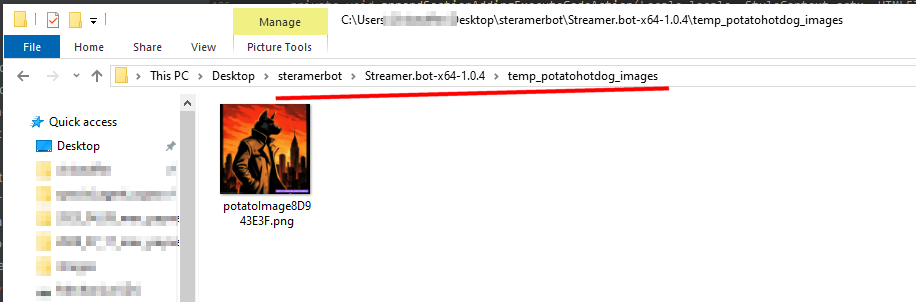
Tam boste našli lokalno pot, na kateri je bila generirana slika shranjena na disku, znotraj mape temp_potatohotdog_images v vašem imeniku namestitve Streamer.bot.
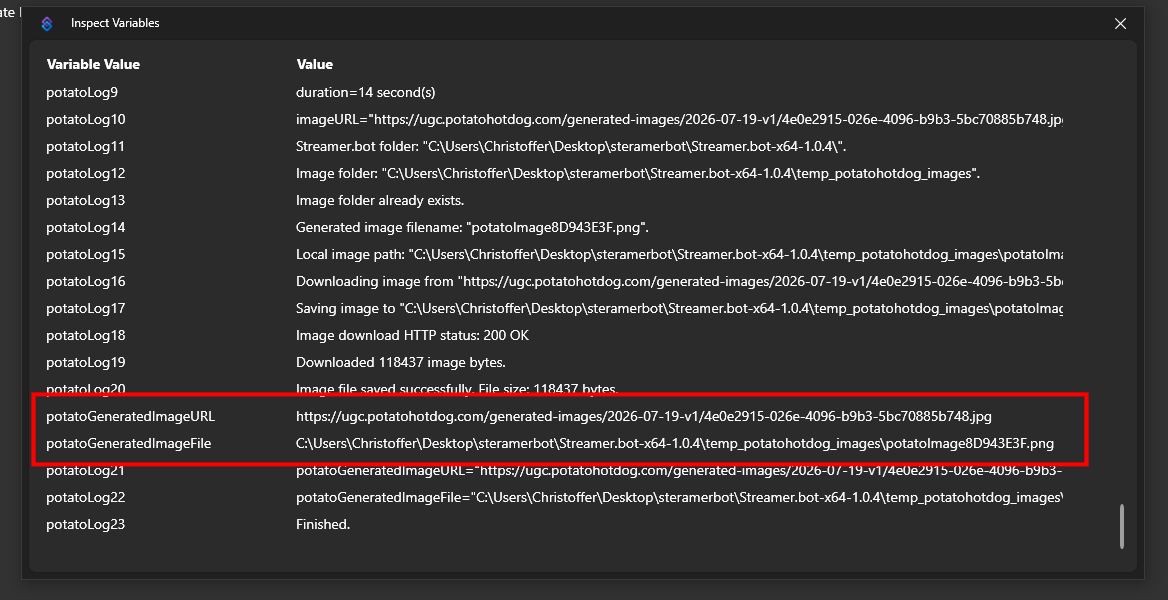
Odprite tisto mapo, da boste neposredno videli preneseno sliko.
Odpravljanje težav
Če skripta ne deluje, kot je pričakovano, je najboljši način za odpravljanje napak preverjanje zapisnikov dejanj.
To lahko storite tako, da preverite svoje spremenljivke akcije preko Zgodovine dejanj.
Ta vodič je bil prvič objavljen 2026-07-19 in bil nazadnje spremenjen 2026-07-19.
Drugi Podobni Vodiči
Tukaj je še nekaj drugih vodnikov po korakih, ki bi vam lahko bili koristni.

