
PotatoHotDog ponúka bezplatné API TTS (Text-to-Speech), ktoré môžete volať priamo zo Streamer.bot, bez potreby Speaker.bot alebo akéhokoľvek iného middleware od tretích strán. Tento návod ukazuje, ako pridať malý vlastný skript v C# do podakcie Execute Code vo Streamer.bot, ktorý vygeneruje reč, stiahne zvuk a automaticky ho prehrá.
Poskytujeme dva hotové skripty, ktoré si môžete skopírovať a vložiť: jeden na prehrávanie statického Piper TTS hlasu a druhý na prehrávanie vášho vlastného klonovaného hlasu. Oba skripty potrebujú iba váš PotatoHotDog API kľúč, ID hlasu a text, ktorý má byť prečítaný.
Požadované Argumenty
Na generovanie TTS je potrebné zadať tri argumenty vo Streamer.bot pred spustením podakcie Execute Code. Inak povedané, tieto tri veci treba zadať:
- API kľúč.
- ID hlasu, ktorý chcete vygenerovať, buď statický hlas alebo klonovaný hlas.
- Text.
Tieto zodpovedajú nasledujúcim argumentom Streamer.bot:
- potatoKey
- potatoVoiceID
- potatoText
Špecifikujete argumenty vo svojej akcii tak, že kliknete pravým tlačidlom myši na podriadené akcie, potom vyberiete Pridať, Jadro, Argumenty a nakoniec Nastaviť argument.
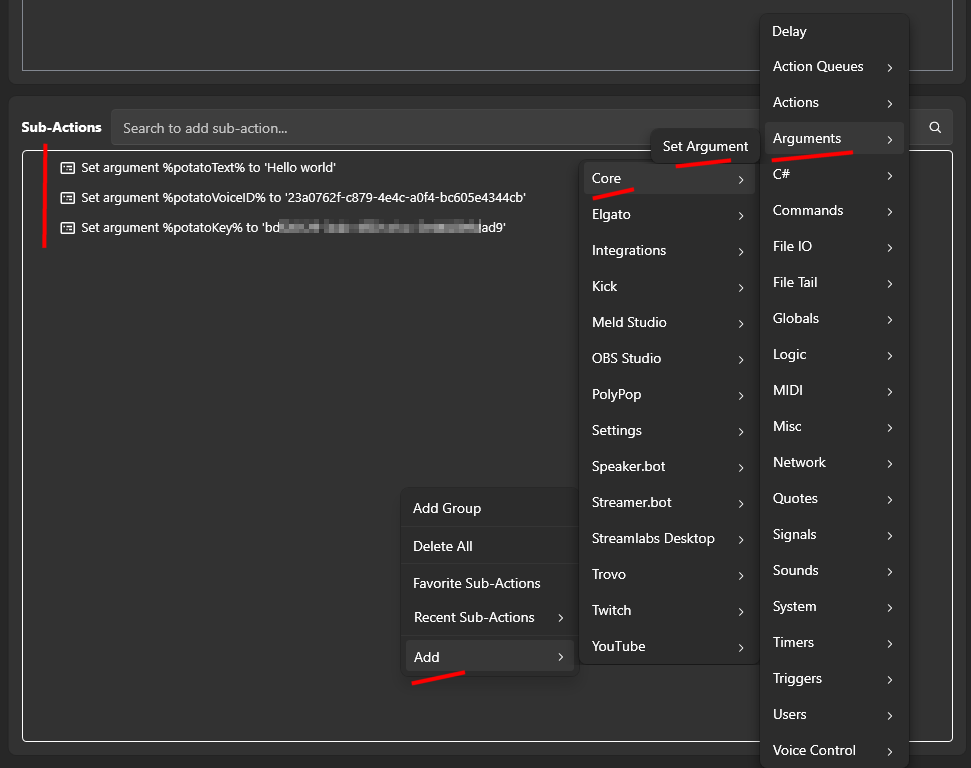
Pridanie akcie Execute Code v Streamer.bot
Otvorte Streamer.bot a prejdite na kartu Akcie. Vytvorte novú akciu alebo otvorte existujúcu a dajte jej názov, ktorý neskôr rozpoznáte, napríklad "PotatoHotDog TTS".
Keď je vybraná vaša akcia, kliknite na Pridať podriadené akcie, potom vyberte Core a následne Spustiť C# kód. Toto pridá podriadenú akciu, do ktorej môžete vložiť surový C# kód, ktorý Streamer.bot skompiluje a spustí naživo.

Vložte jeden zo skriptov nižšie uvedených do editora kódu, podľa toho, či chcete prehrávať statický hlas alebo klonovaný hlas. Obe skripty predpokladajú, že na akcii už existuje niekoľko argumentov. Pozrite si nižšie uvedené Predpokladané argumenty, ako ich nastaviť.
Po vložení skriptu si tiež pamätajte na kliknutie na Nájsť referencie a Skompilovať a uistite sa, že skript je úspešne skompilovaný.
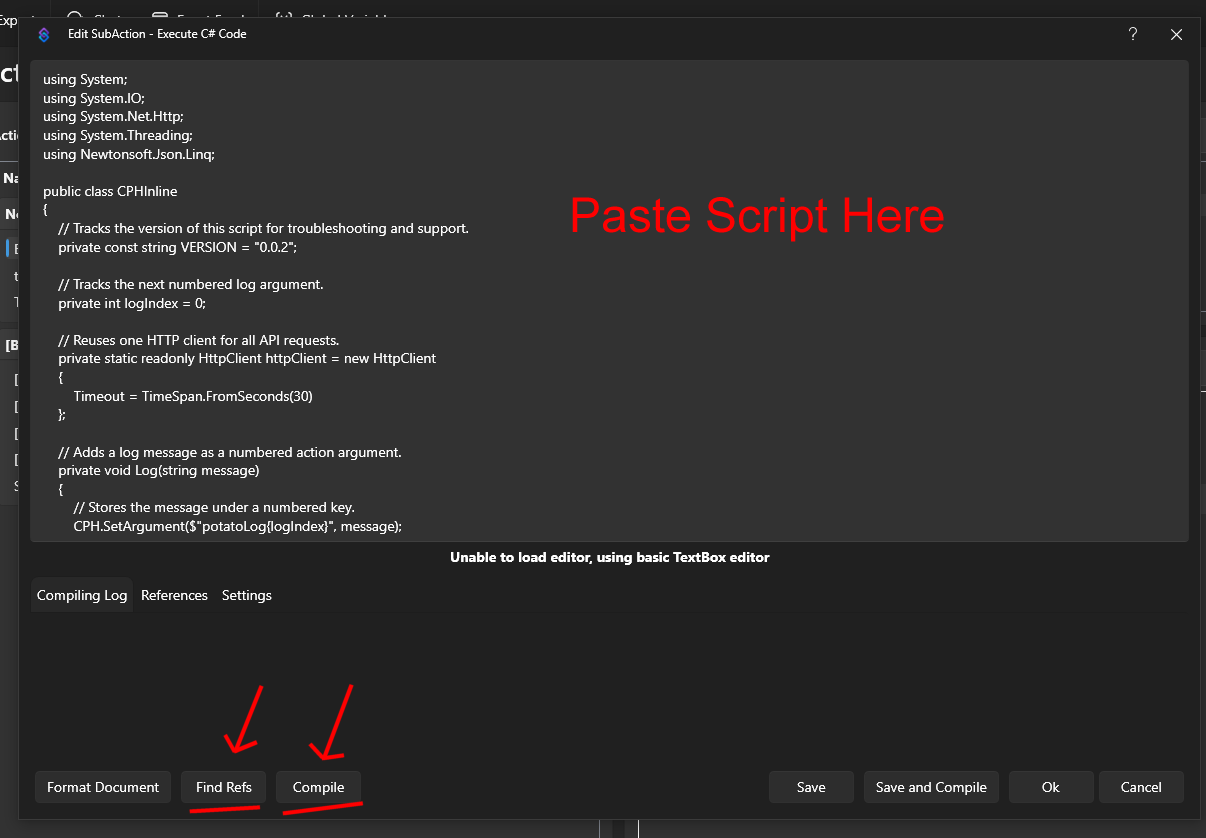
Váš PotatoHotDog API kľúč môžete vygenerovať zo svojho dashboardu. Uložte akciu a potom ju spustite manuálne alebo ju prepojte s príkazom alebo odmenou za kanálové body, aby ste otestovali, že zvuk sa správne prehráva.
Skript na prehrávanie statického hlasu
Tento skript prehrá statický Piper TTS hlas. Vygeneruje reč, počká, kým sa spracovanie dokončí, stiahne výsledný audio súbor a prehrá ho vo Streamer.bot. Na našej stránke Static Voices nájdete zoznam dostupných identifikátorov statických hlasov.
Prehliadať Statické Hlasyusing System;
using System.IO;
using System.Net.Http;
using System.Threading;
using Newtonsoft.Json.Linq;
public class CPHInline
{
// Tracks the version of this script for troubleshooting and support.
private const string VERSION = "2 (static)";
// Base URL for the endpoint that creates a new TTS item.
private const string BASE_URL_GENERATE = "https://api-generate-static-voice-tts-item-v1.potatohotdog.com/";
// Base URL for the endpoint that polls a TTS item's status.
private const string BASE_URL_STATUS = "https://api-fetch-static-voice-tts-item-v1.potatohotdog.com/";
// Tracks the next numbered log argument.
private int logIndex = 0;
// Reuses one HTTP client for all API requests.
private static readonly HttpClient httpClient = new HttpClient
{
Timeout = TimeSpan.FromSeconds(30)
};
// Adds a log message as a numbered action argument.
private void Log(string message)
{
// Stores the message under a numbered key.
CPH.SetArgument($"potatoLog{logIndex}", message);
// Advances the log index for the next message.
logIndex++;
// Keeps the total log count in sync.
CPH.SetArgument("potatoLogCount", logIndex);
}
// Ensures a required action argument exists and is not empty.
private bool RequireArgument(string name, out string value)
{
// Fails when the argument is missing or blank.
if (!CPH.TryGetArg(name, out value) || string.IsNullOrWhiteSpace(value))
{
value = "";
return false;
}
return true;
}
// URL-encodes a value so it can safely be used in a query string.
private string EncodeUrlValue(string value)
{
// Escapes reserved characters for safe use in a URL.
return Uri.EscapeDataString(value);
}
// Performs an HTTP GET request and returns the response body.
private string HttpGet(string url)
{
try
{
Log($"GET {url}");
// Sends the HTTP request synchronously.
HttpResponseMessage response =
httpClient.GetAsync(url).GetAwaiter().GetResult();
// Reads the complete response body.
string responseBody =
response.Content.ReadAsStringAsync().GetAwaiter().GetResult();
Log($"HTTP status: {(int)response.StatusCode} {response.ReasonPhrase}");
// Stops when the server returns an unsuccessful status code.
if (!response.IsSuccessStatusCode)
{
Log($"Error: HTTP request failed with status {(int)response.StatusCode} {response.ReasonPhrase}.");
// Logs the server error response when available.
if (!string.IsNullOrWhiteSpace(responseBody))
{
Log($"Error response: {responseBody}");
}
return null;
}
Log($"Received {responseBody.Length} characters.");
return responseBody;
}
catch (Exception exception)
{
// Logs network, timeout, and other HTTP-related exceptions.
Log($"Error: HTTP request failed: {exception.Message}");
return null;
}
}
// Downloads a file from a URL and saves it to disk.
private bool DownloadFile(string url, string destinationPath)
{
try
{
Log($"Downloading audio from \"{url}\".");
Log($"Saving audio to \"{destinationPath}\".");
// Sends the audio download request.
HttpResponseMessage response =
httpClient.GetAsync(url).GetAwaiter().GetResult();
Log($"Audio download HTTP status: {(int)response.StatusCode} {response.ReasonPhrase}");
// Reads the complete audio response into memory.
byte[] fileData =
response.Content.ReadAsByteArrayAsync().GetAwaiter().GetResult();
// Stops when the audio server returns an unsuccessful status.
if (!response.IsSuccessStatusCode)
{
Log($"Error: Audio download failed with status {(int)response.StatusCode} {response.ReasonPhrase}.");
return false;
}
// Rejects an empty audio response.
if (fileData == null || fileData.Length == 0)
{
Log("Error: The downloaded audio file is empty.");
return false;
}
// Writes the downloaded audio bytes to the destination file.
File.WriteAllBytes(destinationPath, fileData);
Log($"Downloaded {fileData.Length} audio bytes.");
// Confirms that the audio file now exists on disk.
if (!File.Exists(destinationPath))
{
Log("Error: The audio download completed, but the file does not exist on disk.");
return false;
}
// Reports the final file size from disk.
FileInfo fileInfo = new FileInfo(destinationPath);
Log($"Audio file saved successfully. File size: {fileInfo.Length} bytes.");
return true;
}
catch (Exception exception)
{
// Logs download, filesystem, and permission errors.
Log($"Error: Could not download the audio file: {exception.Message}");
return false;
}
}
// Extracts a required string value from a JSON response.
private bool TryGetJsonString(string json, string propertyName, out string value)
{
value = "";
try
{
// Parses the response body as a JSON object.
JObject jsonObject = JObject.Parse(json);
// Retrieves the requested JSON property.
JToken property = jsonObject[propertyName];
if (property == null)
{
Log($"Error: JSON response does not contain \"{propertyName}\".");
return false;
}
value = property.ToString();
// Rejects empty JSON string values.
if (string.IsNullOrWhiteSpace(value))
{
Log($"Error: JSON property \"{propertyName}\" is empty.");
value = "";
return false;
}
return true;
}
catch (Exception exception)
{
// Logs malformed JSON and property conversion errors.
Log($"Error: Could not parse JSON property \"{propertyName}\": {exception.Message}");
return false;
}
}
// Extracts a required integer value from a JSON response.
private bool TryGetJsonInteger(string json, string propertyName, out int value)
{
value = 0;
try
{
// Parses the response body as a JSON object.
JObject jsonObject = JObject.Parse(json);
// Retrieves the requested JSON property.
JToken property = jsonObject[propertyName];
if (property == null)
{
Log($"Error: JSON response does not contain \"{propertyName}\".");
return false;
}
// Converts the JSON property to an integer.
if (!int.TryParse(property.ToString(), out value))
{
Log($"Error: JSON property \"{propertyName}\" is not a valid integer.");
value = 0;
return false;
}
return true;
}
catch (Exception exception)
{
// Logs malformed JSON and property conversion errors.
Log($"Error: Could not parse JSON property \"{propertyName}\": {exception.Message}");
return false;
}
}
// Creates a unique PotatoHotdog WAV filename.
private string CreateAudioFileName()
{
// Uses eight GUID characters to avoid overwriting previous files.
string uniqueID = Guid.NewGuid().ToString("N").Substring(0, 8).ToUpperInvariant();
return $"potatoAudio{uniqueID}.wav";
}
// Creates and returns the dedicated PotatoAudio folder.
private string GetAudioFolder()
{
// Uses Streamer.bot's application directory instead of the process working directory.
string streamerBotFolder = AppDomain.CurrentDomain.BaseDirectory;
// Places generated audio files inside a dedicated subfolder.
string audioFolder = Path.Combine(streamerBotFolder, "temp_potatohotdog_audio");
Log($"Streamer.bot folder: \"{streamerBotFolder}\".");
Log($"Audio folder: \"{audioFolder}\".");
// Creates the audio folder if it does not already exist.
if (!Directory.Exists(audioFolder))
{
Log("Audio folder does not exist. Creating it...");
Directory.CreateDirectory(audioFolder);
Log("Audio folder created.");
}
else
{
Log("Audio folder already exists.");
}
return audioFolder;
}
// Runs the main PotatoHotdog TTS action.
public bool Execute()
{
// Resets log numbering for this execution.
logIndex = 0;
CPH.SetArgument("potatoLogCount", 0);
Log("Starting script...");
// Logs the script version so runs can be tracked over time.
Log($"Version: {VERSION}");
// Retrieves the PotatoHotdog API key.
if (!RequireArgument("potatoKey", out string potatoKey))
{
Log("Error: potatoKey variable is missing. Please login to potatohotdog.com, generate an API key, create a set variable action and save the variable \"potatoKey\" with your key.");
return false;
}
// Retrieves the requested voice ID.
if (!RequireArgument("potatoVoiceID", out string potatoVoiceID))
{
Log("Error: potatoVoiceID variable is missing. Please login to potatohotdog.com, copy a voice ID, create a set variable action and save the variable \"potatoVoiceID\" with your voice ID.");
return false;
}
// Retrieves the text that should be converted to speech.
if (!RequireArgument("potatoText", out string potatoText))
{
Log("Error: potatoText variable is missing. Create a set variable action and save the variable \"potatoText\" with the text you want the TTS to say.");
return false;
}
// Logs the non-secret input values.
Log("potatoKey was provided.");
Log($"potatoVoiceID=\"{potatoVoiceID}\"");
Log($"potatoText=\"{potatoText}\"");
// Builds the API URL used to create the TTS item.
string createUrl = BASE_URL_GENERATE + "?key=" + EncodeUrlValue(potatoKey) + "&voice=" + EncodeUrlValue(potatoVoiceID) + "&text=" + EncodeUrlValue(potatoText);
// Requests creation of the TTS item.
string createJson = HttpGet(createUrl);
if (createJson == null)
{
Log("Error: Failed to create the TTS item.");
return false;
}
Log($"Create response: {createJson}");
// Extracts the created item's ID from the API response.
if (!TryGetJsonString(createJson, "itemID", out string itemID))
{
Log("Error: Could not retrieve itemID from the create response.");
return false;
}
Log($"itemID=\"{itemID}\"");
// Builds the API URL used to poll the TTS item status.
string fetchUrl = BASE_URL_STATUS + "?key=" + EncodeUrlValue(potatoKey) + "&item=" + EncodeUrlValue(itemID);
// Tracks whether the TTS item finishes processing.
bool completed = false;
// Stores the final fetch response containing the audio URL.
string completedFetchJson = null;
// Polls the item status up to 60 times.
for (int attempt = 1; attempt <= 60; attempt++)
{
Log($"Checking item status. Attempt {attempt} of 60.");
// Fetches the latest TTS item status.
string fetchJson = HttpGet(fetchUrl);
if (fetchJson == null)
{
Log($"Error: Failed to fetch the TTS item on attempt {attempt}.");
return false;
}
Log($"Fetch response: {fetchJson}");
// Extracts the current processing status from the response.
if (!TryGetJsonInteger(fetchJson, "statusID", out int statusID))
{
Log("Error: Could not retrieve statusID from the fetch response.");
return false;
}
Log($"statusID={statusID}");
// Stops polling when the API reports that processing is complete.
if (statusID == 0)
{
completed = true;
completedFetchJson = fetchJson;
Log("statusID is 0. TTS processing is complete.");
break;
}
// Waits five seconds before the next polling request.
if (attempt < 60)
{
Log("TTS processing is not complete. Waiting five seconds...");
Thread.Sleep(5000);
}
}
// Fails when the item has not completed after all polling attempts.
if (!completed)
{
Log("Error: TTS processing did not complete after 60 attempts.");
return false;
}
// Extracts the generated audio URL from the completed item response.
if (!TryGetJsonString(completedFetchJson, "audioURL", out string audioURL))
{
Log("Error: Could not retrieve audioURL from the completed fetch response.");
return false;
}
Log($"audioURL=\"{audioURL}\"");
string audioFolder;
try
{
// Resolves and creates the dedicated PotatoAudio directory.
audioFolder = GetAudioFolder();
}
catch (Exception exception)
{
Log($"Error: Could not create or access the audio folder: {exception.Message}");
return false;
}
// Creates a unique local filename for the generated WAV file.
string audioFileName = CreateAudioFileName();
// Combines the audio folder and unique filename.
string audioFilePath = Path.Combine(audioFolder, audioFileName);
Log($"Generated audio filename: \"{audioFileName}\".");
Log($"Local audio path: \"{audioFilePath}\".");
// Downloads the generated audio file to the PotatoAudio folder.
if (!DownloadFile(audioURL, audioFilePath))
{
Log("Error: Failed to download the generated TTS audio.");
return false;
}
try
{
Log($"Starting playback of \"{audioFilePath}\".");
// Plays the WAV file and waits until playback has finished.
CPH.PlaySound(audioFilePath, 1.0f, true, audioFileName, true);
Log("Audio playback finished.");
}
catch (Exception exception)
{
// Logs Streamer.bot audio playback errors.
Log($"Error: Could not play the audio file: {exception.Message}");
return false;
}
Log("Finished.");
return true;
}
}
Skript na prehrávanie klonovaného hlasu
Tento skript funguje rovnako ako vyššie uvedený statický hlasový skript, ale generuje reč pomocou jedného z vašich vlastných klonovaných hlasov. Identifikátory klonovaných hlasov nájdete na stránke Klonované hlasy vo vašom dashboarde PotatoHotDog.
Zobraziť vaše klonované hlasyusing System;
using System.IO;
using System.Net.Http;
using System.Threading;
using Newtonsoft.Json.Linq;
public class CPHInline
{
// Tracks the version of this script for troubleshooting and support.
private const string VERSION = "2 (cloned)";
// Base URL for the endpoint that creates a new TTS item.
private const string BASE_URL_GENERATE = "https://api-generate-cloned-voice-tts-item-v1.potatohotdog.com/";
// Base URL for the endpoint that polls a TTS item's status.
private const string BASE_URL_STATUS = "https://api-fetch-cloned-voice-tts-item-v1.potatohotdog.com/";
// Tracks the next numbered log argument.
private int logIndex = 0;
// Reuses one HTTP client for all API requests.
private static readonly HttpClient httpClient = new HttpClient
{
Timeout = TimeSpan.FromSeconds(30)
};
// Adds a log message as a numbered action argument.
private void Log(string message)
{
// Stores the message under a numbered key.
CPH.SetArgument($"potatoLog{logIndex}", message);
// Advances the log index for the next message.
logIndex++;
// Keeps the total log count in sync.
CPH.SetArgument("potatoLogCount", logIndex);
}
// Ensures a required action argument exists and is not empty.
private bool RequireArgument(string name, out string value)
{
// Fails when the argument is missing or blank.
if (!CPH.TryGetArg(name, out value) || string.IsNullOrWhiteSpace(value))
{
value = "";
return false;
}
return true;
}
// URL-encodes a value so it can safely be used in a query string.
private string EncodeUrlValue(string value)
{
// Escapes reserved characters for safe use in a URL.
return Uri.EscapeDataString(value);
}
// Performs an HTTP GET request and returns the response body.
private string HttpGet(string url)
{
try
{
Log($"GET {url}");
// Sends the HTTP request synchronously.
HttpResponseMessage response =
httpClient.GetAsync(url).GetAwaiter().GetResult();
// Reads the complete response body.
string responseBody =
response.Content.ReadAsStringAsync().GetAwaiter().GetResult();
Log($"HTTP status: {(int)response.StatusCode} {response.ReasonPhrase}");
// Stops when the server returns an unsuccessful status code.
if (!response.IsSuccessStatusCode)
{
Log($"Error: HTTP request failed with status {(int)response.StatusCode} {response.ReasonPhrase}.");
// Logs the server error response when available.
if (!string.IsNullOrWhiteSpace(responseBody))
{
Log($"Error response: {responseBody}");
}
return null;
}
Log($"Received {responseBody.Length} characters.");
return responseBody;
}
catch (Exception exception)
{
// Logs network, timeout, and other HTTP-related exceptions.
Log($"Error: HTTP request failed: {exception.Message}");
return null;
}
}
// Downloads a file from a URL and saves it to disk.
private bool DownloadFile(string url, string destinationPath)
{
try
{
Log($"Downloading audio from \"{url}\".");
Log($"Saving audio to \"{destinationPath}\".");
// Sends the audio download request.
HttpResponseMessage response =
httpClient.GetAsync(url).GetAwaiter().GetResult();
Log($"Audio download HTTP status: {(int)response.StatusCode} {response.ReasonPhrase}");
// Reads the complete audio response into memory.
byte[] fileData =
response.Content.ReadAsByteArrayAsync().GetAwaiter().GetResult();
// Stops when the audio server returns an unsuccessful status.
if (!response.IsSuccessStatusCode)
{
Log($"Error: Audio download failed with status {(int)response.StatusCode} {response.ReasonPhrase}.");
return false;
}
// Rejects an empty audio response.
if (fileData == null || fileData.Length == 0)
{
Log("Error: The downloaded audio file is empty.");
return false;
}
// Writes the downloaded audio bytes to the destination file.
File.WriteAllBytes(destinationPath, fileData);
Log($"Downloaded {fileData.Length} audio bytes.");
// Confirms that the audio file now exists on disk.
if (!File.Exists(destinationPath))
{
Log("Error: The audio download completed, but the file does not exist on disk.");
return false;
}
// Reports the final file size from disk.
FileInfo fileInfo = new FileInfo(destinationPath);
Log($"Audio file saved successfully. File size: {fileInfo.Length} bytes.");
return true;
}
catch (Exception exception)
{
// Logs download, filesystem, and permission errors.
Log($"Error: Could not download the audio file: {exception.Message}");
return false;
}
}
// Extracts a required string value from a JSON response.
private bool TryGetJsonString(string json, string propertyName, out string value)
{
value = "";
try
{
// Parses the response body as a JSON object.
JObject jsonObject = JObject.Parse(json);
// Retrieves the requested JSON property.
JToken property = jsonObject[propertyName];
if (property == null)
{
Log($"Error: JSON response does not contain \"{propertyName}\".");
return false;
}
value = property.ToString();
// Rejects empty JSON string values.
if (string.IsNullOrWhiteSpace(value))
{
Log($"Error: JSON property \"{propertyName}\" is empty.");
value = "";
return false;
}
return true;
}
catch (Exception exception)
{
// Logs malformed JSON and property conversion errors.
Log($"Error: Could not parse JSON property \"{propertyName}\": {exception.Message}");
return false;
}
}
// Extracts a required integer value from a JSON response.
private bool TryGetJsonInteger(string json, string propertyName, out int value)
{
value = 0;
try
{
// Parses the response body as a JSON object.
JObject jsonObject = JObject.Parse(json);
// Retrieves the requested JSON property.
JToken property = jsonObject[propertyName];
if (property == null)
{
Log($"Error: JSON response does not contain \"{propertyName}\".");
return false;
}
// Converts the JSON property to an integer.
if (!int.TryParse(property.ToString(), out value))
{
Log($"Error: JSON property \"{propertyName}\" is not a valid integer.");
value = 0;
return false;
}
return true;
}
catch (Exception exception)
{
// Logs malformed JSON and property conversion errors.
Log($"Error: Could not parse JSON property \"{propertyName}\": {exception.Message}");
return false;
}
}
// Creates a unique PotatoHotdog WAV filename.
private string CreateAudioFileName()
{
// Uses eight GUID characters to avoid overwriting previous files.
string uniqueID = Guid.NewGuid().ToString("N").Substring(0, 8).ToUpperInvariant();
return $"potatoAudio{uniqueID}.wav";
}
// Creates and returns the dedicated PotatoAudio folder.
private string GetAudioFolder()
{
// Uses Streamer.bot's application directory instead of the process working directory.
string streamerBotFolder = AppDomain.CurrentDomain.BaseDirectory;
// Places generated audio files inside a dedicated subfolder.
string audioFolder = Path.Combine(streamerBotFolder, "temp_potatohotdog_audio");
Log($"Streamer.bot folder: \"{streamerBotFolder}\".");
Log($"Audio folder: \"{audioFolder}\".");
// Creates the audio folder if it does not already exist.
if (!Directory.Exists(audioFolder))
{
Log("Audio folder does not exist. Creating it...");
Directory.CreateDirectory(audioFolder);
Log("Audio folder created.");
}
else
{
Log("Audio folder already exists.");
}
return audioFolder;
}
// Runs the main PotatoHotdog TTS action.
public bool Execute()
{
// Resets log numbering for this execution.
logIndex = 0;
CPH.SetArgument("potatoLogCount", 0);
Log("Starting script...");
// Logs the script version so runs can be tracked over time.
Log($"Version: {VERSION}");
// Retrieves the PotatoHotdog API key.
if (!RequireArgument("potatoKey", out string potatoKey))
{
Log("Error: potatoKey variable is missing. Please login to potatohotdog.com, generate an API key, create a set variable action and save the variable \"potatoKey\" with your key.");
return false;
}
// Retrieves the requested voice ID.
if (!RequireArgument("potatoVoiceID", out string potatoVoiceID))
{
Log("Error: potatoVoiceID variable is missing. Please login to potatohotdog.com, copy a voice ID, create a set variable action and save the variable \"potatoVoiceID\" with your voice ID.");
return false;
}
// Retrieves the text that should be converted to speech.
if (!RequireArgument("potatoText", out string potatoText))
{
Log("Error: potatoText variable is missing. Create a set variable action and save the variable \"potatoText\" with the text you want the TTS to say.");
return false;
}
// Logs the non-secret input values.
Log("potatoKey was provided.");
Log($"potatoVoiceID=\"{potatoVoiceID}\"");
Log($"potatoText=\"{potatoText}\"");
// Builds the API URL used to create the TTS item.
string createUrl = BASE_URL_GENERATE + "?key=" + EncodeUrlValue(potatoKey) + "&voice=" + EncodeUrlValue(potatoVoiceID) + "&text=" + EncodeUrlValue(potatoText);
// Requests creation of the TTS item.
string createJson = HttpGet(createUrl);
if (createJson == null)
{
Log("Error: Failed to create the TTS item.");
return false;
}
Log($"Create response: {createJson}");
// Extracts the created item's ID from the API response.
if (!TryGetJsonString(createJson, "itemID", out string itemID))
{
Log("Error: Could not retrieve itemID from the create response.");
return false;
}
Log($"itemID=\"{itemID}\"");
// Builds the API URL used to poll the TTS item status.
string fetchUrl = BASE_URL_STATUS + "?key=" + EncodeUrlValue(potatoKey) + "&item=" + EncodeUrlValue(itemID);
// Tracks whether the TTS item finishes processing.
bool completed = false;
// Stores the final fetch response containing the audio URL.
string completedFetchJson = null;
// Polls the item status up to 60 times.
for (int attempt = 1; attempt <= 60; attempt++)
{
Log($"Checking item status. Attempt {attempt} of 60.");
// Fetches the latest TTS item status.
string fetchJson = HttpGet(fetchUrl);
if (fetchJson == null)
{
Log($"Error: Failed to fetch the TTS item on attempt {attempt}.");
return false;
}
Log($"Fetch response: {fetchJson}");
// Extracts the current processing status from the response.
if (!TryGetJsonInteger(fetchJson, "statusID", out int statusID))
{
Log("Error: Could not retrieve statusID from the fetch response.");
return false;
}
Log($"statusID={statusID}");
// Stops polling when the API reports that processing is complete.
if (statusID == 0)
{
completed = true;
completedFetchJson = fetchJson;
Log("statusID is 0. TTS processing is complete.");
break;
}
// Waits five seconds before the next polling request.
if (attempt < 60)
{
Log("TTS processing is not complete. Waiting five seconds...");
Thread.Sleep(5000);
}
}
// Fails when the item has not completed after all polling attempts.
if (!completed)
{
Log("Error: TTS processing did not complete after 60 attempts.");
return false;
}
// Extracts the generated audio URL from the completed item response.
if (!TryGetJsonString(completedFetchJson, "audioURL", out string audioURL))
{
Log("Error: Could not retrieve audioURL from the completed fetch response.");
return false;
}
Log($"audioURL=\"{audioURL}\"");
string audioFolder;
try
{
// Resolves and creates the dedicated PotatoAudio directory.
audioFolder = GetAudioFolder();
}
catch (Exception exception)
{
Log($"Error: Could not create or access the audio folder: {exception.Message}");
return false;
}
// Creates a unique local filename for the generated WAV file.
string audioFileName = CreateAudioFileName();
// Combines the audio folder and unique filename.
string audioFilePath = Path.Combine(audioFolder, audioFileName);
Log($"Generated audio filename: \"{audioFileName}\".");
Log($"Local audio path: \"{audioFilePath}\".");
// Downloads the generated audio file to the PotatoAudio folder.
if (!DownloadFile(audioURL, audioFilePath))
{
Log("Error: Failed to download the generated TTS audio.");
return false;
}
try
{
Log($"Starting playback of \"{audioFilePath}\".");
// Plays the WAV file and waits until playback has finished.
CPH.PlaySound(audioFilePath, 1.0f, true, audioFileName, true);
Log("Audio playback finished.");
}
catch (Exception exception)
{
// Logs Streamer.bot audio playback errors.
Log($"Error: Could not play the audio file: {exception.Message}");
return false;
}
Log("Finished.");
return true;
}
}
Riešenie problémov
Ak skript nefunguje podľa očakávania, najlepší spôsob, ako to vyriešiť, je skontrolovať logy akcií.
Môžete to urobiť tým, že si prezriete svoje premenné akcií cez Históriu akcií.
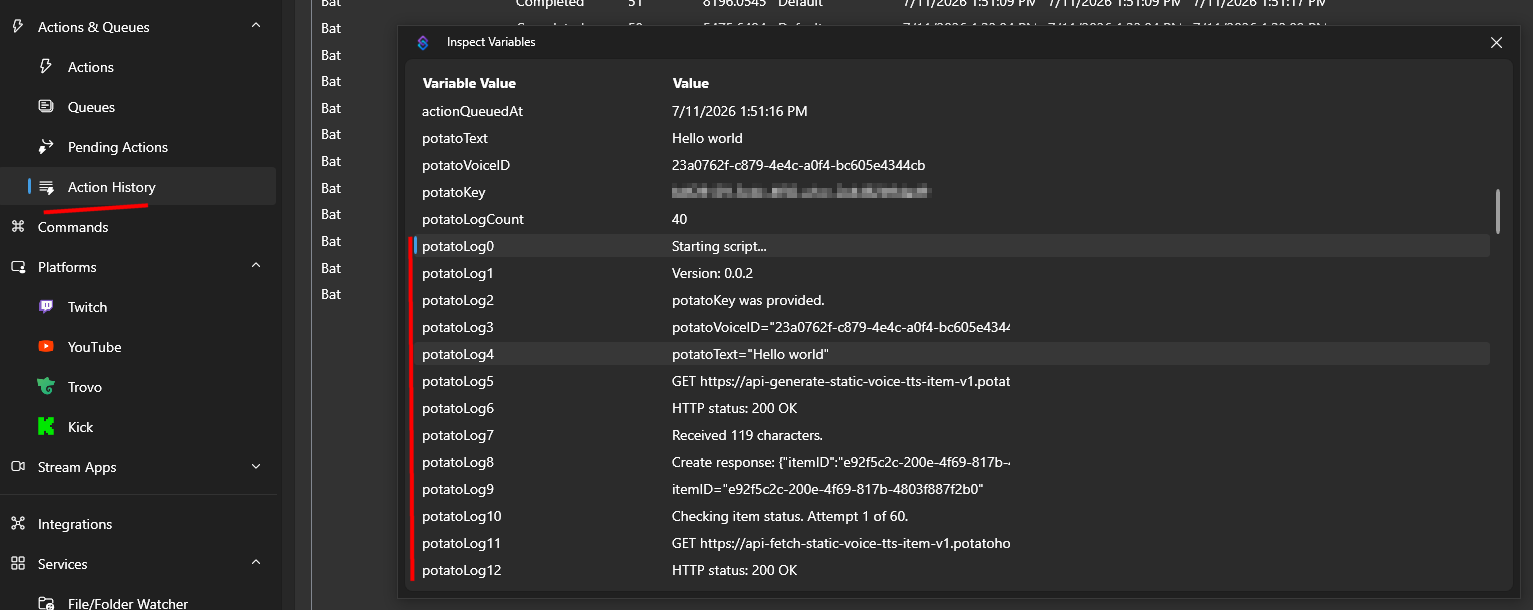
Tento sprievodca bol prvýkrát zverejnený 11.07.2026 a naposledy upravený 11.07.2026.
Ďalšie Podobné Návody
Tu sú ďalšie návody, ktoré by sa vám mohli hodiť.


