
PotatoHotDog pakub tasuta TTS (Text-to-Speech) API-d, mida saad otse Streamer.botist kutsuda, ilma vajaduseta Speaker.bot või mis tahes muu kolmanda osapoole vahendustarkvarata. See juhend näitab, kuidas lisada väike kohandatud C# skript Streamer.bot Execute Code alamtoimingusse, mis genereerib kõne, laadib heli alla ja mängib selle automaatselt tagasi.
Pakume kahte valmis skripti, mida saate kopeerida ja kleepida: üks staatilise Piper TTS-hääle esitamiseks ja teine teie enda kloonitud hääle esitamiseks. Mõlemad skriptid vajavad ainult teie PotatoHotDog API-võtit, hääle ID-d ja teksti, mida soovite kõnelda.
Eeltingimused Argumendid
Et TTS-i genereerimiseks tuleb Streamer.botis enne Execute Code alamtoimingut käivitumist määrata kolm parameetrit. Teisisõnu tuleb need kolm parameetrit määrata:
- API võti.
- Hääle ID, mida soovite genereerida, olgu see staatiline hääl või kloonitud hääl.
- Tekst.
Need vastavad järgmistele Streamer.bot'i argumentidele:
- potatoKey
- potatoVoiceID
- potatoText
Sa määrad oma toimingu argumendid, paremklõpsates alamtoimingute peal, seejärel vali Lisa, Põhi, Argumendid ja lõpuks Määra argument.
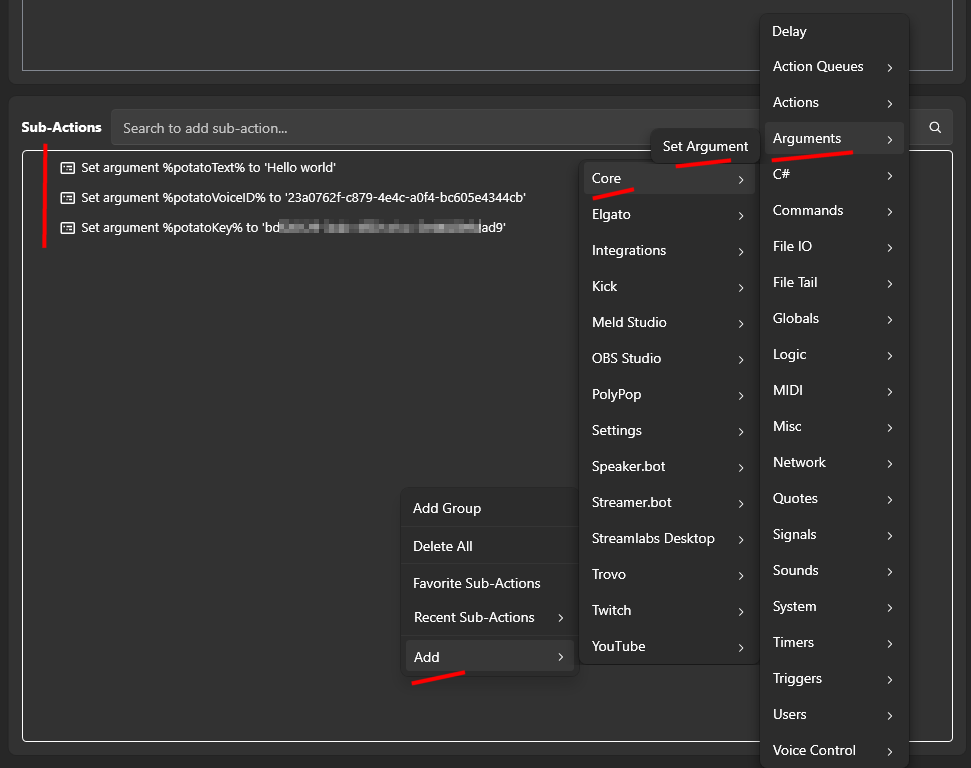
Koodi täitmise toimingu lisamine Streamer.botis
Avage Streamer.bot ja minge Toimingute vahekaartile. Looge uus tegevus, või avage olemasolev tegevus, ja andke sellele nime, mida te hiljem ära tunnete, näiteks "PotatoHotDog TTS".
Kui sinu toiming on valitud, klõpsa Lisa alamtoimingute all, seejärel vali Core ja seejärel Execute C# Code. See lisab alamtoimingu, kuhu saad kleepida puhast C# koodi, mida Streamer.bot kompileerib ja käivitab jooksvalt.

Üks allpool olevatest skriptidest kleebi koodi redaktorisse, sõltuvalt sellest, kas soovid mängida staatilist häält või kloonitud häält. Mõlemad skriptid eeldavad, et mõned argumendid on juba tegevuse jaoks olemas; vaata allpool olevaid eeltingimuste argumente, et näha, kuidas neid seadistada.
Pärast skripti kleebimist ära unusta ka klõpsata 'Find Refs' ja 'Compile' ning veendu, et skript on edukalt kompileeritud.
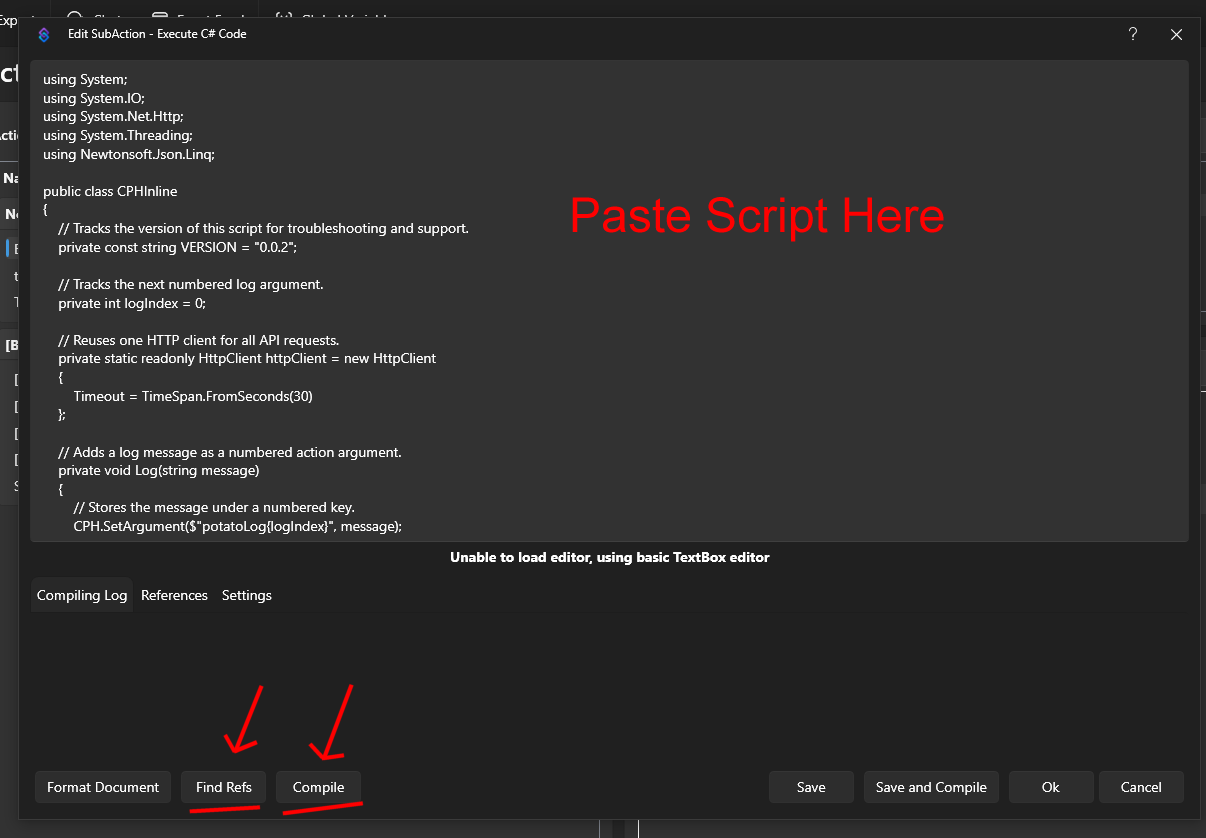
Sinu PotatoHotDog API võti saab genereerida sinu juhtpaneelilt. Salvesta toiming, seejärel käivita see käsitsi või seo see käsu või kanali punktide preemiaga, et testida, et heli taasesitatakse õigesti.
Skript, mis mängib staatilist häält
See skript mängib staatilist Piper TTS häält. See genereerib kõne, ootab selle töötlemise lõpuni, laadib alla tekkinud helifaili ja mängib seda Streamer.botis. Saate leida saadaolevate staatiliste häälte ID-de loendi meie Static Voices lehel.
Sirvi Staatilisi Hääliusing System;
using System.IO;
using System.Net.Http;
using System.Threading;
using Newtonsoft.Json.Linq;
public class CPHInline
{
// Tracks the version of this script for troubleshooting and support.
private const string VERSION = "2 (static)";
// Base URL for the endpoint that creates a new TTS item.
private const string BASE_URL_GENERATE = "https://api-generate-static-voice-tts-item-v1.potatohotdog.com/";
// Base URL for the endpoint that polls a TTS item's status.
private const string BASE_URL_STATUS = "https://api-fetch-static-voice-tts-item-v1.potatohotdog.com/";
// Tracks the next numbered log argument.
private int logIndex = 0;
// Reuses one HTTP client for all API requests.
private static readonly HttpClient httpClient = new HttpClient
{
Timeout = TimeSpan.FromSeconds(30)
};
// Adds a log message as a numbered action argument.
private void Log(string message)
{
// Stores the message under a numbered key.
CPH.SetArgument($"potatoLog{logIndex}", message);
// Advances the log index for the next message.
logIndex++;
// Keeps the total log count in sync.
CPH.SetArgument("potatoLogCount", logIndex);
}
// Ensures a required action argument exists and is not empty.
private bool RequireArgument(string name, out string value)
{
// Fails when the argument is missing or blank.
if (!CPH.TryGetArg(name, out value) || string.IsNullOrWhiteSpace(value))
{
value = "";
return false;
}
return true;
}
// URL-encodes a value so it can safely be used in a query string.
private string EncodeUrlValue(string value)
{
// Escapes reserved characters for safe use in a URL.
return Uri.EscapeDataString(value);
}
// Performs an HTTP GET request and returns the response body.
private string HttpGet(string url)
{
try
{
Log($"GET {url}");
// Sends the HTTP request synchronously.
HttpResponseMessage response =
httpClient.GetAsync(url).GetAwaiter().GetResult();
// Reads the complete response body.
string responseBody =
response.Content.ReadAsStringAsync().GetAwaiter().GetResult();
Log($"HTTP status: {(int)response.StatusCode} {response.ReasonPhrase}");
// Stops when the server returns an unsuccessful status code.
if (!response.IsSuccessStatusCode)
{
Log($"Error: HTTP request failed with status {(int)response.StatusCode} {response.ReasonPhrase}.");
// Logs the server error response when available.
if (!string.IsNullOrWhiteSpace(responseBody))
{
Log($"Error response: {responseBody}");
}
return null;
}
Log($"Received {responseBody.Length} characters.");
return responseBody;
}
catch (Exception exception)
{
// Logs network, timeout, and other HTTP-related exceptions.
Log($"Error: HTTP request failed: {exception.Message}");
return null;
}
}
// Downloads a file from a URL and saves it to disk.
private bool DownloadFile(string url, string destinationPath)
{
try
{
Log($"Downloading audio from \"{url}\".");
Log($"Saving audio to \"{destinationPath}\".");
// Sends the audio download request.
HttpResponseMessage response =
httpClient.GetAsync(url).GetAwaiter().GetResult();
Log($"Audio download HTTP status: {(int)response.StatusCode} {response.ReasonPhrase}");
// Reads the complete audio response into memory.
byte[] fileData =
response.Content.ReadAsByteArrayAsync().GetAwaiter().GetResult();
// Stops when the audio server returns an unsuccessful status.
if (!response.IsSuccessStatusCode)
{
Log($"Error: Audio download failed with status {(int)response.StatusCode} {response.ReasonPhrase}.");
return false;
}
// Rejects an empty audio response.
if (fileData == null || fileData.Length == 0)
{
Log("Error: The downloaded audio file is empty.");
return false;
}
// Writes the downloaded audio bytes to the destination file.
File.WriteAllBytes(destinationPath, fileData);
Log($"Downloaded {fileData.Length} audio bytes.");
// Confirms that the audio file now exists on disk.
if (!File.Exists(destinationPath))
{
Log("Error: The audio download completed, but the file does not exist on disk.");
return false;
}
// Reports the final file size from disk.
FileInfo fileInfo = new FileInfo(destinationPath);
Log($"Audio file saved successfully. File size: {fileInfo.Length} bytes.");
return true;
}
catch (Exception exception)
{
// Logs download, filesystem, and permission errors.
Log($"Error: Could not download the audio file: {exception.Message}");
return false;
}
}
// Extracts a required string value from a JSON response.
private bool TryGetJsonString(string json, string propertyName, out string value)
{
value = "";
try
{
// Parses the response body as a JSON object.
JObject jsonObject = JObject.Parse(json);
// Retrieves the requested JSON property.
JToken property = jsonObject[propertyName];
if (property == null)
{
Log($"Error: JSON response does not contain \"{propertyName}\".");
return false;
}
value = property.ToString();
// Rejects empty JSON string values.
if (string.IsNullOrWhiteSpace(value))
{
Log($"Error: JSON property \"{propertyName}\" is empty.");
value = "";
return false;
}
return true;
}
catch (Exception exception)
{
// Logs malformed JSON and property conversion errors.
Log($"Error: Could not parse JSON property \"{propertyName}\": {exception.Message}");
return false;
}
}
// Extracts a required integer value from a JSON response.
private bool TryGetJsonInteger(string json, string propertyName, out int value)
{
value = 0;
try
{
// Parses the response body as a JSON object.
JObject jsonObject = JObject.Parse(json);
// Retrieves the requested JSON property.
JToken property = jsonObject[propertyName];
if (property == null)
{
Log($"Error: JSON response does not contain \"{propertyName}\".");
return false;
}
// Converts the JSON property to an integer.
if (!int.TryParse(property.ToString(), out value))
{
Log($"Error: JSON property \"{propertyName}\" is not a valid integer.");
value = 0;
return false;
}
return true;
}
catch (Exception exception)
{
// Logs malformed JSON and property conversion errors.
Log($"Error: Could not parse JSON property \"{propertyName}\": {exception.Message}");
return false;
}
}
// Creates a unique PotatoHotdog WAV filename.
private string CreateAudioFileName()
{
// Uses eight GUID characters to avoid overwriting previous files.
string uniqueID = Guid.NewGuid().ToString("N").Substring(0, 8).ToUpperInvariant();
return $"potatoAudio{uniqueID}.wav";
}
// Creates and returns the dedicated PotatoAudio folder.
private string GetAudioFolder()
{
// Uses Streamer.bot's application directory instead of the process working directory.
string streamerBotFolder = AppDomain.CurrentDomain.BaseDirectory;
// Places generated audio files inside a dedicated subfolder.
string audioFolder = Path.Combine(streamerBotFolder, "temp_potatohotdog_audio");
Log($"Streamer.bot folder: \"{streamerBotFolder}\".");
Log($"Audio folder: \"{audioFolder}\".");
// Creates the audio folder if it does not already exist.
if (!Directory.Exists(audioFolder))
{
Log("Audio folder does not exist. Creating it...");
Directory.CreateDirectory(audioFolder);
Log("Audio folder created.");
}
else
{
Log("Audio folder already exists.");
}
return audioFolder;
}
// Runs the main PotatoHotdog TTS action.
public bool Execute()
{
// Resets log numbering for this execution.
logIndex = 0;
CPH.SetArgument("potatoLogCount", 0);
Log("Starting script...");
// Logs the script version so runs can be tracked over time.
Log($"Version: {VERSION}");
// Retrieves the PotatoHotdog API key.
if (!RequireArgument("potatoKey", out string potatoKey))
{
Log("Error: potatoKey variable is missing. Please login to potatohotdog.com, generate an API key, create a set variable action and save the variable \"potatoKey\" with your key.");
return false;
}
// Retrieves the requested voice ID.
if (!RequireArgument("potatoVoiceID", out string potatoVoiceID))
{
Log("Error: potatoVoiceID variable is missing. Please login to potatohotdog.com, copy a voice ID, create a set variable action and save the variable \"potatoVoiceID\" with your voice ID.");
return false;
}
// Retrieves the text that should be converted to speech.
if (!RequireArgument("potatoText", out string potatoText))
{
Log("Error: potatoText variable is missing. Create a set variable action and save the variable \"potatoText\" with the text you want the TTS to say.");
return false;
}
// Logs the non-secret input values.
Log("potatoKey was provided.");
Log($"potatoVoiceID=\"{potatoVoiceID}\"");
Log($"potatoText=\"{potatoText}\"");
// Builds the API URL used to create the TTS item.
string createUrl = BASE_URL_GENERATE + "?key=" + EncodeUrlValue(potatoKey) + "&voice=" + EncodeUrlValue(potatoVoiceID) + "&text=" + EncodeUrlValue(potatoText);
// Requests creation of the TTS item.
string createJson = HttpGet(createUrl);
if (createJson == null)
{
Log("Error: Failed to create the TTS item.");
return false;
}
Log($"Create response: {createJson}");
// Extracts the created item's ID from the API response.
if (!TryGetJsonString(createJson, "itemID", out string itemID))
{
Log("Error: Could not retrieve itemID from the create response.");
return false;
}
Log($"itemID=\"{itemID}\"");
// Builds the API URL used to poll the TTS item status.
string fetchUrl = BASE_URL_STATUS + "?key=" + EncodeUrlValue(potatoKey) + "&item=" + EncodeUrlValue(itemID);
// Tracks whether the TTS item finishes processing.
bool completed = false;
// Stores the final fetch response containing the audio URL.
string completedFetchJson = null;
// Polls the item status up to 60 times.
for (int attempt = 1; attempt <= 60; attempt++)
{
Log($"Checking item status. Attempt {attempt} of 60.");
// Fetches the latest TTS item status.
string fetchJson = HttpGet(fetchUrl);
if (fetchJson == null)
{
Log($"Error: Failed to fetch the TTS item on attempt {attempt}.");
return false;
}
Log($"Fetch response: {fetchJson}");
// Extracts the current processing status from the response.
if (!TryGetJsonInteger(fetchJson, "statusID", out int statusID))
{
Log("Error: Could not retrieve statusID from the fetch response.");
return false;
}
Log($"statusID={statusID}");
// Stops polling when the API reports that processing is complete.
if (statusID == 0)
{
completed = true;
completedFetchJson = fetchJson;
Log("statusID is 0. TTS processing is complete.");
break;
}
// Waits five seconds before the next polling request.
if (attempt < 60)
{
Log("TTS processing is not complete. Waiting five seconds...");
Thread.Sleep(5000);
}
}
// Fails when the item has not completed after all polling attempts.
if (!completed)
{
Log("Error: TTS processing did not complete after 60 attempts.");
return false;
}
// Extracts the generated audio URL from the completed item response.
if (!TryGetJsonString(completedFetchJson, "audioURL", out string audioURL))
{
Log("Error: Could not retrieve audioURL from the completed fetch response.");
return false;
}
Log($"audioURL=\"{audioURL}\"");
string audioFolder;
try
{
// Resolves and creates the dedicated PotatoAudio directory.
audioFolder = GetAudioFolder();
}
catch (Exception exception)
{
Log($"Error: Could not create or access the audio folder: {exception.Message}");
return false;
}
// Creates a unique local filename for the generated WAV file.
string audioFileName = CreateAudioFileName();
// Combines the audio folder and unique filename.
string audioFilePath = Path.Combine(audioFolder, audioFileName);
Log($"Generated audio filename: \"{audioFileName}\".");
Log($"Local audio path: \"{audioFilePath}\".");
// Downloads the generated audio file to the PotatoAudio folder.
if (!DownloadFile(audioURL, audioFilePath))
{
Log("Error: Failed to download the generated TTS audio.");
return false;
}
try
{
Log($"Starting playback of \"{audioFilePath}\".");
// Plays the WAV file and waits until playback has finished.
CPH.PlaySound(audioFilePath, 1.0f, true, audioFileName, true);
Log("Audio playback finished.");
}
catch (Exception exception)
{
// Logs Streamer.bot audio playback errors.
Log($"Error: Could not play the audio file: {exception.Message}");
return false;
}
Log("Finished.");
return true;
}
}
Skript kloonitud hääle esitamiseks
See skript töötab sama moodi nagu ülaltoodud staatiline hääle skript, kuid kasutab kõne loomiseks üht teie enda kloonitud häält. Oma kloonitud hääle ID-d leiate lehelt 'Kloonitud hääled' PotatoHotDogi juhtpaneelil.
Vaata Oma Kloonitud Hääliusing System;
using System.IO;
using System.Net.Http;
using System.Threading;
using Newtonsoft.Json.Linq;
public class CPHInline
{
// Tracks the version of this script for troubleshooting and support.
private const string VERSION = "2 (cloned)";
// Base URL for the endpoint that creates a new TTS item.
private const string BASE_URL_GENERATE = "https://api-generate-cloned-voice-tts-item-v1.potatohotdog.com/";
// Base URL for the endpoint that polls a TTS item's status.
private const string BASE_URL_STATUS = "https://api-fetch-cloned-voice-tts-item-v1.potatohotdog.com/";
// Tracks the next numbered log argument.
private int logIndex = 0;
// Reuses one HTTP client for all API requests.
private static readonly HttpClient httpClient = new HttpClient
{
Timeout = TimeSpan.FromSeconds(30)
};
// Adds a log message as a numbered action argument.
private void Log(string message)
{
// Stores the message under a numbered key.
CPH.SetArgument($"potatoLog{logIndex}", message);
// Advances the log index for the next message.
logIndex++;
// Keeps the total log count in sync.
CPH.SetArgument("potatoLogCount", logIndex);
}
// Ensures a required action argument exists and is not empty.
private bool RequireArgument(string name, out string value)
{
// Fails when the argument is missing or blank.
if (!CPH.TryGetArg(name, out value) || string.IsNullOrWhiteSpace(value))
{
value = "";
return false;
}
return true;
}
// URL-encodes a value so it can safely be used in a query string.
private string EncodeUrlValue(string value)
{
// Escapes reserved characters for safe use in a URL.
return Uri.EscapeDataString(value);
}
// Performs an HTTP GET request and returns the response body.
private string HttpGet(string url)
{
try
{
Log($"GET {url}");
// Sends the HTTP request synchronously.
HttpResponseMessage response =
httpClient.GetAsync(url).GetAwaiter().GetResult();
// Reads the complete response body.
string responseBody =
response.Content.ReadAsStringAsync().GetAwaiter().GetResult();
Log($"HTTP status: {(int)response.StatusCode} {response.ReasonPhrase}");
// Stops when the server returns an unsuccessful status code.
if (!response.IsSuccessStatusCode)
{
Log($"Error: HTTP request failed with status {(int)response.StatusCode} {response.ReasonPhrase}.");
// Logs the server error response when available.
if (!string.IsNullOrWhiteSpace(responseBody))
{
Log($"Error response: {responseBody}");
}
return null;
}
Log($"Received {responseBody.Length} characters.");
return responseBody;
}
catch (Exception exception)
{
// Logs network, timeout, and other HTTP-related exceptions.
Log($"Error: HTTP request failed: {exception.Message}");
return null;
}
}
// Downloads a file from a URL and saves it to disk.
private bool DownloadFile(string url, string destinationPath)
{
try
{
Log($"Downloading audio from \"{url}\".");
Log($"Saving audio to \"{destinationPath}\".");
// Sends the audio download request.
HttpResponseMessage response =
httpClient.GetAsync(url).GetAwaiter().GetResult();
Log($"Audio download HTTP status: {(int)response.StatusCode} {response.ReasonPhrase}");
// Reads the complete audio response into memory.
byte[] fileData =
response.Content.ReadAsByteArrayAsync().GetAwaiter().GetResult();
// Stops when the audio server returns an unsuccessful status.
if (!response.IsSuccessStatusCode)
{
Log($"Error: Audio download failed with status {(int)response.StatusCode} {response.ReasonPhrase}.");
return false;
}
// Rejects an empty audio response.
if (fileData == null || fileData.Length == 0)
{
Log("Error: The downloaded audio file is empty.");
return false;
}
// Writes the downloaded audio bytes to the destination file.
File.WriteAllBytes(destinationPath, fileData);
Log($"Downloaded {fileData.Length} audio bytes.");
// Confirms that the audio file now exists on disk.
if (!File.Exists(destinationPath))
{
Log("Error: The audio download completed, but the file does not exist on disk.");
return false;
}
// Reports the final file size from disk.
FileInfo fileInfo = new FileInfo(destinationPath);
Log($"Audio file saved successfully. File size: {fileInfo.Length} bytes.");
return true;
}
catch (Exception exception)
{
// Logs download, filesystem, and permission errors.
Log($"Error: Could not download the audio file: {exception.Message}");
return false;
}
}
// Extracts a required string value from a JSON response.
private bool TryGetJsonString(string json, string propertyName, out string value)
{
value = "";
try
{
// Parses the response body as a JSON object.
JObject jsonObject = JObject.Parse(json);
// Retrieves the requested JSON property.
JToken property = jsonObject[propertyName];
if (property == null)
{
Log($"Error: JSON response does not contain \"{propertyName}\".");
return false;
}
value = property.ToString();
// Rejects empty JSON string values.
if (string.IsNullOrWhiteSpace(value))
{
Log($"Error: JSON property \"{propertyName}\" is empty.");
value = "";
return false;
}
return true;
}
catch (Exception exception)
{
// Logs malformed JSON and property conversion errors.
Log($"Error: Could not parse JSON property \"{propertyName}\": {exception.Message}");
return false;
}
}
// Extracts a required integer value from a JSON response.
private bool TryGetJsonInteger(string json, string propertyName, out int value)
{
value = 0;
try
{
// Parses the response body as a JSON object.
JObject jsonObject = JObject.Parse(json);
// Retrieves the requested JSON property.
JToken property = jsonObject[propertyName];
if (property == null)
{
Log($"Error: JSON response does not contain \"{propertyName}\".");
return false;
}
// Converts the JSON property to an integer.
if (!int.TryParse(property.ToString(), out value))
{
Log($"Error: JSON property \"{propertyName}\" is not a valid integer.");
value = 0;
return false;
}
return true;
}
catch (Exception exception)
{
// Logs malformed JSON and property conversion errors.
Log($"Error: Could not parse JSON property \"{propertyName}\": {exception.Message}");
return false;
}
}
// Creates a unique PotatoHotdog WAV filename.
private string CreateAudioFileName()
{
// Uses eight GUID characters to avoid overwriting previous files.
string uniqueID = Guid.NewGuid().ToString("N").Substring(0, 8).ToUpperInvariant();
return $"potatoAudio{uniqueID}.wav";
}
// Creates and returns the dedicated PotatoAudio folder.
private string GetAudioFolder()
{
// Uses Streamer.bot's application directory instead of the process working directory.
string streamerBotFolder = AppDomain.CurrentDomain.BaseDirectory;
// Places generated audio files inside a dedicated subfolder.
string audioFolder = Path.Combine(streamerBotFolder, "temp_potatohotdog_audio");
Log($"Streamer.bot folder: \"{streamerBotFolder}\".");
Log($"Audio folder: \"{audioFolder}\".");
// Creates the audio folder if it does not already exist.
if (!Directory.Exists(audioFolder))
{
Log("Audio folder does not exist. Creating it...");
Directory.CreateDirectory(audioFolder);
Log("Audio folder created.");
}
else
{
Log("Audio folder already exists.");
}
return audioFolder;
}
// Runs the main PotatoHotdog TTS action.
public bool Execute()
{
// Resets log numbering for this execution.
logIndex = 0;
CPH.SetArgument("potatoLogCount", 0);
Log("Starting script...");
// Logs the script version so runs can be tracked over time.
Log($"Version: {VERSION}");
// Retrieves the PotatoHotdog API key.
if (!RequireArgument("potatoKey", out string potatoKey))
{
Log("Error: potatoKey variable is missing. Please login to potatohotdog.com, generate an API key, create a set variable action and save the variable \"potatoKey\" with your key.");
return false;
}
// Retrieves the requested voice ID.
if (!RequireArgument("potatoVoiceID", out string potatoVoiceID))
{
Log("Error: potatoVoiceID variable is missing. Please login to potatohotdog.com, copy a voice ID, create a set variable action and save the variable \"potatoVoiceID\" with your voice ID.");
return false;
}
// Retrieves the text that should be converted to speech.
if (!RequireArgument("potatoText", out string potatoText))
{
Log("Error: potatoText variable is missing. Create a set variable action and save the variable \"potatoText\" with the text you want the TTS to say.");
return false;
}
// Logs the non-secret input values.
Log("potatoKey was provided.");
Log($"potatoVoiceID=\"{potatoVoiceID}\"");
Log($"potatoText=\"{potatoText}\"");
// Builds the API URL used to create the TTS item.
string createUrl = BASE_URL_GENERATE + "?key=" + EncodeUrlValue(potatoKey) + "&voice=" + EncodeUrlValue(potatoVoiceID) + "&text=" + EncodeUrlValue(potatoText);
// Requests creation of the TTS item.
string createJson = HttpGet(createUrl);
if (createJson == null)
{
Log("Error: Failed to create the TTS item.");
return false;
}
Log($"Create response: {createJson}");
// Extracts the created item's ID from the API response.
if (!TryGetJsonString(createJson, "itemID", out string itemID))
{
Log("Error: Could not retrieve itemID from the create response.");
return false;
}
Log($"itemID=\"{itemID}\"");
// Builds the API URL used to poll the TTS item status.
string fetchUrl = BASE_URL_STATUS + "?key=" + EncodeUrlValue(potatoKey) + "&item=" + EncodeUrlValue(itemID);
// Tracks whether the TTS item finishes processing.
bool completed = false;
// Stores the final fetch response containing the audio URL.
string completedFetchJson = null;
// Polls the item status up to 60 times.
for (int attempt = 1; attempt <= 60; attempt++)
{
Log($"Checking item status. Attempt {attempt} of 60.");
// Fetches the latest TTS item status.
string fetchJson = HttpGet(fetchUrl);
if (fetchJson == null)
{
Log($"Error: Failed to fetch the TTS item on attempt {attempt}.");
return false;
}
Log($"Fetch response: {fetchJson}");
// Extracts the current processing status from the response.
if (!TryGetJsonInteger(fetchJson, "statusID", out int statusID))
{
Log("Error: Could not retrieve statusID from the fetch response.");
return false;
}
Log($"statusID={statusID}");
// Stops polling when the API reports that processing is complete.
if (statusID == 0)
{
completed = true;
completedFetchJson = fetchJson;
Log("statusID is 0. TTS processing is complete.");
break;
}
// Waits five seconds before the next polling request.
if (attempt < 60)
{
Log("TTS processing is not complete. Waiting five seconds...");
Thread.Sleep(5000);
}
}
// Fails when the item has not completed after all polling attempts.
if (!completed)
{
Log("Error: TTS processing did not complete after 60 attempts.");
return false;
}
// Extracts the generated audio URL from the completed item response.
if (!TryGetJsonString(completedFetchJson, "audioURL", out string audioURL))
{
Log("Error: Could not retrieve audioURL from the completed fetch response.");
return false;
}
Log($"audioURL=\"{audioURL}\"");
string audioFolder;
try
{
// Resolves and creates the dedicated PotatoAudio directory.
audioFolder = GetAudioFolder();
}
catch (Exception exception)
{
Log($"Error: Could not create or access the audio folder: {exception.Message}");
return false;
}
// Creates a unique local filename for the generated WAV file.
string audioFileName = CreateAudioFileName();
// Combines the audio folder and unique filename.
string audioFilePath = Path.Combine(audioFolder, audioFileName);
Log($"Generated audio filename: \"{audioFileName}\".");
Log($"Local audio path: \"{audioFilePath}\".");
// Downloads the generated audio file to the PotatoAudio folder.
if (!DownloadFile(audioURL, audioFilePath))
{
Log("Error: Failed to download the generated TTS audio.");
return false;
}
try
{
Log($"Starting playback of \"{audioFilePath}\".");
// Plays the WAV file and waits until playback has finished.
CPH.PlaySound(audioFilePath, 1.0f, true, audioFileName, true);
Log("Audio playback finished.");
}
catch (Exception exception)
{
// Logs Streamer.bot audio playback errors.
Log($"Error: Could not play the audio file: {exception.Message}");
return false;
}
Log("Finished.");
return true;
}
}
Tõrkeotsing
Kui skript ei käitu nii, nagu oodatud, on vea tuvastamiseks parim viis kontrollida tegevuste logisid.
Sa saad seda teha, uurides oma Action muutujad Action History kaudu.
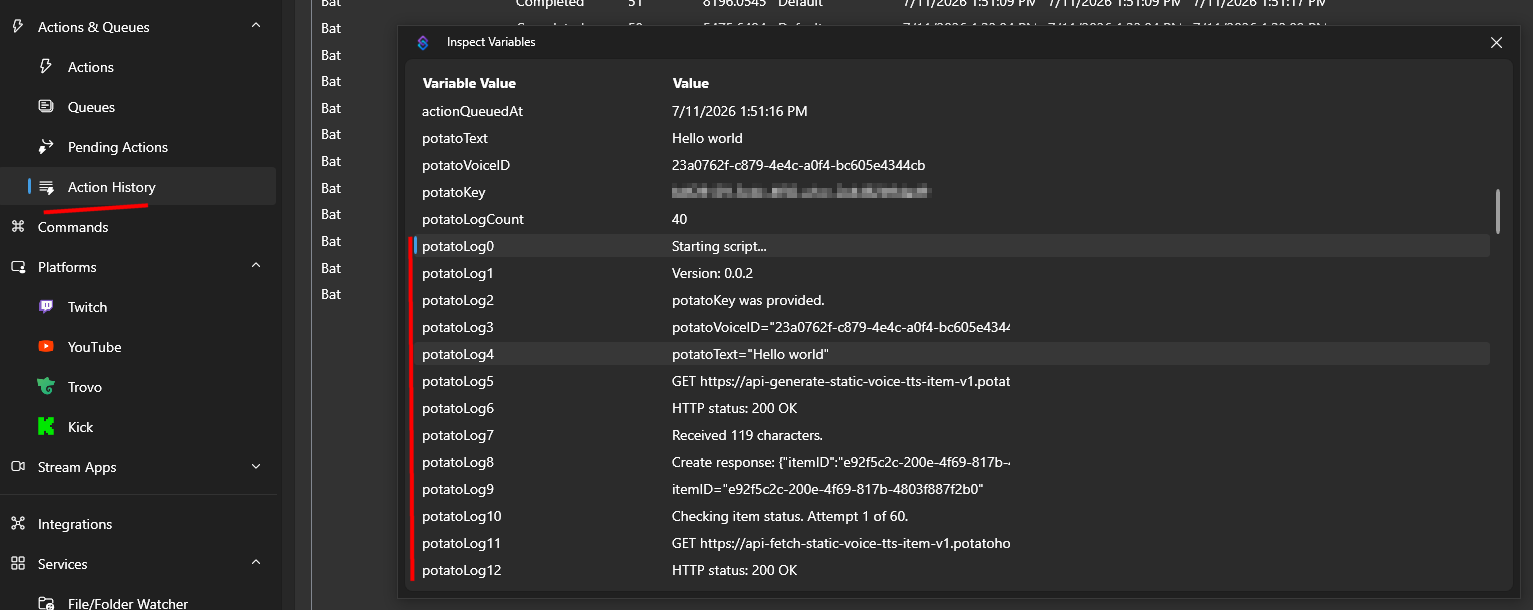
See juhend avaldati esmakordselt 2026-07-11 ning viimane muudatus tehti 2026-07-11.
Teised Sarnased Juhendid
Siin on veel mõned juhendid, mis võivad teile kasulikuks osutuda.


